
Everything you'd want to know before you install.
A detailed look at how Multi-Warehouse PrestaShop 8 & 9 — Automatic Order Routing by Stock and Geographic Zone works, why we built it the way we did, and the thinking behind the features above.
§ 01
Why a multi-warehouse module?
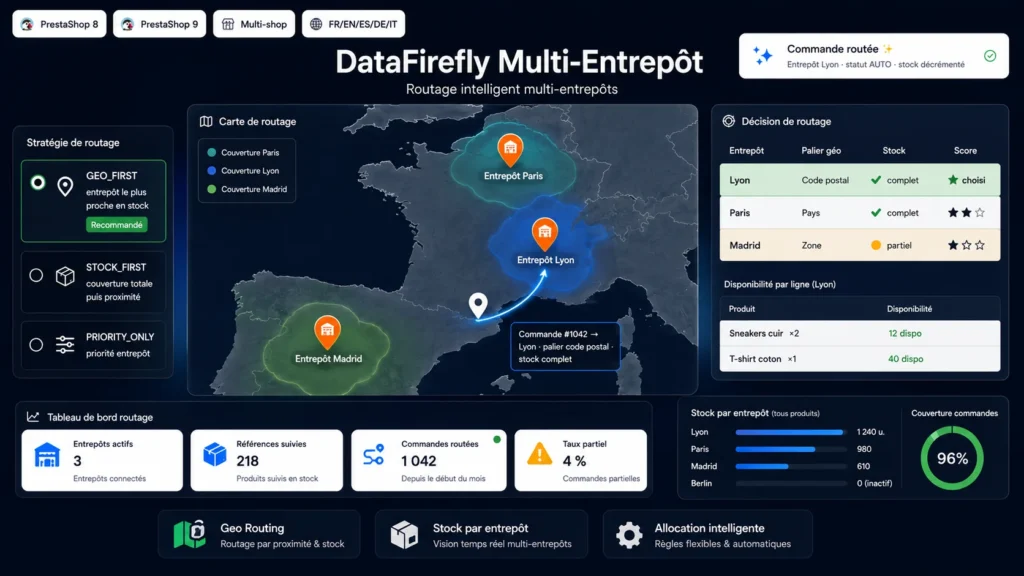
As soon as you ship from several storage sites, every order raises the same question: which warehouse should handle it? Multi-Warehouse & Stock Routing answers it automatically by combining the stock actually available and the customer's delivery zone, to reduce lead times and shipping costs.
§ 02
Three arbitration strategies
Geography first favours the nearest warehouse that holds the full stock. Stock first prioritises a warehouse able to serve the entire order, then breaks ties by proximity. Priority follows the order you define, ignoring geography.
§ 03
Coverage zones without an API
Proximity relies on coverage rules you control: postcode prefix, country or PrestaShop zone. No dependency on an external geocoding service, no data sent to a third party, fully self-hosted operation.
§ 04
Reliable stock, even on re-assignment
The module manages per-warehouse stock that it decrements on assignment. The exact allocation is stored, guaranteeing a correct stock credit-back if you re-assign the order to another warehouse. Optional synchronisation pushes the sum of warehouses to PrestaShop stock.
§ 05
Control from the order page
A dedicated panel appears in the back-office order page: assigned warehouse, routing status, line-by-line availability, manual re-assignment or automatic recalculation in one click.

There are no reviews yet.