
Everything you'd want to know before you install.
A detailed look at how Sales Counter — Number of sales shown on the product page (PrestaShop 8 & 9) works, why we built it the way we did, and the thinking behind the features above.
§ 01
What this module does
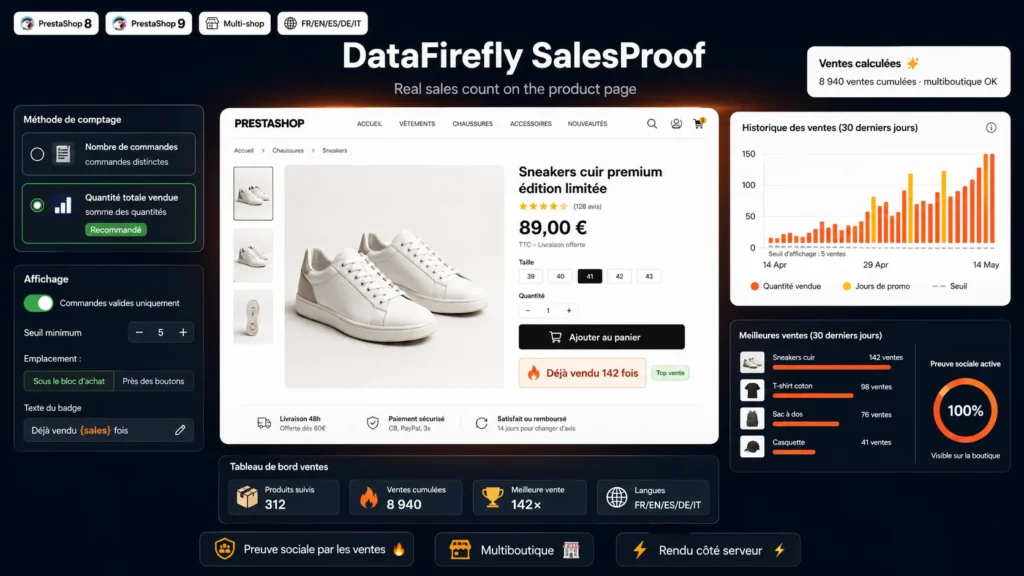
Showing how many times a product has already been sold is one of the simplest and most effective reassurance levers in e-commerce. A hesitant visitor is reassured to see that an item has already convinced many buyers. This module automatically adds that message to every product page, from your real sales data, with no manual entry.
§ 02
Reliable and honest counting
The counter relies on your shop's order lines. You can limit it to valid orders so it only reflects sales that were actually paid, and counting is automatically restricted to the current shop in a multistore context. No invented data: the number displayed matches your sales.
§ 03
Two ways to count
Depending on the message you want to convey, the module counts either the total quantity sold (the sum of ordered quantities) or the number of distinct orders that included the product. The first highlights volume, the second the number of different customers convinced.
§ 04
Display you control
A display threshold avoids showing a number that is too low: below it, no badge appears. You choose the placement, below the buy block or near the buy buttons, and you fully customize the text, per language, with a reserved spot for the number so you can position it wherever you want in the sentence.
§ 05
DataFirefly standards
Module developed with no Composer dependency, with server-side rendering and no external JavaScript library. Native configuration page, compatible with PrestaShop 8 and 9, and delivered with French, English, Spanish, German and Italian translations.




There are no reviews yet.