
The “buy three, get one free” mechanic is one of the most effective ways to lift average order value on products with a low unit price and frequent repeat purchase: consumables, cosmetics, food, small spare parts. It is also one of the worst served by PrestaShop in a native setup. The cart rule engine knows how to give a product away, but it does not know how to repeat the offer for every batch of three, nor how to announce it before the customer has reached the cart.
Here is precisely what the native engine does, where it stops, and how to build an offer that holds up on a real catalogue.
What cart rules can do
Under Discounts > Cart rules, PrestaShop does provide a “Send a free gift” action. You pick a product, optionally a combination, and it is added to the cart at zero price once the conditions are met. On the conditions side, the Conditions tab lets you restrict the rule to a product selection, to customer groups, to a time window, and set a minimum amount or a minimum quantity of products in the cart.
On paper, that looks like a 3+1. In practice, four limits surface as soon as you go live.
The rule does not repeat
A customer who puts nine items in the cart should receive three gifts. The native rule applies once. The “Total available for each user” field changes nothing here: it counts orders, not the batches inside a single cart. You can create three successive rules with thresholds at 3, 6 and 9, but that approach does not scale and becomes unmanageable beyond two tiers.
The minimum quantity applies to the whole cart
The quantity condition counts the products in the cart, not the units of a given product. A customer who buys one item from each reference in the selection triggers the offer just as much as one who takes the same item three times. Depending on your catalogue, that nuance alone is enough to make the operation unprofitable.
The gift is a fixed product
The action designates a single reference. On an offer such as “buy 3 t-shirts, get the 4th free”, the customer always receives the same t-shirt, in the same size, whatever their first three units were. That is acceptable for a sample, not for a range-wide offer.
Nothing shows before the cart
This is the most expensive limit. A promotion the customer discovers after building their cart does not change their buying behaviour. It only cuts your margin on an order that would have happened anyway. The offer has to be visible on the product page and in the category listing to have any effect on the quantity ordered.
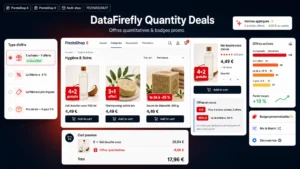 PrestaShop 8 & 9 Quantity Discount Module — Buy X Get Y Free & Promo BadgesFive quantity promotion mechanics, each with the badge that sells it on the product thumbnail.€79.00
The specific price workaround, and what it costs
Many shops go through a quantity-based specific price: from 4 units, 25% off. Mathematically, the customer does pay for three items out of four. Three important differences remain.
- Perception changes. A 25% discount reads as a price cut, a free item reads as a gain. The second one triggers the extra unit far more often.
- The displayed unit price drops. That commits you on pricing compliance ground: this new price enters the history of prices applied and can become your reference price for the following 30 days under the Omnibus Directive.
- The threshold is rigid. A customer taking 7 units gets 25% on all 7, not on 4 only, which is not the intended mechanic.
This workaround remains valid for B2B or semi-wholesale, where reading in percentages is natural. It does not replace a gift mechanic in B2C.
Setting up a 3+1 offer that works
A complete implementation assumes four decisions, to be made before touching the back office.
- The scope. Full category, manual selection or brand. Avoid applying the offer to products whose unit margin is below 30%, the free batch would push you under break-even.
- The repetition. One offer per order, or repeated for every batch of three. The second case requires the rule to divide the quantity and apply the result as many times as needed.
- The free unit. The cheapest product in the batch is the most common convention, and the safest one for your margin. The alternative, a designated product, reads more clearly but is riskier when prices across the selection are uneven.
- Stacking. Decide whether the offer applies to products already on promotion. In PrestaShop, that arbitration is set product by product through specific prices, not globally, which means checking the selection before each commercial operation.
Making the offer visible
A profitable 3+1 mechanic shows in three places:
- on the category listing thumbnail, as a short badge, to catch attention before the click;
- on the product page, at the height of the quantity selector, with an indication of what is left to go, along the lines of “add 1 unit to receive your free item”;
- in the cart, with the gift line clearly identified at 0 euro and not mixed in with the other lines.
The third point is the one the native engine handles correctly. The first two require work on the theme or a module that exposes this information to the templates.
The compliance angle
A free item does not change the unit price of the paid items. On that basis, it does not create a new reference price and does not trigger the obligation to display the lowest price of the last 30 days. That is a real advantage of the gift over the percentage discount, often underestimated when choosing the mechanic.
Two precautions remain. The value of the gift must appear on the invoice, if only at 0 euro, for accounting traceability. And the terms of the offer, period, quantity, products concerned, must be reachable from the operation page.
Going faster
If your commercial calendar includes several operations of this type per year, rebuilding the mechanic each time costs more than tooling it once. The Quantity Promotions module for PrestaShop handles repetition per batch, the choice of the free unit, display on the product page and in the listing, and stacking rules, on PrestaShop 8 as well as PrestaShop 9.