

Opening a second store in multistore mode means giving it a catalog. Recreating a tree of one hundred products by hand is out of the question, and file-based export-import loses the images, the associations and the positions.
Duplicating a complete category is the most common operation of this project, and it comes with a few traps.
What the native features allow
PrestaShop natively handles associating a product with several stores. From the product page, you tick the stores concerned.
Two limits make this approach unusable at scale.
The operation is product by product. On one hundred references, count several hours of clicking.
It does not create the destination categories. A product associated with a second store without its categories existing there becomes an orphan, invisible in the navigation.
The back office multiple selection allows a mass association, but it handles neither the tree nor the store-specific settings.
The prior question: share or duplicate
A structuring decision, to be taken before any manipulation, because it is hard to revisit afterwards.
The shared product exists once, associated with several stores. A description change propagates everywhere. The stock is common or separate depending on the configuration.
It is the right model when your stores sell the same product with limited differences: price, language, presentation.
The duplicated product exists in two independent copies. Each store has its page, its descriptions, its images, its stock.
It is the right model when the contents genuinely need to diverge: different positioning, different target, ranges that will separate over time.
The practical criterion: if you plan to write different descriptions, duplicate. Otherwise, share. Sharing is far less costly in maintenance, and moving from sharing to duplication remains possible later, the reverse much less so.
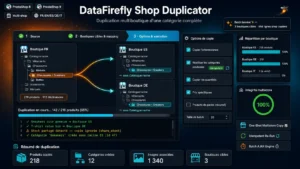 Multistore Duplication of a Full Category — PrestaShop 8 & 9Copy a whole category from one shop to another, in a single click€109.00
What must be copied
A complete category is more than products. Seven elements to handle.
The tree with the subcategories, keeping the hierarchy and the positions.
The category contents: name, description, image, metadata.
The products with their descriptions, prices and references.
The combinations, with their attributes, their price impacts and their stocks.
The images, with their associations to the combinations and their alternative texts.
The features and the brands, which must exist in the destination store.
The positions of the products in each category, which often represent merchandising work you do not want to redo.
The last two points are the ones you discover after the fact: products associated but attached to no brand, or all positioned in identifier order.
The problem of duplicate references
This is the main technical trap, and it must be prepared upstream.
If you duplicate the products, each copy must carry a distinct reference, at the risk of making your exports, your feeds and your stock management uninterpretable.
Three strategies.
The per-store suffix. The reference becomes identical plus a suffix. Simple, readable, and remember to apply it to the combinations as well.
The preserved reference with a store identifier. You keep the same commercial reference and distinguish by context. This assumes all your downstream tools handle that notion.
A new numbering for the destination store, with a correspondence table kept.
A point to check before starting: the barcodes. The same barcode on two distinct products causes problems as soon as you feed a marketplace or a comparison engine.
What must be different after duplication
Four elements that must never be copied as is.
The prices, if your stores have different positionings or currencies. Plan an adjustment rule at duplication rather than an identical copy.
The taxes, which depend on the store’s country.
The page addresses, which must be generated in the language of the destination store and not copied over.
The metadata, title and description, which often carry the name of the first store.
This last point is frequently forgotten and it shows immediately in the search results.
The recommended procedure
Six steps, in this order.
1. Back up the database. A badly calibrated duplication on three hundred products cannot be undone by hand.
2. Prepare the destination store: active languages, currencies, customer groups, tax rules. Duplicating to a badly configured store produces inconsistent data.
3. Test on a small category, five to ten products with combinations and images. Check the complete result before handling the rest.
4. Duplicate in batches, category by category rather than the whole catalog. You limit the scope of an error and you can adjust between two passes.
5. Check after each batch, using the list below.
6. Regenerate the thumbnails and the search index for the new store. It is the most often forgotten step, and it explains most of the “invisible products” observed after duplication.
The post-duplication checklist
Seven checks, to be done on a sample of ten products.
The products appear in the navigation of the new store, not only in the back office.
The images display, with their associated combinations.
The prices are those expected, taxes included and correctly calculated.
The stocks behave as planned, common or separate depending on your choice.
The page addresses are clean and in the right language.
The positions in the categories are preserved.
The internal search returns the new products, which validates the index regeneration.
What breaks most often
Three symptoms and their causes.
Products invisible on the front office. Almost always one of these three causes: non-existent destination category, product not associated with the default customer group, or search index not regenerated.
Missing images. Thumbnails not regenerated for the new store, or image-store association not carried over.
Prices at zero or aberrant. Tax rule absent in the destination store, or currency not activated.
These three families cover most of the incidents, and they can be diagnosed in a few minutes once you know where to look.
The Multistore Duplication of a Complete Category module handles this operation on PrestaShop 8 and 9: copy of the tree with products, combinations, images and positions, reference handling by suffix or renumbering, price adjustment rules at duplication and a control report after processing.