PrestaShop Administration & Productivity

Multistore Duplication of a Full Category — PrestaShop 8 & 9

Copy a whole category from one shop to another, in a single click

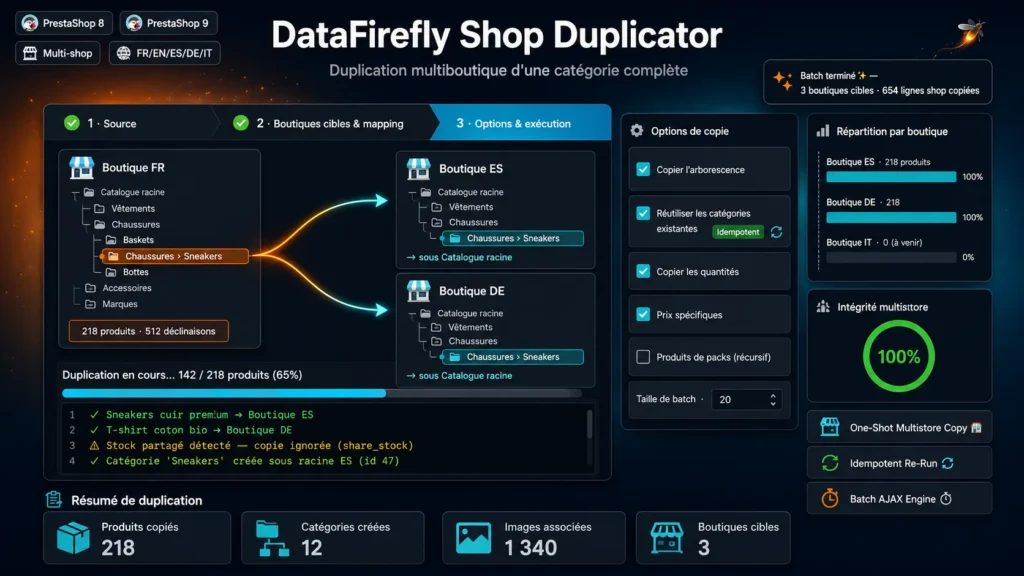
Multistore duplication of a whole category — products, combinations, images, specific prices and stock — to one or several target shops, with no duplicates and no timeout.

At a glance
  • Duplicates a whole category — products, combinations, images, specific prices and stock — from one shop to one or several others in a click.
  • Multistore-association approach: no duplicate product entity and no image duplicated on disk.
  • 3-step wizard with visual mapping of target categories and AJAX batch execution, no timeout even on thousands of products.
  • Re-runnable and idempotent: reuses already-created categories instead of re-creating them.
  • Compatible with PrestaShop 8.0 to 9.x, native multistore, interface in 5 languages.
PrestaShop 8 & 9 Native multistore AJAX batch Idempotent / re-runnable FR · EN · ES · DE · IT
  • 30-day refund
  • 12 months updates
  • 24h support
www.datafirefly.com/en/
Duplicating a full category to another store in a PrestaShop multistore
v1.0.0 · updated 2026-07-15
What it does

The short version.

01

One-shot duplication of a full category

Select a source shop and category, with or without its sub-categories, and copy everything at once: products, combinations, attributes, images, specific prices, quantities and carriers.

02

Multistore association, not cloning

Products stay shared entities. The engine copies only per-shop data (product_shop, product_lang, image_shop, product_attribute_shop, stock, specific prices). The result: a catalog synchronized by IDs, with zero images duplicated on disk.

03

Visual mapping of target categories

For each selected shop, pick the destination category from a tree. Since id_parent is global, categories are cleanly re-created under the mapped parent — or reused if they already exist.

04

Batch execution, no timeout

Processing runs as AJAX batches with a progress bar and a live log. Jobs are persisted in the database: an interrupted batch resumes exactly where it stopped.

The long version

Everything you'd want to know before you install.

A detailed look at how Multistore Duplication of a Full Category — PrestaShop 8 & 9 works, why we built it the way we did, and the thinking behind the features above.

§ 01

What is this module for?

Running several shops within one PrestaShop often means manually re-copying whole sections of the catalog from one shop to another. This module automates it: you pick a source category and your target shops, and it duplicates in a single pass every product in that category — with its combinations, images, attributes, specific prices and stock — to the destination categories you mapped.

§ 02

Multistore association rather than cloning

Unlike a plain product duplicator, the module does not create new product entities. It builds on PrestaShop's native multistore mechanism: products are shared across shops, only shop-specific data is copied. You avoid duplicate references, the explosion of images on disk, and you keep future global changes propagating.

§ 03

A 3-step wizard

Step 1: the source shop and category, with or without sub-categories. Step 2: the target shops, each with its mapping tree to designate the destination category. Step 3: the copy options (tree, category reuse, quantities, specific prices, pack products, re-indexing, batch size), a summary, then execution with live progress.

§ 04

Idempotent and re-runnable

The reuse-categories option detects categories already created by matching under the same parent: re-running the duplication does not create duplicates, it simply updates. Ideal to replay a sync after adding products to the source.

§ 05

Built for large catalogs

Execution happens as successive AJAX batches, with an adjustable batch size. No risk of PHP timeout, even on thousands of products and combinations. Since the job is persisted in the database, a network interruption does not restart from scratch.