


Everything you'd want to know before you install.
A detailed look at how Breadcrumbs Pro works, why we built it the way we did, and the thinking behind the features above.
A breadcrumb that becomes a navigation tool
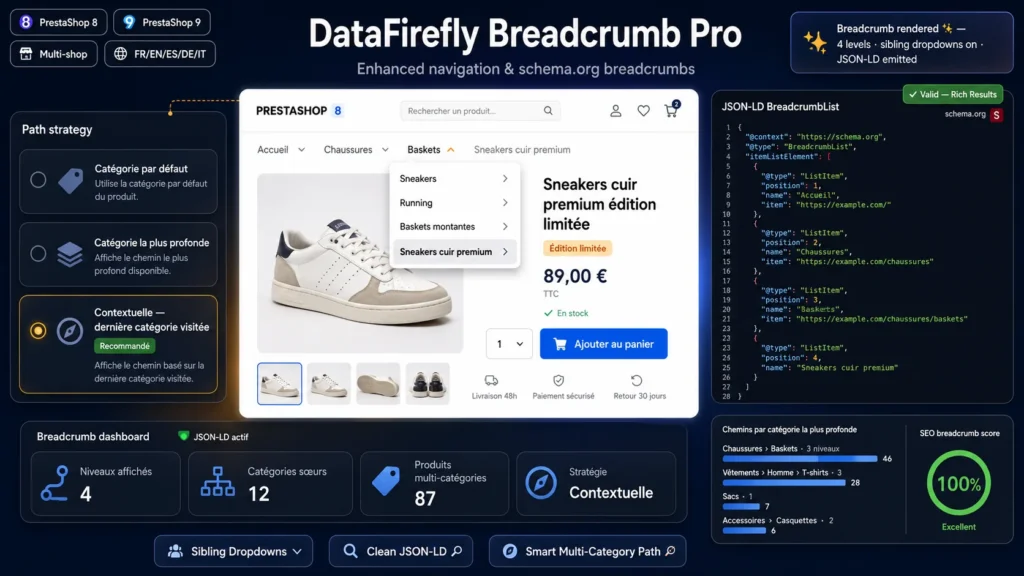
On a typical store, the breadcrumb is a mere position indicator: to explore a neighboring category, the visitor has to go up one level and back down. Breadcrumbs Pro turns every level into a dropdown menu listing sibling categories: from a Sneakers product page, your customer switches to Running or High-tops in one click, without ever leaving the page. On category pages, an option displays the subcategories of the current category on the last level, making it as easy to drill down the tree as to browse across it.
Structured data Google loves
The module injects JSON-LD BreadcrumbList markup in the head of every page: numbered positions, name and URL for each level, and a last item deliberately without a URL as recommended by Google guidelines. Your pages become eligible for the navigation path display in search results instead of the raw URL, improving snippet readability and click-through rate.
The right path for multi-category products
When a product belongs to several categories, which path should be shown? Breadcrumbs Pro offers three strategies. Default category: the classic PrestaShop behavior, hardened with an automatic fallback if the category is disabled. Deepest category: the most specific path, ideal for SEO. Contextual: the module remembers the last category visited by the customer and uses it when the product belongs to it, so the trail reflects the actual browsing journey, falling back to the deepest category otherwise.
Risk-free integration
No template or class overrides: the module attaches to the displayWrapperTop hook available in the Classic theme and virtually all marketplace themes, and hides the theme breadcrumb with CSS to avoid duplicates. PrestaShop and theme updates never break anything. The JavaScript is vanilla, jQuery-free, and the CSS is isolated under a dedicated prefix.
Built for real catalogs
Multistore: every query respects the current shop associations. Multilingual: category names, rewritten URLs and labels resolve in the visitor language. CMS pages display their CMS category tree, brand and supplier pages get their own trail, and other pages fall back cleanly on their meta title. Sibling category lists are cached per request and capped, staying fast even on large catalogs.

There are no reviews yet.