
Everything you'd want to know before you install.
A detailed look at how DF Translate — AI Multilingual Translation for WordPress & WooCommerce (free) works, why we built it the way we did, and the thinking behind the features above.
§ 01
The right data model: real content, not a fragile layer
DF Translate doesn't rewrite your text on the fly. Every translation is real content in your WordPress database — a full post, page or product — linked to its original by a translation group, exactly the way Polylang and WPML do it. That's what guarantees flawless SEO (each language gets its own indexable URL) and maximum compatibility: anything that works with a WordPress post works with DF Translate, including your theme, your page builder and your SEO plugins.
§ 02
AI in service of translation, with your own key
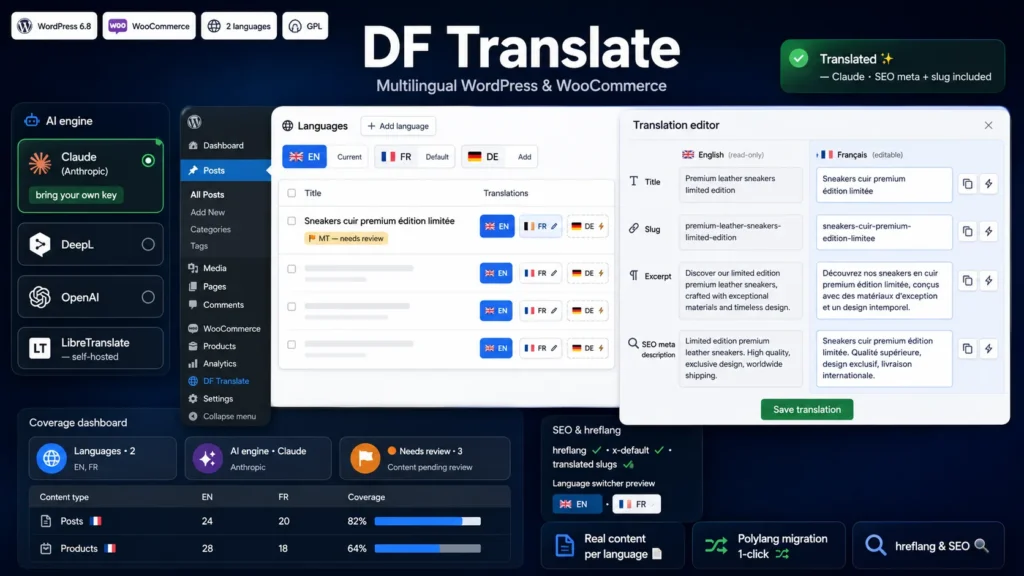
Machine translation is optional and runs on your own API key. Plug in Claude (Anthropic) for the best writing quality, DeepL (free tier available), OpenAI, or a LibreTranslate server you host yourself for full data sovereignty. No per-word subscription, no middleman: your content only leaves your site for the provider you configured, and only when you trigger a translation.
§ 03
AI built for e-commerce
The AI engines receive your store's context: content type, product category, brand tone you define. Your product pages are translated as marketing copy, not word for word. Shortcodes, printf placeholders (%s) and, crucially, Gutenberg block comments and their JSON attributes are frozen before sending and never altered — your layouts stay intact.
§ 04
The side-by-side editor
Review and fix any translation next to its source, on a single screen: title, slug, excerpt and SEO metadata aligned, each with an AI-translate button and a copy-from-source button. A status selector, navigation between the group's languages and an outdated-translation indicator complete the picture. It's the editing experience free plugins were missing.
§ 05
SEO done right
Automatic hreflang tags with x-default, clean per-language prefixed URLs, translated slugs generated from the translated title, and above all: your Yoast, Rank Math, AIOSEO or SEOPress titles and descriptions are translated too, which many solutions forget. The language switcher fits as a Gutenberg block, a widget, a shortcode, in your menus or in the admin bar, with crisp SVG flags on every system.
§ 06
Migrate from Polylang in one click
Already using Polylang? Import all your languages, your content language assignments and your translation groups in one click. Your Polylang data is never modified and your existing languages are preserved. It's the simplest way to move to DF Translate without losing anything.
§ 07
Built to be used every day
A coverage dashboard shows at a glance what's translated, by language and by content type. In your post and product lists, a translation matrix displays and opens every version, creates missing ones in one click and assigns a language to orphan content. You filter by language with counts, you set the language in Quick Edit and Bulk Edit, and machine translations are flagged "needs review" until a human validates them. .po import/export, health checks with automatic repair, encrypted API keys: every detail is handled.
§ 08
Move up to Pro when you're ready
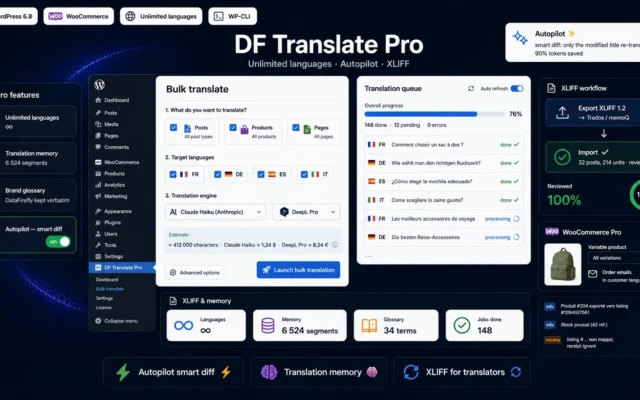
The free version covers 2 languages and everything you need for a professional bilingual site. DF Translate Pro adds unlimited languages, whole-site bulk translation with cost estimation, an autopilot that automatically translates new and modified content (with a smart diff that only re-translates the changed fields), translation memory, a brand glossary, WooCommerce variable products, order emails in the customer's language, translated URL bases, XLIFF export/import for professional translators, and WP-CLI commands.


There are no reviews yet.