


Everything you'd want to know before you install.
A detailed look at how Recurring & Scheduled Orders — Automatic Reordering for PrestaShop 8 & 9 works, why we built it the way we did, and the thinking behind the features above.
From one-off to recurring revenue
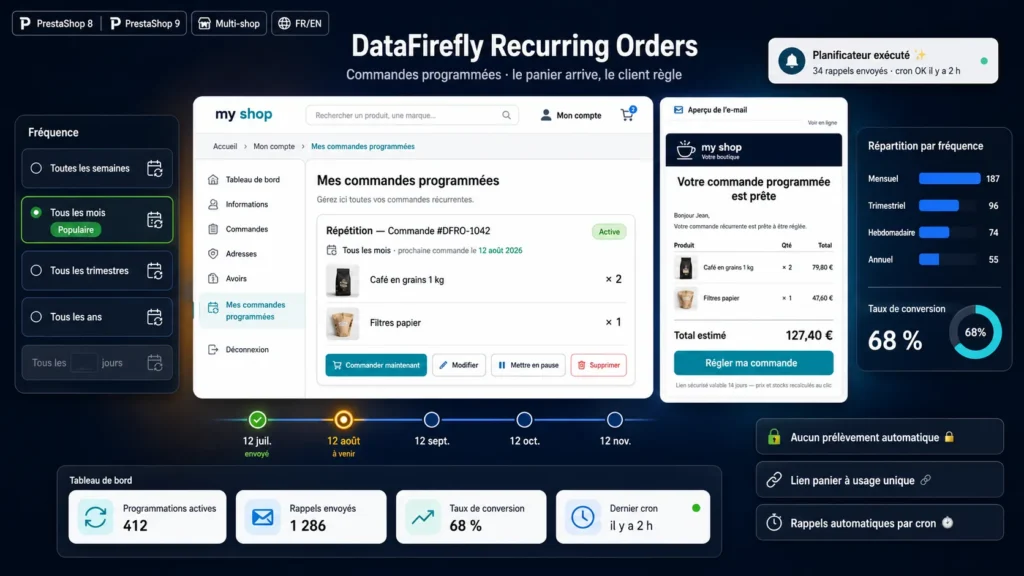
Coffee, pet food, consumables, supplements, cleaning products: as soon as a product gets rebought, the customer forgets to reorder it. DataFirefly Recurring Orders lets them schedule the repetition in three clicks from an order they already placed, choosing their frequency and their next order date.
The cart link, not the direct debit
The module never charges the customer automatically. There is no recurring mandate to collect, no card to store and no strong authentication to replay. Before each due date the customer receives an email carrying a secure link: they click, the cart is rebuilt, and they pay with the method of their choice. Acceptance rates for this model run well above classic subscriptions, and chargeback exposure disappears.
A cart that is always right
The cart is not pre-generated when the email is sent, it is rebuilt when the link is clicked. Prices, promotions, cart rules and stock are therefore the ones of the day. Products that became unavailable are skipped rather than blocking the order, and addresses deleted in the meantime fall back to the customer default address.
Control and measurement
The back office adds three screens under the Orders menu: the list of schedules with their frequency and next due date, the history of every link sent with its status, and the settings. Every order coming from a schedule is linked back automatically, giving an immediate read on the recurring revenue generated.



There are no reviews yet.