
Everything you'd want to know before you install.
A detailed look at how Variant Photo Swatches & Stock Module PrestaShop 8/9 works, why we built it the way we did, and the thinking behind the features above.
§ 01
Visual choice sells
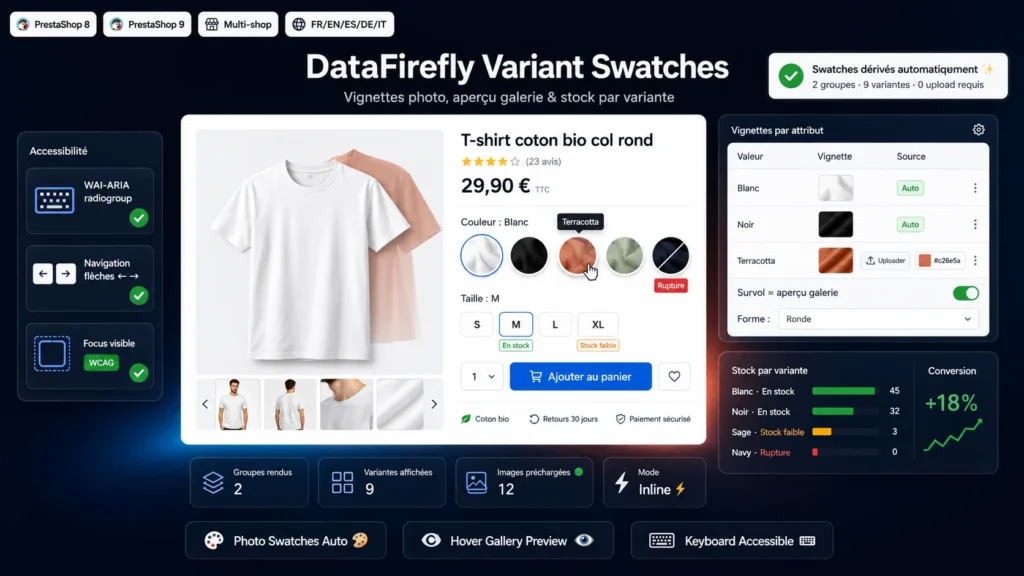
In fashion, home decor or cosmetics, customers buy with their eyes. A dropdown reading White / Black / Red shows nothing; a row of photo swatches shows everything. The module replaces the native combination widgets with clickable visual chips, and every hover previews the variant in the main gallery — shoppers explore the range without a single page reload.
§ 02
Working from the moment you install
Most swatch modules require uploading one image per attribute before anything shows up. Here, swatches are derived automatically from the photos already attached to your combinations: install the module, open a product page, it is live. A smart safeguard avoids false positives — a Size group whose values all share the same photo stays as text chips; only groups genuinely differentiated by image switch to photos.
§ 03
Stock visible before the click
Every swatch announces its availability: in stock, low stock below a threshold you define, or sold out. Exhausted variants can stay visible but struck through — useful to show the breadth of the range — or disappear completely. The calculation respects both the store-wide out-of-stock ordering behavior and the per-combination setting.
§ 04
Accessible and compliant
The selector implements the WAI-ARIA radiogroup pattern by the book: a single tab stop per attribute group, arrow-key navigation with wrap-around, selection via space or enter, states announced to assistive technologies and a visible focus ring. With European accessibility requirements, this is a concrete differentiator against purely visual variant pickers.
§ 05
Light and robust by architecture
Variant data is embedded directly in the page at render time: no AJAX call on load, no dependency on an endpoint being available, immediate display. The module enhances PrestaShop's native widgets instead of replacing theme templates — which is what makes it compatible with Classic, Hummingbird and most premium themes without overhead.



There are no reviews yet.