
Everything you'd want to know before you install.
A detailed look at how Supplier Feed Import & Dropshipping for PrestaShop 8 & 9 — CSV, XML, JSON works, why we built it the way we did, and the thinking behind the features above.
A real supplier import engine, not a one-off CSV import
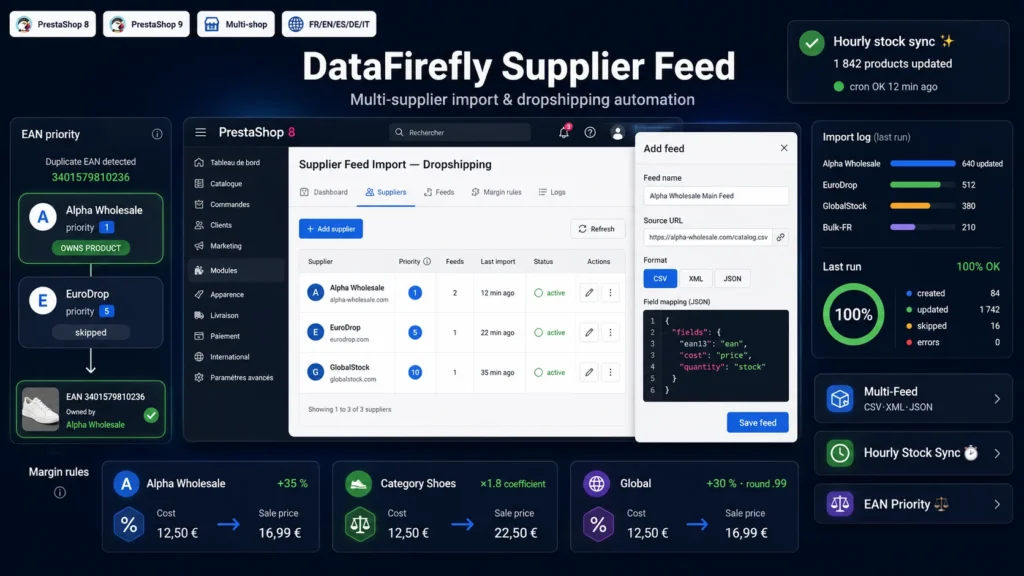
PrestaShop's standard CSV import is built for a single manual load. Dropshipping and multi-supplier sourcing need something else entirely: several sources in different formats, recurring updates, margins that vary by supplier and category, and stock that moves constantly. This module industrializes all of it — you configure your suppliers and feeds once, then the cron takes care of the rest.
CSV, XML, JSON — the same engine for every supplier
Every supplier delivers its catalog its own way. The module accepts the three most common formats and a simple JSON mapping links the feed's columns or nodes to normalized product fields. CSV detects its own delimiter and accepts decimal commas; XML follows a node path with attribute reading; JSON uses dot notation with access to array indexes. EANs are validated and normalized, and gzip responses are decoded transparently.
Your margins, your pricing logic
The retail price is computed from the supplier's purchase cost according to your rules: percent markup, multiplier coefficient or fixed addition. A rule can be global, supplier-specific, category-specific, or combine both — and the most specific rule wins, taking the category hierarchy into account. An optional psychological rounding (x.99, x.95, x.90 or integer) finishes the job. The cost is kept as the wholesale price and reported to the native PrestaShop supplier.
The priority that settles EAN duplicates
In a multi-supplier setup, the same product often arrives from several sources with the same EAN13 code. Without arbitration it's chaos: contradicting prices, stock jumping from one value to another. Here, each supplier has a priority. On a shared EAN, the best-priority one owns the product and the other sources are skipped for that reference. And if a better-priority supplier appears, it automatically takes over the link. You decide who's authoritative, the module sticks to it.
Stock by the hour, controlled creations
Two crons are enough. The first, hourly, runs in "stock" mode: it only touches prices and quantities of already-linked products — fast and risk-free. The second, at night, runs in "full" mode: it also creates missing products for the feeds you allowed, imports their cover image and links the native supplier. Created products are disabled by default so you can review them before publishing, and every run leaves a detailed log — created, updated, skipped, errors — purged automatically according to your retention.

There are no reviews yet.