
Everything you'd want to know before you install.
A detailed look at how Quick View Module for PrestaShop 8/9 — Product Quick Preview works, why we built it the way we did, and the thinking behind the features above.
The quick view in PrestaShop themes is a missed opportunity
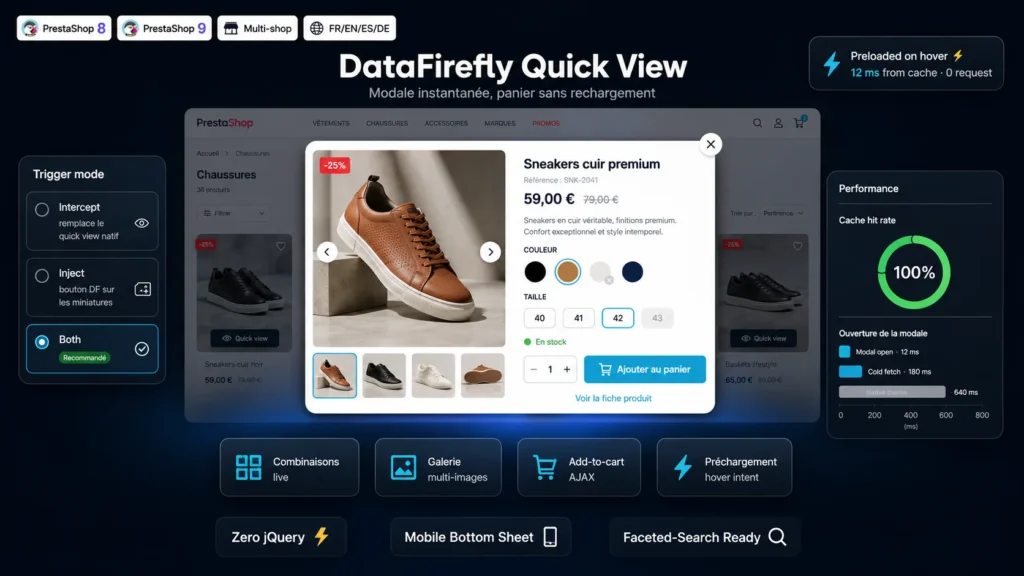
In most themes, the quick view boils down to an image, a title, a price and a button. No gallery, no size picker, an add-to-cart that reloads the page or sends the customer elsewhere, and a slow opening because everything is fetched on click. The result: the customer closes the modal and leaves, or abandons the category for the product page and never comes back. This module rebuilds the idea from scratch and turns it into a real conversion tool.
Everything the customer needs to decide, right in the modal
The full product gallery is there, with thumbnails, arrows, keyboard navigation and touch swipe on mobile. So are the combinations: colour swatches with their textures, size buttons, dropdowns depending on how you configured them. On every click, the price, discount, reference, stock and images update live. Combinations that don't exist are greyed out and out-of-stock ones flagged, so the customer never wastes time on an impossible choice.
Instant opening thanks to preloading
Most quick views wait for the click to fetch product data, forcing a wait of half a second or more. Here, as soon as the mouse lingers on a miniature — the intent delay is adjustable — the data is preloaded in the background, along with the first image. On click, everything is already in memory: the modal opens with no latency. Data is cached in the browser for the lifetime you choose, with a cache scoped by language, currency, shop and customer group, so a price that isn't the visitor's own is never shown.
Add-to-cart no longer breaks the journey
The addition is made over AJAX to PrestaShop's native cart controller: the header cart refreshes on its own, the modal confirms the addition visually, and the customer stays on the category page. Any errors — out of stock, minimum quantity not reached — are shown clearly inside the modal instead of on an error page. Products with required customization are properly redirected to their own page.
Fits your theme without modifying it
Three trigger modes to choose from: replace your theme's native quick view, add a dedicated button on product miniatures, or both. The miniature CSS selector is configurable to fit custom themes, the accent colour is set in one click, and the module re-injects itself automatically after every faceted search filter. No template is overridden and no dependency is added: the JavaScript is vanilla, without jQuery, and the modal styles are self-contained.
There are no reviews yet.