


Everything you'd want to know before you install.
A detailed look at how Local Google Fonts Module PrestaShop 8/9 — Self-Hosted GDPR Fonts works, why we built it the way we did, and the thinking behind the features above.
§ 01
Google Fonts and GDPR: a very real legal risk
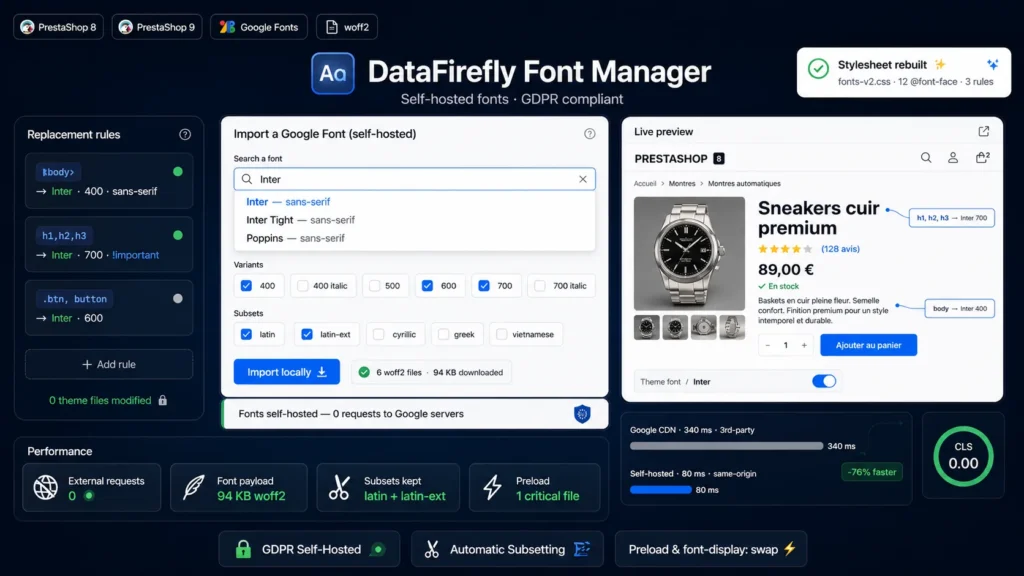
When your theme loads a font from fonts.googleapis.com, every visitor's browser transmits their IP address to Google's servers without prior consent. The Munich Regional Court ruled this practice unlawful under GDPR back in January 2022, and waves of cease-and-desist letters followed in Germany, Austria and France. The only clean solution is self-hosting: font files are served from your own domain, and no data ever flows to Google. That is exactly what this module does, in one click.
§ 02
Importing is as simple as the Google Fonts catalog itself
Type a font name in the built-in search: autocomplete browses the full Google Fonts catalog, cached on your server. Select the weights you need (400 and 700 are pre-checked) and your audience's alphabets, then click Import. The module downloads the official woff2 files, verifies their binary signature, stores them in a dedicated folder and regenerates the stylesheet. If your theme still loads external fonts, an option strips them from the rendered HTML: stylesheet links, preconnects and inline imports.
§ 03
Automatic subsetting: only serve the bytes you need
A full family can weigh hundreds of kilobytes if you ship every alphabet. The module only downloads the checked subsets — latin and latin-ext by default — and keeps each file's original unicode-range. As a result, browsers only request the character ranges actually present on the page. A typical Western European store ends up serving 20 to 90 KB of fonts instead of several hundred, with zero visual loss.
§ 04
Preloading and font-display: typography working for your Core Web Vitals
For each family, a toggle preloads the critical file — woff2, normal style, latin alphabet, weight closest to 400 — through a link rel preload tag placed at the top of the page. Combined with the font-display swap strategy applied by default to all declarations, text stays visible while fonts load and the final typeface appears without a jarring flash. You fine-tune the trade-off between visual stability and speed with the block, fallback, optional or auto modes.
§ 05
Change your typography without ever touching the theme
The module generates replacement rules from simple CSS selector to font mappings: body to Inter 400, headings to Inter 700, buttons to the weight of your choice. Each rule accepts a fallback stack (sans-serif, serif, system-ui…), a style and an optional important flag. The generated stylesheet loads after the theme CSS and is versioned for caching: theme updates break nothing, and uninstalling restores your original fonts instantly. Custom fonts are added through a simple woff2, woff, ttf or otf upload.





There are no reviews yet.