


Everything you'd want to know before you install.
A detailed look at how Heavy & Bulky Items Delivery Form — Furniture, Appliances, TV (PrestaShop 8 & 9) works, why we built it the way we did, and the thinking behind the features above.
Why a delivery form for heavy items?
A 75-inch TV on the 4th floor with no elevator, a sofa that does not fit the staircase, a washing machine delivered in front of a locked building: every failed bulky delivery costs a second carrier trip, an unhappy customer and sometimes a refund. The cause is almost always the same — nobody asked the customer about access conditions before shipping. This module asks the right questions at the right time: at the checkout carrier step.
A fully configurable questionnaire, no coding required
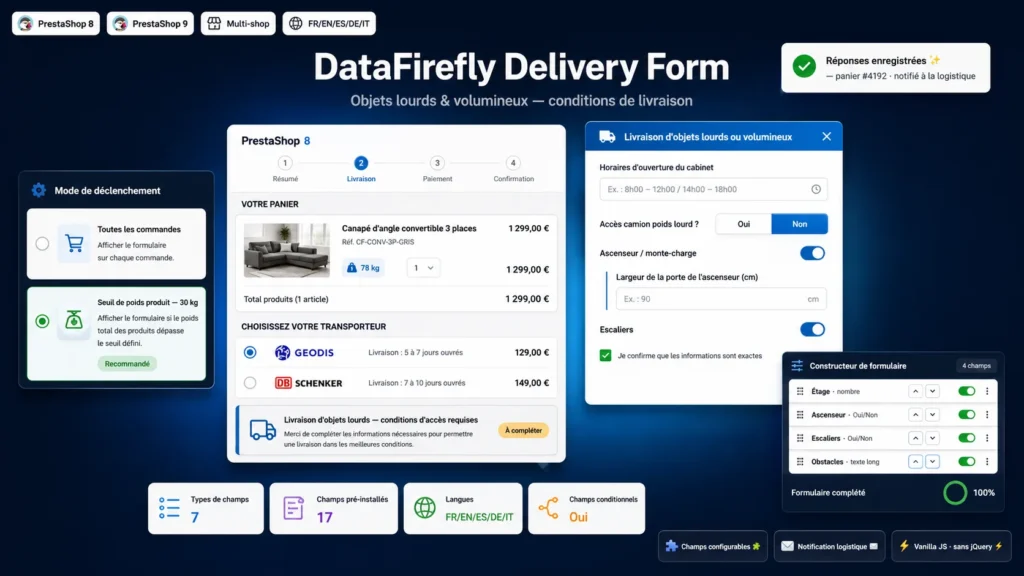
Unlike hard-coded forms, every question is a field you create in the back office: type, label per language, help text, required flag, position. Conditional fields let you reproduce the logic of a real logistics questionnaire — the elevator door width question only appears if the customer answered Yes to the elevator question. A set of 17 fields is pre-installed (presence hours, heavy-truck access, parking distance, floor, elevator, stairs, narrow passages, obstacles, accuracy confirmation): keep them, adapt them or start from scratch.
Target only the products that need it
Four trigger modes: every order, product weight threshold (a 30 kg setting covers appliances and furniture), a list of specific products or entire categories. The form shows the customer which cart products are affected, so they understand why these questions are being asked.
Answers your logistics team can act on
When the order is validated, the answers are attached to the order, visible in a dedicated panel of the order page, and sent by HTML email to the address of your choice — logistics team, carrier or warehouse. You know before shipping whether you need two delivery people, a furniture lift or a prior phone appointment, and you can quote the service accordingly.
A polished customer experience
The form opens in a modern, responsive modal: choice cards, switches, Yes/No pills, live validation of required fields. Answers are stored per cart: a returning customer finds their answers pre-filled. In blocking mode, they cannot confirm the delivery step without completing the form. All in vanilla JavaScript, no jQuery or external library, so your checkout stays fast.
There are no reviews yet.