
Everything you'd want to know before you install.
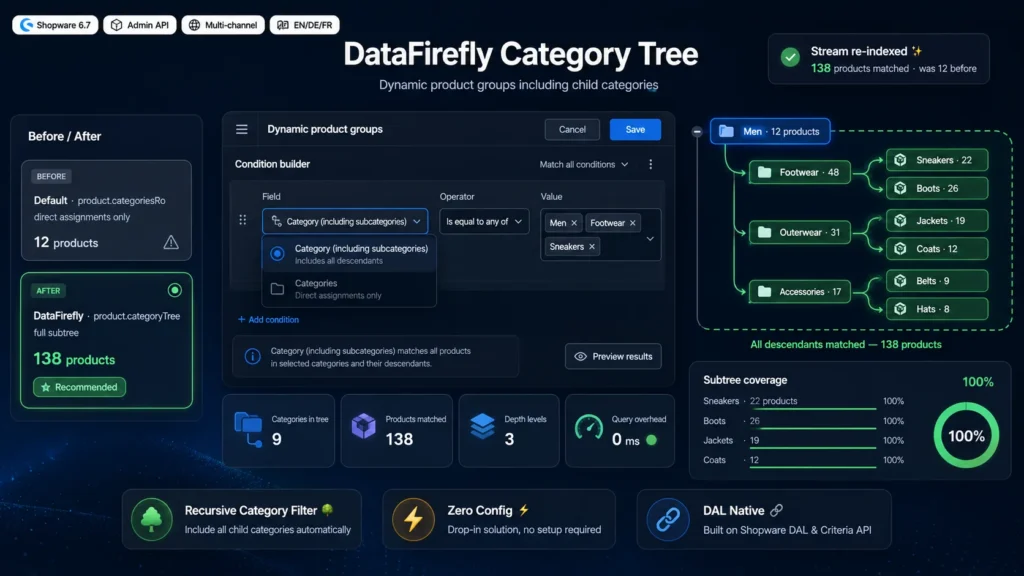
A detailed look at how Dynamic Product Groups Subcategories Shopware 6 — DfStreamCategoryTree: recursive category filter including child categories works, why we built it the way we did, and the thinking behind the features above.
Why the native category filter does not walk down the tree
The dynamic product group condition builder exposes a Categories field that queries the product.categoriesRo association. That association only lists the categories a product is explicitly attached to in its Categories tab. A properly organised catalogue files products in leaf categories: a sneaker model sits in Men, Footwear, Sneakers, not in Men. The consequence is mechanical: a filter on Men returns only the rare products assigned directly at that level. This is not a bug, it is the documented behaviour of the association, but it catches everyone off guard the moment they build a merchandising stream on a whole family.
What product.categoryTree does
Shopware already maintains, on every product, a JSON field named categoryTree holding the ID of every category along the path, from the root down to the assigned category. It is recalculated by the CategoryIndexer whenever a category moves or a product assignment changes. The storefront uses it internally for category listings. An equalsAny filter on that field with a parent category ID therefore matches every product whose path runs through it, at any depth. The field exists and works in the DAL, but the administration does not offer it in the condition builder selector: it is missing from the productStreamConditionService allow list.
The exact role of the plugin
DfStreamCategoryTree adds one line to that allow list and provides the matching translated labels. That is all, and that is deliberate. It introduces no service decorator, no product event listener, no table, no migration. The filter built in the interface is a perfectly standard DAL filter, evaluated by the same engine as every other stream condition. It also means a stream configured with this plugin stays readable and usable even if the plugin is deactivated later: the filter keeps working at DAL level, only the field display in the interface disappears.
Typical use cases
A navigation category page powered by a dynamic group covering a whole product family, without listing subcategories by hand. A promotion rule applying a discount across an entire department, sub-departments included. An automatic cross-selling block built on the department the viewed product belongs to. An export feed or a Shopping Experience block fed by a stream that must reflect an entire branch of the catalogue. In all these cases, the native version forces you to reopen the configuration for every new subcategory. The categoryTree version needs no maintenance at all.
Installation and administration rebuild
The plugin installs through a ZIP upload under Extensions, My extensions, or by dropping the folder into custom slash plugins then running plugin:refresh and plugin:install --activate. Since it changes administration behaviour, an admin bundle rebuild is required once after installation through the build-administration command or bin slash console bundle:dump followed by compilation. On a production environment managed by a deployment pipeline, that rebuild is usually already part of the standard steps. Once the administration is recompiled, the field appears immediately in the condition selector, with no plugin configuration to fill in.
What the plugin does not do
It does not replace the native Categories filter, it sits alongside it. It does not change the category indexing algorithm or the categoryTree calculation, it consumes what Shopware already produces. It does not apply to storefront listing filters or faceted navigation, which rely on a separate mechanism. It does not run on Shopware Cloud, since the SaaS version hosted by Shopware does not allow server plugin installation. And it does not claim to speed up stream evaluation: the field being native and indexed, evaluation cost is that of a standard filter, no more and no less.
There are no reviews yet.