PrestaShop Catalogue Management

PrestaShop Pre-Order Module 8 & 9: Sell Products That Are Out of Stock

Take the orders while your supplier is still packing the delivery.

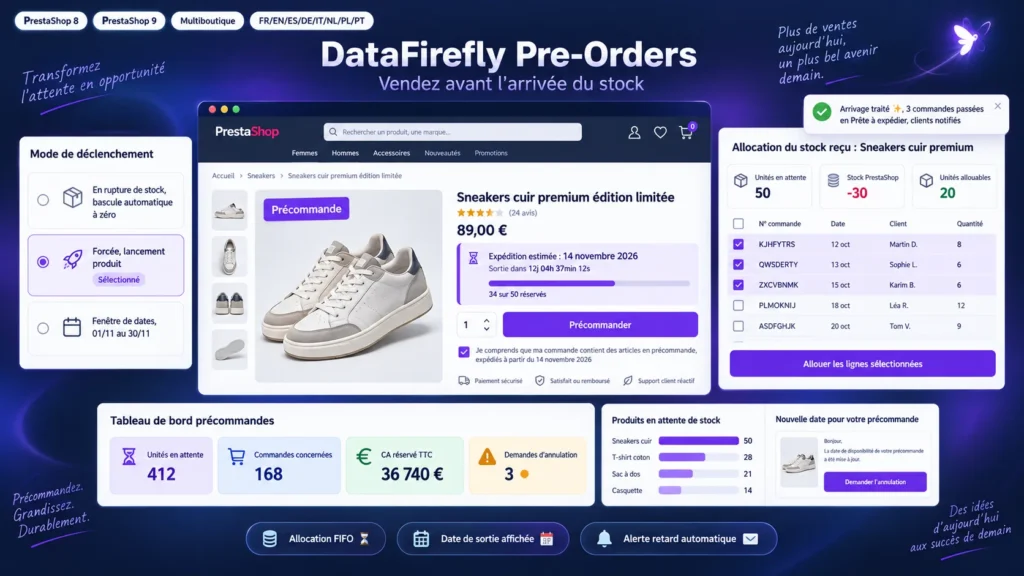
An out-of-stock product is a sale walking to a competitor. This module turns the shortage into a pre-order: the button becomes Pre-order, the estimated shipping date shows on the product page, and the order is paid as usual. In the back office you always know how many units are reserved, how many to order from your supplier, and when the delivery lands you serve customers oldest first in one click. If the date slips, a single action e-mails every affected customer with the new date and a cancellation link.

At a glance
  • Pre-order automatically when out of stock, forced for a launch, or between two dates
  • Estimated shipping date, countdown and reserved-units bar on the product page
  • Global and per-customer quantity caps, timestamped consent checkbox at checkout
  • Allocation screen for incoming stock, oldest orders served first
  • One action e-mails every waiting customer when the date changes, with a cancellation link
PrestaShop 8 & 9 FIFO allocation Release date Multistore
  • 30-day refund
  • 12 months updates
  • 24h support
www.datafirefly.com/en/
PrestaShop Pre-Order Module 8 & 9: Sell Products That Are Out of Stock
v1.0.0 · updated 2026-09-22
What it does

The short version.

01

Three ways to start a pre-order

When out of stock: the product switches to pre-order at zero and returns to normal sale as soon as stock is back. Forced: permanent pre-order while the rule is active, even with stock, for a product launch. Date window: pre-orders open and close to the minute.

02

The customer knows what they are buying

Renamed button, Pre-order badge in listings, estimated shipping date, countdown to release, a 34 of 50 reserved bar and a free message per language. A mandatory consent checkbox at checkout repeats the date, and the timestamp is stored in the database.

03

Incoming stock distributes itself

When the delivery arrives, the module computes the units actually available for pre-orders and suggests an allocation from the oldest orders to the most recent. Orders whose pre-ordered lines are fully served switch to the ready-to-ship status and the customer gets an e-mail.

04

A delay takes three clicks

Change the shipping date on the rule: waiting pre-orders are updated and, if you ask for it, every affected customer receives the new date with a link to request cancellation. The history of announced dates is kept.

The long version

Everything you'd want to know before you install.

A detailed look at how PrestaShop Pre-Order Module 8 & 9: Sell Products That Are Out of Stock works, why we built it the way we did, and the thinking behind the features above.

§ 01

What PrestaShop does, and what it does not

PrestaShop can allow orders when a product is out of stock, and that is where it stops. No reliable availability date on the product page, no pre-order cap, no tracking of what is reserved, no way to share a partial delivery between the customers who are waiting. This module adds that layer: a rule decides when pre-orders are open, what the customer sees, how many units you accept, and how incoming stock is distributed.

§ 02

One rule per product, or per combination

Size M is out of stock while L is available: a rule on the M combination alone is enough. On every cart save the module checks that the other combinations still follow the original shop setting, and blocks the ones that must not be orderable. Rules are created one by one, in bulk by category, brand or supplier, or through a CSV import for a whole catalogue.

§ 03

Pre-orders you can actually serve

A pre-order lowers the stock like any other order, which pushes it below zero. The module relies on that behaviour: the units actually available for pre-orders are the waiting units plus the current stock. The dashboard shows, product by product, what is reserved, what can be allocated right now and what is left to order from the supplier, with a CSV export ready to send.

§ 04

Follow-up on the customer side

Customers find their pre-orders in their account, with the status of each line and the estimated date. E-mails follow them at every step: confirmation at checkout, notice when the date changes, announcement when the items are ready to leave. If they no longer want to wait, a link lets them request cancellation, which you confirm or refuse from the back office.

§ 05

Built for real catalogues

The module handles multistore, eight languages, carts that mix stock and pre-orders according to the policy you choose, deferred payments such as bank wire, and the schema.org PreOrder output so Google does not show your products as unavailable. The code follows PrestaShop conventions, uses no Composer dependency, and runs from PrestaShop 8.0 to 9.x with the same ZIP.