
Our best PrestaShop modules for managing orders in the back office
Eight modules to correct, document and track your orders without spending the day on it.
The customer wants the next size up, the invoice needs one more legal notice, support can't work out what the buyer is seeing. Nothing serious, but it all takes time. These are the PrestaShop modules that make those tasks quick and traceable.
Sound familiar?
An order you can't correct cleanly
The customer wants the next size up or entered the wrong address. The native back office leaves little room: cancel, recreate, and the invoice doesn't follow.
An invoice nobody dares touch
Adding a legal notice or a payment QR code means editing .tpl files, overwritten at the next update.
Generic order emails
They are the emails your customers open most, and they look like those of every other PrestaShop shop.
Who changed what?
A price edited, an order switched to refunded: without a log, nobody knows who did it or when.
Our selection, ranked
Every module below is built, maintained and supported by our team. The ranking reflects what we would install first on a client store.
-
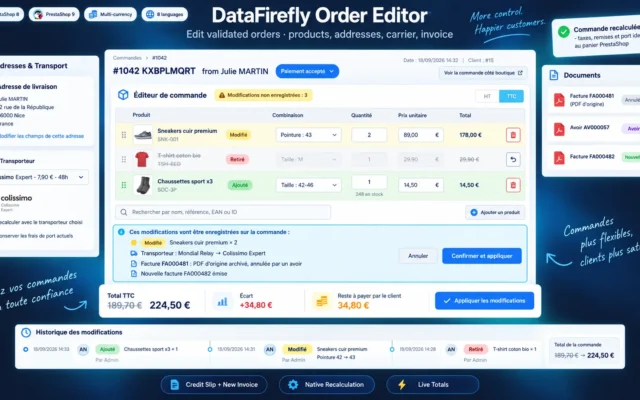
Add or remove a line, change a variant, correct a quantity or an address after validation. Taxes and discounts recalculated, invoice or credit note regenerated.
Add, remove or swap products on a validated order, fix quantities, prices and addresses, change the carrier or add a discount. Taxes, discounts and…
€129.00 View the module -
Customize PrestaShop PDF Invoices for PrestaShop 8 & 9 Without Editing TPL Files
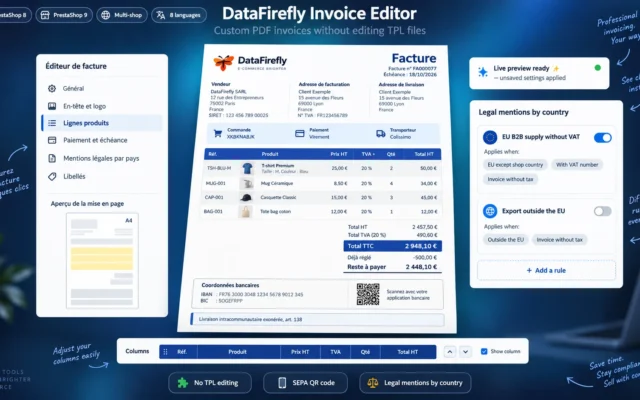
An invoice that looks like youLogo, legal notices per country, custom fields, due date, bank details and SEPA QR code, delivery slips. Without touching .tpl files.
PDF invoice editor for PrestaShop 8 and 9: logo, colors, product line columns, custom fields, legal mentions by country, due date, bank details with…
€99.00 View the module -
PrestaShop Email Template Editor: Customize Order Emails Visually (8 & 9)
Order emails redesignedVisual editor for transactional emails, with shared blocks, personal discount voucher and design export. Your emails stop looking like everyone else's.
Visual editor for PrestaShop 8 and 9 transactional emails: product blocks with photos, totals, addresses, recommended products, promo banners, personal voucher and a preview…
€99.00 View the module -
Login as Customer Pro — PrestaShop 8 / 9 Module
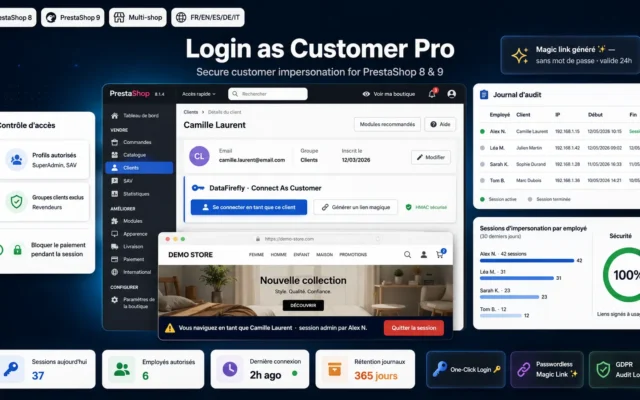
See what the customer seesLog in to a customer's account from the back office to reproduce a cart problem or place an order on their behalf.
Log in to any customer's account in one click from the PrestaShop 8 / 9 back office. Signed, expiring links, exit banner, passwordless magic…
€49.00 View the module -
Back-Office Audit Log — Traceability & Compliance for PrestaShop 8 & 9
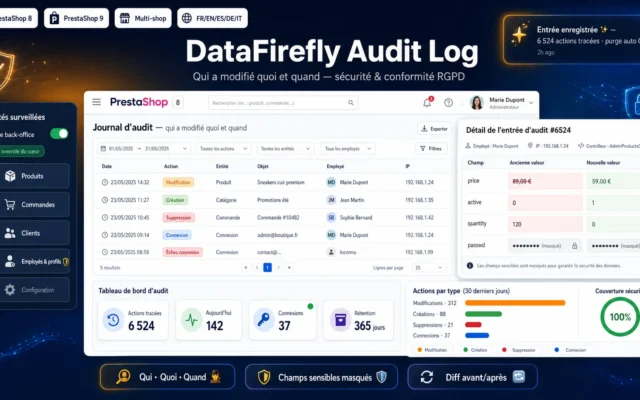
Once there are several of youWho changed this order, this price, this status, and when. Essential when several people work in the back office and orders become editable.
Track every creation, update and deletion in the PrestaShop back office with the field-by-field before/after detail, the employee, the IP address and the timestamp.…
€49.00 View the module -
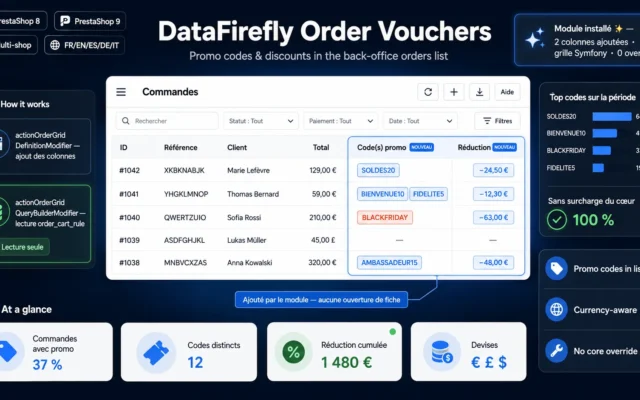
Promo Codes & Discounts in the Orders List — PrestaShop 8 & 9
Discount codes in the listA discount codes and reductions column in the order list. You see which campaign generated which sale without opening each order.
Add two columns to the back-office orders list: the promo code(s) used and the total discount amount, formatted in the order currency. Built on…
€29.00 View the module -
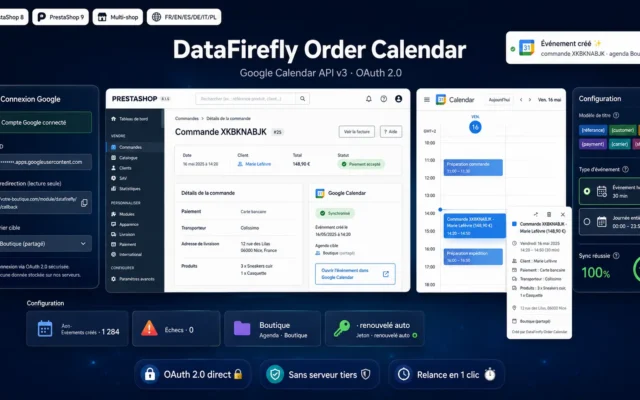
Google Calendar Module for PrestaShop 8 & 9: New Orders Added to Your Calendar Automatically
Orders in your calendarEvery order added automatically to Google Calendar. Useful for pickups, scheduled deliveries, services and rentals.
Every validated order creates a complete event in your Google Calendar: reference, customer, total, products, delivery address. Direct OAuth 2.0 connection with your own…
€79.00 View the module -
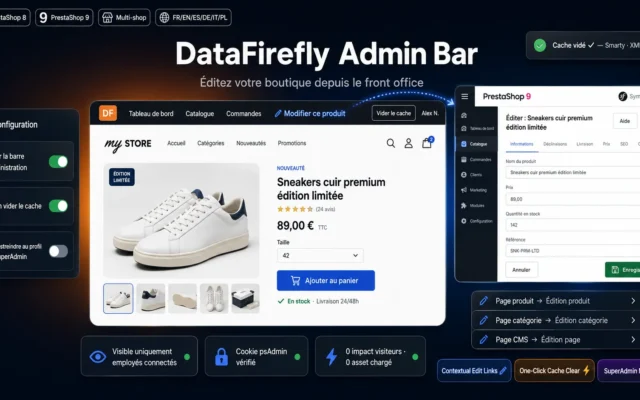
Front Office Admin Bar PrestaShop 8 & 9 – Edit Products from Your Storefront
Front to back in one clickAn admin bar on the storefront: edit the product or page you are looking at without searching for it in the back office.
The WordPress-style admin bar for PrestaShop 8 and 9: edit the product, category or CMS page you are viewing in one click from the…

Side-by-side comparison
| Module | Best for | Price | Rating | Link |
|---|---|---|---|---|
| Edit Orders in PrestaShop 8 & 9: Products, Addresses and Invoice | Best overall | €129.00 | — | |
| Customize PrestaShop PDF Invoices for PrestaShop 8 & 9 Without Editing TPL Files | An invoice that looks like you | €99.00 | — | |
| PrestaShop Email Template Editor: Customize Order Emails Visually (8 & 9) | Order emails redesigned | €99.00 | — | |
| Login as Customer Pro — PrestaShop 8 / 9 Module | See what the customer sees | €49.00 | — | |
| Back-Office Audit Log — Traceability & Compliance for PrestaShop 8 & 9 | Once there are several of you | €49.00 | — | |
| Promo Codes & Discounts in the Orders List — PrestaShop 8 & 9 | Discount codes in the list | €29.00 | — | |
| Google Calendar Module for PrestaShop 8 & 9: New Orders Added to Your Calendar Automatically | Orders in your calendar | €79.00 | — | |
| Front Office Admin Bar PrestaShop 8 & 9 – Edit Products from Your Storefront | Front to back in one click | €49.00 | 5.0 |
The back office is where margin leaks away in minutes
An order to correct, an invoice to redo, a customer to walk through a problem on the phone: none of these tasks is hard, but each takes ten minutes, several times a day. Over a year, that adds up to a job in itself.
What this selection covers
The modules below act after the order: changing it, producing clean documents, seeing what the customer sees, finding out who changed what. For bulk catalogue editing, see our catalogue management selection.
How to choose
Start with what costs you the most time
Log one week of requests: how many orders corrected, invoices redone by hand, customers talked through on the phone? The module to install first is the one that removes the most frequent task, not the most complete one.
Correcting an order means correcting its documents too
An edited order whose invoice didn't follow creates an accounting gap. Check that the module recalculates taxes and discounts and produces the matching invoice or credit note, instead of only changing the lines.
The documents your customers receive
The PDF invoice and order emails are read by all your customers. Customising them in .tpl files works until the next theme or PrestaShop update. A back-office editor keeps your settings out of the core files.
Once there are several of you
The more employees in the back office and the more editable orders, the more an audit log becomes necessary. It answers the question everyone ends up asking after a mistake: who did this?
What you gain
Corrections without re-entering
The order is edited in place, amounts are recalculated and the invoice or credit note follows.
Documents that look like you
Invoices, delivery slips and emails are customised from the back office and survive updates.
Faster support
Logging in to the customer's account shows exactly what they see, instead of guessing from a screenshot.
A trace of every action
The audit log records back-office changes by employee and by date.
From install to results
-
Measure your corrections
One week of logging is enough to know whether the problem is the order, the invoice or support.
-
Make orders editable
With tax recalculation and an up-to-date invoice or credit note, otherwise accounting falls behind.
-
Customise invoices and emails
Outside .tpl files, so your settings survive updates.
-
Switch on the audit log
Before several people work in the back office, not after the first mistake.
Frequently asked questions
Doesn't the native back office already let me edit an order?
It allows some corrections, with limits you reach quickly: changing a variant, correcting an address after validation or keeping the invoice consistent with the edited order often means working around the system. dforderedit handles these cases with tax and discount recalculation, then regeneration of the invoice or credit note.
Can an invoice be changed once issued?
As a general rule, an issued invoice is corrected with a credit note and a new invoice, not by rewriting the document. That is why an order-editing module must produce the right credit note or invoice. Check the applicable rule with your accountant.
Will my invoice customisations survive updates?
Yes, if they are made in the module and not in the theme or core .tpl files. dfinvoiceeditor and dfmaileditor also let you export their settings to reuse them on another shop.
Is logging in as a customer safe?
Access is from the back office, by authorised employees. Restrict that right to support profiles and pair it with an audit log to keep a record of back-office actions.
Which module should I start with?
If you correct orders every week, dforderedit. If customers often ask for reissued invoices or specific notices, the invoice editor. If your support team spends time working out what the customer sees, login as customer.
Not sure which one fits your store?
Tell us your context — we answer with a straight recommendation, not a sales pitch.