
Everything you'd want to know before you install.
A detailed look at how Custom T-Shirt Printing for PrestaShop 8 & 9: Logo Printing, Screen Printing, Embroidery works, why we built it the way we did, and the thinking behind the features above.
Why custom apparel is hard to sell online
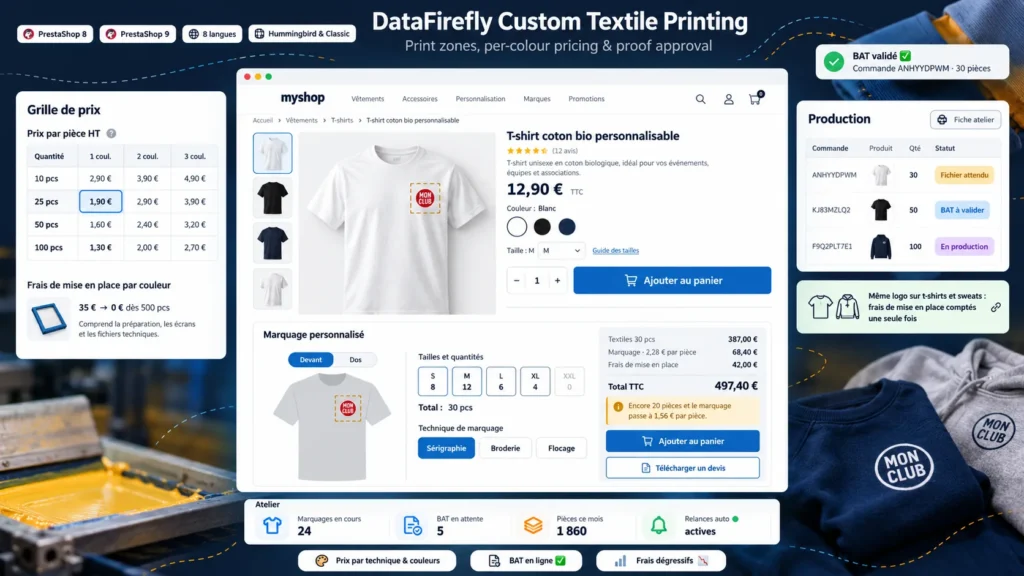
The price of a print job depends on the technique, the number of colours, the total quantity and setup fees that decrease with volume. PrestaShop cannot calculate this, so shops end up showing a teaser price and handling every order by email. This module calculates the exact price on the product page and carries it into the cart, the order and the invoice through PrestaShop's native customization.
A product page built for group orders
The customization block sits right under the add to cart button. Customers enter quantities size by size, tick their placements, choose technique and colour count, then drag and drop their file. The preview shows the garment in the chosen colour, the logo is positioned with the mouse, and a resolution indicator prevents bad surprises at print time. On mobile, a sticky bar keeps the total and the add button within thumb reach.
Exact prices, even during your promotions
PrestaShop applies a product's percentage reductions to the customization price as well. The module compensates for this so the printing always stays at your grid price, even while the garment is on sale. Native quantity discounts and pieces already in the cart are included in the estimate, which matches the cart total to the cent.
One logo on several products
When a club orders t-shirts and hoodies with the same file in the same placement, the workshop uses the same screen. The module recognises this: the price tier is calculated on the total number of pieces and setup fees are charged only once. If the first product is removed from the cart, the fees move to the other one automatically.
From proof to delivery
After ordering, each print job follows a status: file awaited, file received, proof to approve, changes requested, proof approved, in production, completed. Customers act from their order or from the link in their email, and the workshop is notified of every answer. The Production tab gathers the whole work queue, the workshop sheet works as a job ticket, and a reminder goes out on its own when a customer forgets to answer.

There are no reviews yet.