
Everything you'd want to know before you install.
A detailed look at how Add Custom Checkout & Registration Fields to PrestaShop 8 & 9 (PO Number, Delivery Date) works, why we built it the way we did, and the thinking behind the features above.
What PrestaShop cannot do
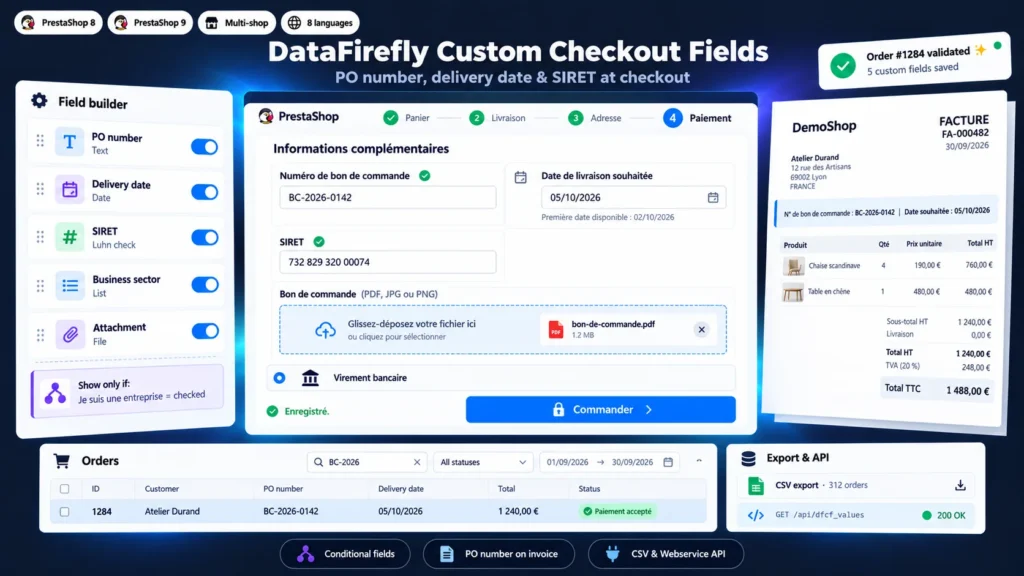
PrestaShop offers a free message at the delivery step and, in B2B mode, SIRET and APE fields on the customer account. Nothing for a purchase order number per order, a requested delivery date or a document to attach, and no way to make this information mandatory. Business buyers write it in the message or send it by email, customer service copies it by hand, and the invoice goes out without the reference the customer's accounts department requires to pay it.
Each field at the right point of the journey
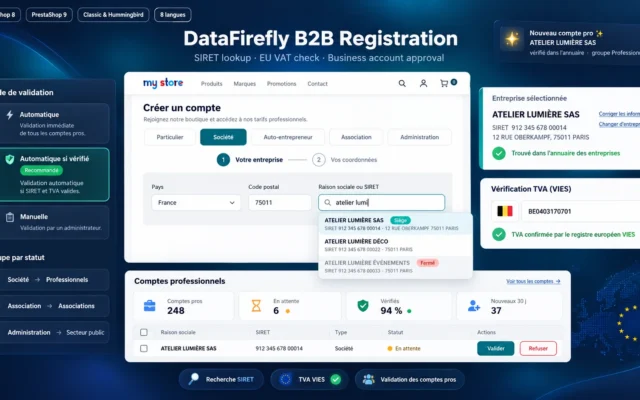
Company fields (SIRET, business sector) are saved on the customer account: entered at registration or with the first order, they are prefilled afterwards and copied to each order. Order fields (PO number, requested date, attachment) appear in the checkout, at the payment or delivery step. Each order keeps a copy of the values from the day it was placed.
For customer service, accounting and the ERP
The PO number and requested date appear on the order page, in a searchable column of the order list, on the invoice and on the delivery slip. The CSV export lists the orders of a period with their fields, ready for Excel. An ERP or connector reads the same values through the PrestaShop webservice, with the dfcf_values resource.
Attachments with no risk for the shop
A file sent by a customer is checked twice: its extension must be in the allowed list of the field, and its real content must match, so a script renamed to .pdf is refused. It is stored with a random name and no extension, in a folder where direct access is denied. Only the customer who owns the order and back-office employees can download it.
Fields adapted to each customer
A manufacturer selling in France and Belgium can limit the SIRET to French billing addresses, show the PO number only to the Professionals group and ask for a document only when the customer picks the Healthcare sector. Conditions can be chained and a hidden field is never required.
There are no reviews yet.