
Everything you'd want to know before you install.
A detailed look at how PrestaShop POS Integration: Sync Stock & Sales with Square, Zettle, SumUp works, why we built it the way we did, and the thinking behind the features above.
One physical shop, one website, one stock
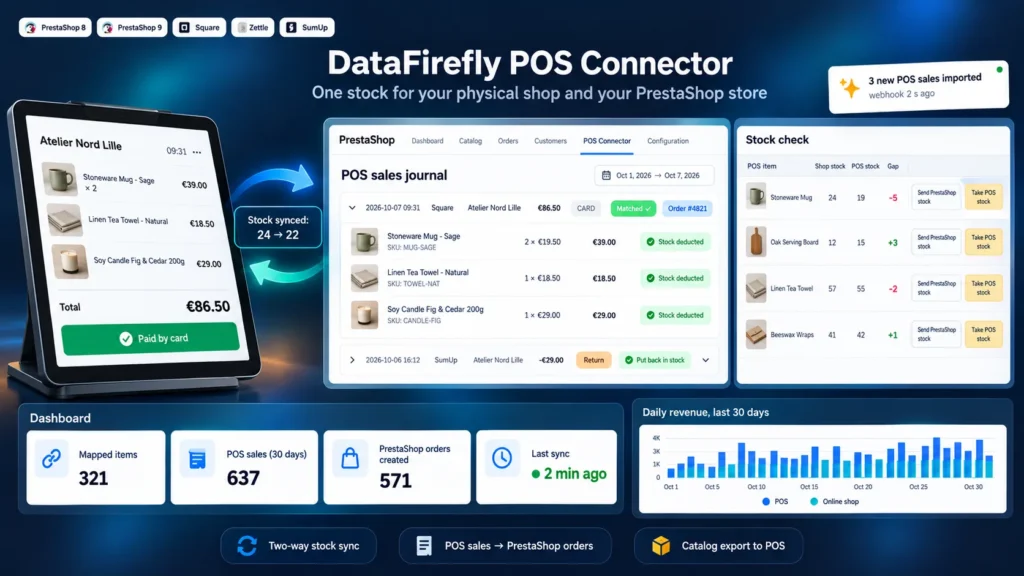
When the POS and the website each keep their own stock, the last item sells twice: once at the counter, once online. The module removes this double count by making PrestaShop the only reference. The POS always receives the real quantity, and each in-store sale comes back into PrestaShop to decrease the online stock.
How the sync works
Each stock change of a mapped product is queued, then the PrestaShop quantity is sent to every POS. The module sends an absolute quantity, never a difference, so a replayed update creates no drift. Sales arrive through the cron every 5 minutes and, for Square and Zettle, within seconds through signed webhooks. A nightly full sync and a gap check on each run catch anything changed outside PrestaShop.
In-store sales inside PrestaShop
Each sale is recorded in a journal with its lines, POS, location and payment method. As an option, a fully mapped sale becomes a PrestaShop order at ticket prices, dated at the time of the sale, with a walk-in customer and a POS carrier that never shows at the checkout. No email goes out, to the customer or to you. Square returns and Zettle refunds put the items back in stock and leave a note on the original order.
Starting from an existing catalog
If your products are already in PrestaShop, the Send catalog tab creates them in Square or Zettle with their combinations, price, SKU, barcode and stock, then maps them at once. If the POS already holds items, reading its catalog maps them by reference or barcode, and the name suggestions handle items entered without a SKU.
What each POS supports
Square and Zettle support everything: two-way stock, sales, returns, gap check and catalog export. On Zettle, stock tracking must be enabled on the products, which the catalog export does automatically. SumUp only exposes transactions in its public API: the module imports the sales and deducts them from the PrestaShop stock, but it cannot update the stock shown in SumUp or create products there.


There are no reviews yet.