
Everything you'd want to know before you install.
A detailed look at how Bulk Price Increase for WooCommerce (Inflation & Charm Pricing) works, why we built it the way we did, and the thinking behind the features above.
The real problem with a bulk price increase
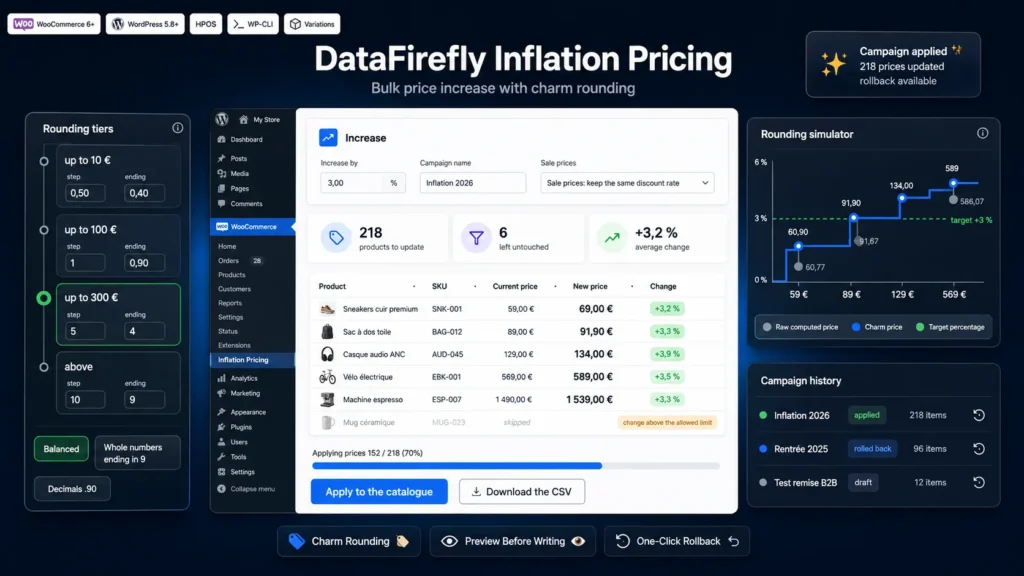
Multiplying a whole catalogue by 1.03 takes five minutes in SQL. The trouble starts right after: a product at 59 becomes 60.77, a product at 569 becomes 586.07, and your shop ends up with unreadable prices that reek of automated processing. This plugin does both operations at once: it applies the percentage, then snaps every result onto a price ladder you have defined.
How tier rounding works
A tier is defined by two numbers: a step and an ending. The result always equals the step multiplied by an integer, plus the ending. A step of 10 with an ending of 9 produces 9, 19, 59, 89, 569, 899. A step of 1 with an ending of 0.90 produces 9.90, 14.90, 60.90. A step of 5 with an ending of 4 produces 124, 129, 134. You can stack as many tiers as you need, each covering a price band, so a 12 accessory and a 2,500 machine are handled differently.
The trade-off between readability and accuracy, made visible
The coarser the ladder, the further the applied change drifts from the target percentage. A 3 percent increase on 59 gives 60.77: a ladder in whole numbers ending in 9 turns it into 69, which is 17 percent. That is arithmetic, no plugin can avoid it. What changes here is that you see it before you commit. A simulator shows the actual change on sample prices, the preview gives it product by product, and a per campaign ceiling automatically leaves out the items whose rounding distorts the increase too much.
Rounding on the price your customer reads
If your shop enters net prices and displays gross prices, rounding the stored value achieves nothing: the customer will see 59.04 instead of 59. The plugin therefore converts the stored price into a gross price using the product tax class, applies the rounding to that value, then converts back to net before saving. The behaviour is set from a single dropdown and works just as well on a shop that stores gross prices.
A scope you control down to the product
A campaign can target the whole catalogue or a narrow selection: categories with their child categories, excluded categories, tags, product types, publication statuses, regular price range, and an option to skip items already on sale. Two free text fields accept lists of IDs or SKUs, for inclusion as well as exclusion, so you can spare a specific range or handle a single supplier.
Four strategies for sale prices
Struck-through prices deserve their own treatment. You choose: recompute the sale price to keep the same discount rate, apply the same percentage as the regular price, leave it strictly alone, or remove it altogether. If a new sale price would end up above the new regular price, it is dropped automatically to avoid an inconsistency in the shop.
Nothing is written without approval, everything is reversible
Every campaign runs in three stages: scope selection, computation of all the new prices, then application. Between computation and application, a paginated table shows each product with its current price, its future price, the actual percentage change and, where relevant, the reason it was left out. The whole set exports to CSV. Once a campaign has been applied, the previous prices stay in the database: the history screen restores the exact state, sparing if you wish the products you have edited in the meantime.
Built for large catalogues
Processing runs in Ajax batches with a progress bar, and the batch size is adjustable to suit shared hosting. Variations are updated individually, then the parent product is resynchronised so the displayed minimum and maximum prices stay correct. Four WP-CLI commands cover the same journey from the command line, useful for a catalogue with tens of thousands of references or to fold the annual increase into a deployment script.




There are no reviews yet.