PrestaShop Checkout & Payment

Delivery Date & Time Slot PrestaShop 8 & 9: Florist Module with Gift Message Card

The right date, the right slot, the right message, never more than your workshop can prepare.

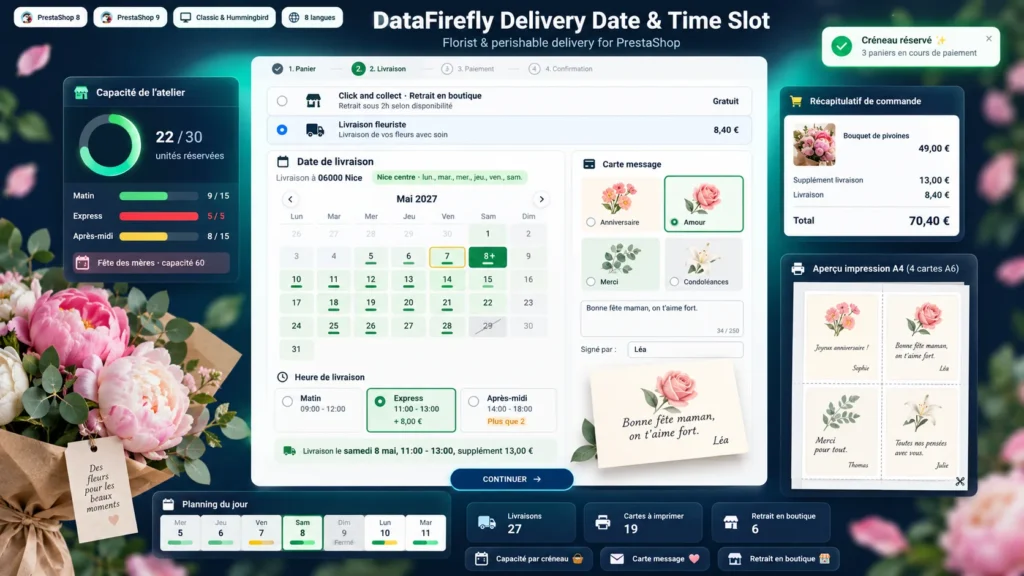
The day before Mother's Day, a florist receives 80 orders for the same Saturday morning while the workshop can prepare 40. Without a module, customers have to be called back one by one. With this module, the customer picks a date and a slot that are still available, writes the card message while watching the preview, and every slot closes on its own once the workshop is full. In the morning you open the daily planning and print the cards and the delivery sheet.

At a glance
  • Mandatory delivery date and time slot at checkout, checked on the server
  • Workshop capacity in units per day and per slot, closures and peak days
  • Postcode zones with delivery weekdays and extra lead time
  • Message card with designs, live preview, signature or anonymous card
  • Store pickup, express or Sunday surcharges, planning and card printing
PrestaShop 8 & 9 Workshop capacity Store pickup 8 languages
  • 30-day refund
  • 12 months updates
  • 24h support
www.datafirefly.com/en/
Delivery Date & Time Slot PrestaShop 8 & 9: Florist Module with Gift Message Card
v1.1.0 · updated 2026-09-24
What it does

The short version.

01

Never more orders than the workshop can prepare

Each product uses workload units: a bouquet counts 1, a large funeral arrangement can count 4. You set the capacity per weekday and per slot. A full slot disappears from checkout, and carts being paid hold their place for a few minutes to prevent overbooking.

02

A checkout built for sending flowers

The block appears under the carriers, above the Continue button. The calendar shows each day's load, and slots show the last places and any surcharge. The customer picks a card design, writes the message and sees the card fill in live, signed or anonymous.

03

Delivery or store pickup

For a Click & collect carrier the block becomes Pickup date: no zone, no recipient phone, no surcharge. When the customer switches carrier, the block updates and the surcharge line is added to or removed from the cart without reloading the page.

04

Everything ready in the morning

The planning shows 14 days with their fill rate, gauges per slot and the list of deliveries with address, items and message. Cards print in A6, four per A4 sheet with cut lines, and the delivery sheet separates deliveries from store pickups.

The long version

Everything you'd want to know before you install.

A detailed look at how Delivery Date & Time Slot PrestaShop 8 & 9: Florist Module with Gift Message Card works, why we built it the way we did, and the thinking behind the features above.

§ 01

Why the delivery date is the weak spot of online florists

PrestaShop offers carriers and a free-text message field, but no delivery date. The customer writes "for Saturday" in the comment, the workshop discovers the order too late, and on holidays the shop accepts far more orders than it can prepare. This module adds a real date and slot choice at checkout, based on the real capacity of your workshop, and blocks validation until the choice is made.

§ 02

Capacity that follows your workshop

Capacity is counted in units. Each product uses one or more units depending on the work it needs, and you set how many units the workshop can prepare each day and in each slot. Peak days have their own capacity, closures block the date, and made-to-order products add their preparation days to the lead time. Cancelled orders free their place according to the statuses you choose.

§ 03

Delivery zones by weekday

A zone groups postcodes and the days your courier serves it, with extra lead time for distant towns. The customer's calendar only offers the days their zone is delivered. A slot can be restricted to some zones, and a postcode outside every zone cannot check out with a concerned carrier.

§ 04

Surcharges and store pickup

You can charge for an express slot, a Sunday or a same-day delivery. Since PrestaShop cannot add an amount to shipping costs without changing its core, the surcharge is added to the cart on a separate line with its own tax rule, so it shows clearly on the order and the invoice. For Click & collect, the customer picks a pickup date and time, with no zone and no surcharge.

§ 05

From checkout to delivery round

Each order keeps its date, slot, zone, card and message, frozen when the order is placed. The daily planning shows the workshop load and the list of deliveries. Cards print ready to cut, the delivery sheet lists addresses by slot, and the date appears in the order emails, on the invoice and in a filterable column of the order list.