
Everything you'd want to know before you install.
A detailed look at how Restore Cart Link for PrestaShop 8 & 9: Shareable Cart Links and Customer Cart History works, why we built it the way we did, and the thinking behind the features above.
Hand a cart back to a customer without making them retype it
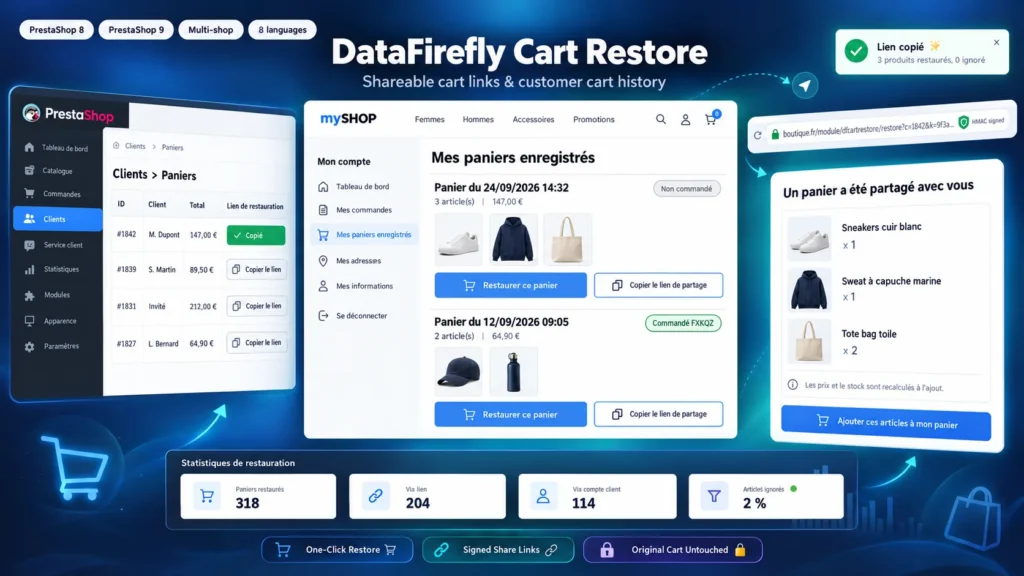
A customer calls with a question, a sales rep prepares an order, a B2B buyer puts together a list for a manager: the cart already exists in PrestaShop, but nothing lets you pass it on. With this module, the link is shown on every cart in the back office. You copy it, you send it, and the recipient finds the items with the right combinations and quantities.
A copy, never a transfer
The native PrestaShop cart recovery link logs the person into the account of the customer who owns the cart. This module does the opposite: the source cart is never modified and nobody is logged in as someone else. Items are added one by one to the visitor's basket, so the current rules apply: prices, promotions, stock, minimum quantities and availability for order.
A cart history in the customer account
The My saved carts page lists the customer's carts with their date, number of items, products total and ordered status. The customer expands the details, spots items that are no longer available and restores the cart they want. In replace mode, the current cart is kept in the history, so they can go back to it at any time.
Built for links sent by email
Mail gateways such as Outlook Safe Links or Proofpoint, and link previews in Slack, Teams or WhatsApp, open links before the recipient does. Without protection, every automatic visit would create a cart. The preview page, enabled by default, shows the items and waits for a click on Add these items to my basket. Known bots always get this page, even if you turn it off.
There are no reviews yet.