PrestaShop Catalogue Management

Sell License Keys and Digital Products on PrestaShop 8 & 9

Keys delivered the moment payment is confirmed, a stock that never oversells and an API your software uses to check its license.

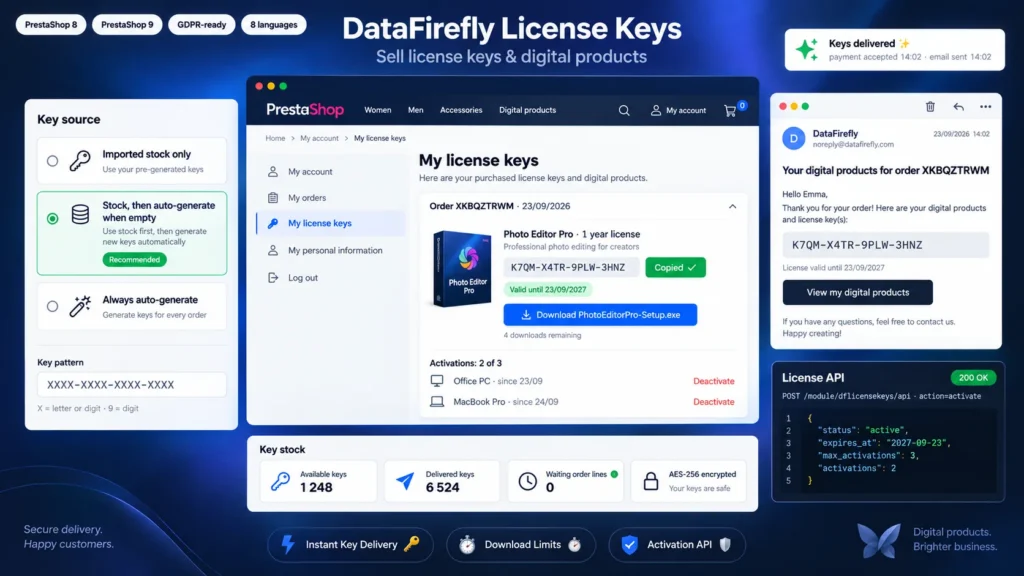
PrestaShop can sell a virtual product with a file, but not a different license key for each customer. This module manages a key stock that you import or that it generates itself, and assigns keys to the order as soon as it reaches a paid status. The customer receives them by email, finds them in their account and downloads the attached file through a personal link limited in number of downloads. For software publishers, a license API checks the key, limits the number of activated devices and enforces the expiry date.

At a glance
  • Key stock imported by pasting, TXT or CSV, encrypted with AES-256 and deduplicated
  • Automatic delivery by email, in the customer account and on the order confirmation page
  • Pattern-based key generator, alongside the stock or instead of it
  • Downloadable file through a personal link, with download limit and expiry
  • License API: validation, per-device activation, validity period
PrestaShop 8 & 9 AES-256 encrypted keys License API 8 languages
  • 30-day refund
  • 12 months updates
  • 24h support
www.datafirefly.com/en/
Sell License Keys and Digital Products on PrestaShop 8 & 9
v1.1.0 · updated 2026-09-23
What it does

The short version.

01

Delivered as soon as payment is confirmed

A card payment accepted at 2:02 pm, the key is in the customer's inbox at 2:02 pm. For a bank transfer, delivery starts when you set the order to Payment accepted. The triggering statuses are chosen in the settings, and the order confirmation page already shows the keys when payment is immediate.

02

A stock that never oversells

Each key is assigned by an atomic query: two orders placed in the same second never receive the same key. The product quantity follows the keys that are really free, with orders awaiting payment deducted. If the stock hits zero, the order waits and goes out on its own at the next import, and an email alert warns you before it gets there.

03

Your software checks its license

Your application calls the API with the key and a device identifier. The module replies whether the license is active, revoked or expired, and refuses a fourth activation when you set the limit to three computers. A one-year license expires on its own and a refund revokes it, with nothing to change on the software side.

04

Customers manage their licenses themselves

The My license keys page gathers the keys of all their orders with a copy button, the remaining download links and the activated devices. When they change computer, they free the old one themselves instead of writing to support.

The long version

Everything you'd want to know before you install.

A detailed look at how Sell License Keys and Digital Products on PrestaShop 8 & 9 works, why we built it the way we did, and the thinking behind the features above.

§ 01

What PrestaShop does not do with virtual products

A PrestaShop virtual product can carry a downloadable file, identical for every buyer. For a Windows key, a software license, a game code or access to an online course, each customer must receive a unique code, and that code must never be sent twice. Without a module, the merchant sends keys by hand, order after order, with the delays and mistakes that come with it.

§ 02

A key stock filled in seconds

Paste the list of keys received from your supplier or drop a TXT or CSV file: duplicates are skipped, each key is encrypted before being saved, and a batch label (a supplier invoice number, for example) lets you find or export them later. If you publish your own software, the generator creates keys from your pattern, in batches or on the fly for each order.

§ 03

Delivery that goes out by itself, at the right time

The module waits for the order to reach a paid status. It then assigns the keys, sends the email in the order language and shows them in the customer account. An order missing keys is put on hold and served automatically at the next import, in order of arrival. A cancellation or a refund revokes the keys and blocks downloads.

§ 04

Protected files and counted downloads

The file (installer, PDF, archive) is stored in the PrestaShop download folder and is never reachable directly. Each order line gets a personal link that checks the download limit and the expiry date before sending the file. The counter is updated atomically, and the order page in the back office lists the latest downloads with their IP address.

§ 05

An API for software publishers

Enable the API and your software can check a key, activate it on a computer and deactivate it. You set the maximum number of devices per key and the license validity on the product page. The JSON reply gives the status, the expiry date and the activations used. The full reference, with a curl example, is shown in the module settings.