



Everything you'd want to know before you install.
A detailed look at how Split Combinations into Separate Products: Explode a Variant Product in PrestaShop 8 & 9 works, why we built it the way we did, and the thinking behind the features above.
Why split a product with combinations
A shoe available in fifteen colours sits on a single page. Google indexes one URL, shows one title, associates one image. The other fourteen colours do not exist for a search engine, and they do not appear in your Google Shopping feed or in your internal search results either. Splitting the page gives each colour its own address, title, description and thumbnail. It is the same logic large marketplaces apply to products heavily searched by attribute.
Two strategies, one screen
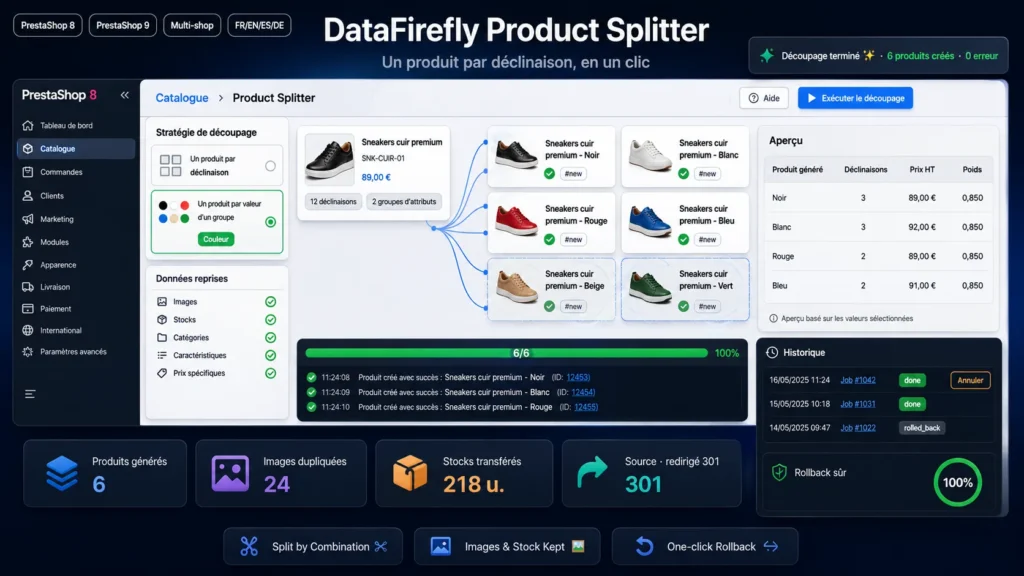
The first creates a simple product per combination. Useful when each combination has its own commercial existence, for example a fragrance sold in three volumes. The second extracts one attribute group and leaves the others in place. You get one product per colour, each keeping its sizes as combinations. This is the most common case in fashion.
Final prices do not move
In per-combination mode, the combination price impact is added to the base price of the new product. In per-group mode, the module takes the minimum impact within the extracted group, moves it into the base price, then recalculates each remaining impact by subtraction. A customer paying 92 euros for a white item in size M still pays 92 euros after the split. Weight is handled the same way.
What follows the product
Images linked to the combination are duplicated first, falling back to all source images when none are linked. The copy covers the original file and every thumbnail already generated, whatever the format, along with translated captions. Stock is transferred combination by combination. Then come categories, the default category, features including custom values, tags, remapped specific prices, carriers, attachments, suppliers and customisation fields.
What happens to the source product
Four behaviours are available. Keep it as is, while you check the result. Disable it. Disable and 301-redirect it to the first generated product, which passes inbound links along and avoids a 404 on an already indexed URL. Or delete it permanently once the split is validated.
Preview then batch processing
Before any write, a preview lists the products that will be created with their name, the number of combinations kept, the price excluding tax and the weight. The split is then stored as a job and processed in successive AJAX batches. Batch size is adjustable, so a range of a hundred references can be processed on shared hosting without hitting the execution time limit.
Rolling back a split
Every job appears in a history with its status and a product-by-product breakdown. A rollback button deletes all generated products and restores the original status and redirect of the source product. You can therefore test a strategy, inspect the front office rendering, revert and start again with different settings.
Technical integration
The module adds a tab under Catalog and installs no class or controller override. It ships no Composer dependency and runs on a standalone class loader. Table and constant names that differ between PrestaShop 8 and 9 are resolved dynamically, including the product image directory renamed in version 9. Two tables are created for jobs and their items, and dropped on uninstall.

There are no reviews yet.