
Everything you'd want to know before you install.
A detailed look at how Wine Shop Module for PrestaShop 8 & 9: Excise Duties, Age Verification and Mixed Cases works, why we built it the way we did, and the thinking behind the features above.
Selling alcohol online with PrestaShop
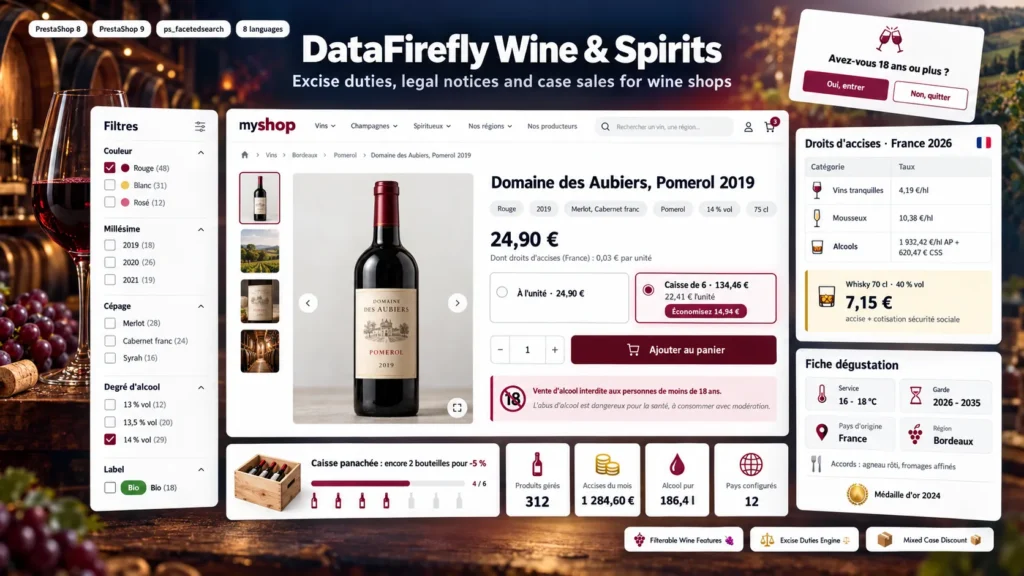
A wine and spirits shop has to display a health warning, refuse sales to minors and know the excise duty on every bottle. For distance selling to another EU country, the excise duty of the destination country is due. PrestaShop knows neither the alcohol content of a product nor its volume of pure alcohol. This module adds that data to every product and uses it from the category filter to the invoice.
A wine profile entered once, used everywhere
In the Modules tab of the product page, you enter the excise category, the vintage or non-vintage, the grape varieties, the appellation, the ABV, the volume, the color, the region, the country of origin, the certifications, the serving temperature, the aging potential and the awards. Tasting notes and food pairings are entered per language. This data feeds the filters, the Tasting sheet tab, the listing badges and the excise calculation. For an existing catalog, the CSV import fills everything in one go, with a simulation mode.
Excise duties at the right amount
The duty on a bottle depends on its volume, ABV, category and delivery country. The module applies your rates to the volume of the ordered combination: a magnum pays twice as much as a bottle. In included mode, the product page shows “Including excise duties” and the cart shows the total. In added mode, an Excise duties line appears in the cart, on the order and on the invoice, with the VAT rate you choose. Every order feeds the excise register, exportable to CSV for your returns.
Legal age and notices by country
The delivery country is read from the cart address, then from the customer account, then from the visitor country. For each country, you set the legal age, the checkout checkbox and the notice per language, and you can block alcohol delivery: the customer is stopped at the delivery step with a clear message. The optional age verification popup asks for a confirmation or a date of birth on the first visit and uses the legal age of the visitor country.
The case of 6 and the mixed case
On the product page, customers choose between the bottle and the case, with the case price and the saving. In case-only mode, cart quantities are rounded to full cases. The mixed case rewards mixed carts: from 6 eligible bottles, the discount applies to every eligible bottle, carried by the price of each line so that VAT and invoices stay exact.
There are no reviews yet.