
Everything you'd want to know before you install.
A detailed look at how Product Questions & Answers Module PrestaShop 8/9 — Q&A with QAPage Rich Snippets works, why we built it the way we did, and the thinking behind the features above.
§ 01
An unanswered question is a lost sale
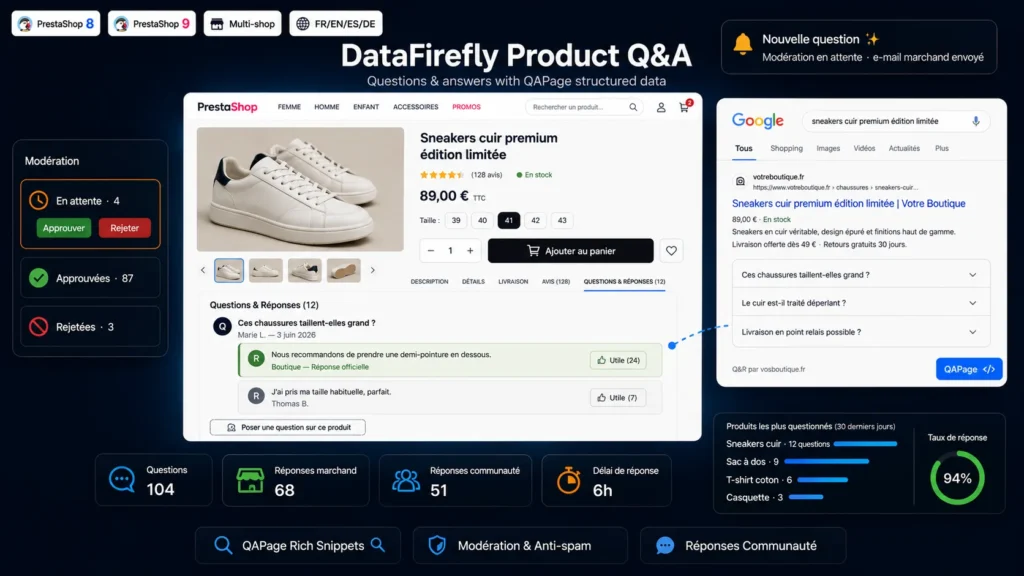
The customer hesitates: do these shoes run large, is the leather treated, is pickup-point delivery available. With no answer on the page, they close the tab. A Questions & Answers block captures that hesitation at the exact moment it appears, and turns it into published information that helps every subsequent buyer.
§ 02
The SEO your competitors are not using
Google can display a question accordion under a search result, provided it receives valid QAPage markup. This module produces it automatically, separating the merchant reply, published as acceptedAnswer, from community answers, published as suggestedAnswer along with their vote count. Your pages occupy more of the results page without writing a single extra line.
§ 03
Unique content that writes itself
Every question and every answer is original text, written by your customers, using the exact words they type into a search bar. That real vocabulary — the one your product descriptions never have — is what lifts the page on long-tail searches you would never have anticipated.
§ 04
You stay in control
Nothing is published without your approval unless you decided so. Every question arrives pending, listed in a dedicated back office tab with its product, author and date. You approve, reject or delete, one by one or in bulk, and you reply officially in a single field. The merchant reply goes live immediately, bypassing moderation.
§ 05
The community takes over
A customer who already bought often knows better than you whether a garment runs large. Enable community answers and your buyers will reply for you. The "Helpful" button pushes the best answers up, and the vote counter feeds the upvoteCount field of the structured data directly: Google understands which answer carries authority.
§ 06
Spam stays out
An invisible honeypot field traps bots that fill in everything. An anti-flood delay blocks burst submissions. An optional GDPR consent checkbox protects the collection of guest e-mail addresses. You can also restrict the form to signed-in customers with a single switch.
§ 07
The customer is notified, and comes back
Every new question sends you an e-mail at the address of your choice. As soon as you publish your official reply, the customer receives an e-mail containing their question, your answer, and a link that takes them straight to the answer anchor on the product page. A hesitant visitor becomes a visitor returning to the buy page.




There are no reviews yet.