PrestaShop Catalogue Management

Minimum Order Quantity and Pack Multiples for PrestaShop 8 & 9

Sold by 6, 12 minimum for trade customers, a 150 order minimum for resellers: your sales terms enforced in the cart.

PrestaShop only handles one minimum quantity per product, with no multiples and no customer groups, and a single minimum order amount for the whole shop. This module adds quantity rules per product, combination, category or for the whole catalog, each with a minimum, a required multiple and a maximum, optionally limited to one customer group. It also sets a minimum order amount per group. A cart that breaks a rule cannot go to checkout, and the customer sees line by line what to change.

At a glance
  • Minimum, required multiple and maximum per product, combination, category or whole catalog
  • Rules limited to one customer group (trade, resellers, wholesalers)
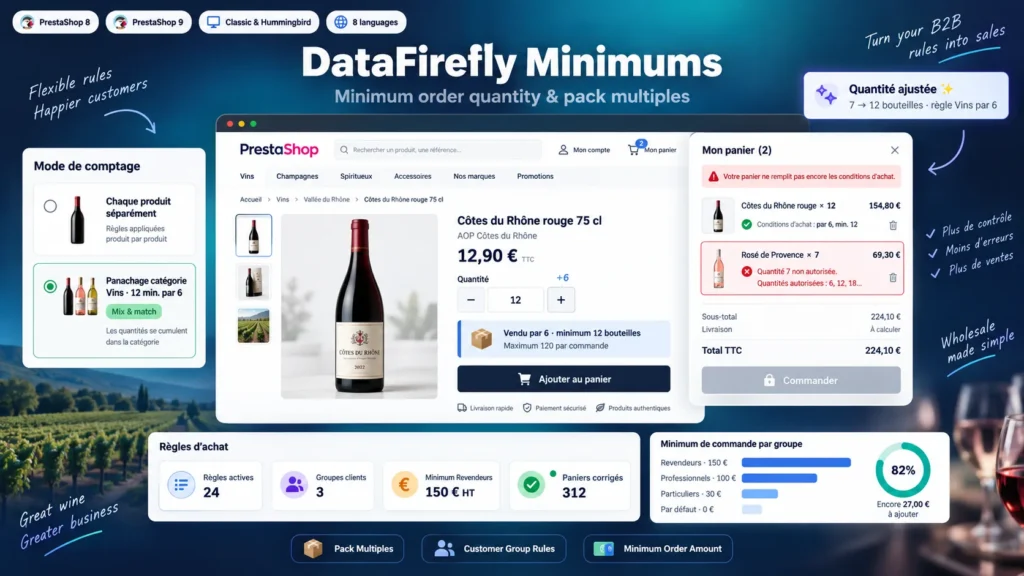
  • Mix and match per category: 12 bottles minimum in total, any assortment, in cases of 6
  • Minimum order amount per customer group, tax excluded or included
  • Checkout blocked through PrestaShop's native mechanism, on Classic and Hummingbird
PrestaShop 8 & 9 B2B Classic & Hummingbird CSV import
  • 30-day refund
  • 12 months updates
  • 24h support
www.datafirefly.com/en/
Minimum Order Quantity and Pack Multiples for PrestaShop 8 & 9
v1.0.0 · updated 2026-09-22
What it does

The short version.

01

Pack multiples, not just a minimum

A rule combines a minimum, a multiple and a maximum. A product sold by 6 only accepts 6, 12, 18 and so on. If the minimum is not a multiple, it is rounded up to the next one: minimum 10 by 6 gives 12.

02

Different terms for different customers

Each rule applies to all customers or to one group. Retail customers buy single units while trade customers order cases of 12, on the same product.

03

Mix and match per category

A category rule can count each product separately or all products of the category together. The customer builds a case of 12 bottles freely across all your wines.

04

Minimum order amount per group

Set 150 for resellers, 50 for retail customers and a fallback amount for other groups. The amount is compared tax excluded or included, before or after vouchers, and converted into the cart currency.

The long version

Everything you'd want to know before you install.

A detailed look at how Minimum Order Quantity and Pack Multiples for PrestaShop 8 & 9 works, why we built it the way we did, and the thinking behind the features above.

§ 01

What PrestaShop cannot do on its own

The Minimum quantity field of the product page blocks below a threshold but does not enforce a multiple: a customer can order 7 bottles of a wine sold in cases of 6. That field is the same for every customer, and the minimum purchase total of the order settings applies to the whole shop. You cannot sell single units to retail customers and cases to trade customers, or require a 150 order from resellers only.

§ 02

One rule, three conditions

Each quantity rule carries a minimum, a multiple and a maximum. It targets a combination, a product, a category with or without its subcategories, or the whole catalog, for all customers or for one group. When several rules concern the same product, the highest priority wins, then the most specific rule: combination, product, deepest category, catalog. At equal level, a group rule comes before a rule for all groups.

§ 03

Mix and match for assorted cases

On a category rule, mix and match mode adds up every product of the category in the cart. Example: minimum 12 bottles in the Wines category, in multiples of 6, whatever the assortment. These rules are checked on top of each product's own rule, so you can require a mixed case while still selling some references by the unit.

§ 04

Blocking that goes through PrestaShop

The module does not rewrite the checkout. It fills the minimalPurchaseRequired key of the cart, the one PrestaShop uses for its own minimum amount: the checkout button is disabled, the message appears in the native alert, and the order controller sends the customer back to the cart if they try to reach it directly. As an option, an invalid quantity added to the cart is corrected server side to the nearest allowed quantity.

§ 05

Terms visible before buying

A box on the product page shows the minimum, multiple and maximum that apply to the logged-in customer. A badge in product lists flags pack selling, and each cart line recalls its condition. Quantity inputs follow the rule: the + button goes from 6 to 12, not from 6 to 7.