
Everything you'd want to know before you install.
A detailed look at how Show Subcategory Products in the Parent Category PrestaShop 8 & 9 works, why we built it the way we did, and the thinking behind the features above.
Why your parent categories look empty
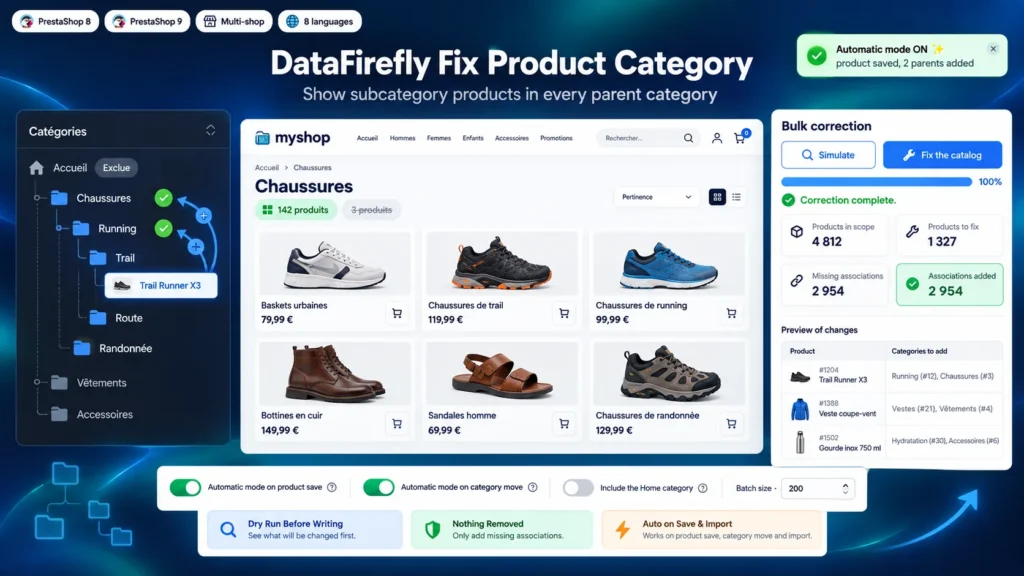
PrestaShop only lists in a category the products directly assigned to it. When an import, a supplier feed or quick data entry files a product in its final category only, the higher levels do not see it. The first-level menu pages, which often carry the traffic and the rankings, then show a handful of products while the catalog holds hundreds below them.
Real associations, not just a display trick
The faceted search module offers an option to show subcategory products in a listing. It only changes the display: in the database, the product still does not belong to the parent category. Cart rules restricted by category, exports, product feeds and third-party modules that read associations do not see it. This module creates the real associations, visible wherever PrestaShop and its modules read the categories of a product.
Fix what exists, then forget about it
The bulk fix processes the catalog in batches, with no timeout risk, after a dry run that measures the work. The automatic mode then takes over: a product created in the product page, imported by CSV or sent through the webservice is assigned to its parents as soon as its categories are saved. If you move a category under another parent, every product of the branch is assigned to the new parents.
You stay in control of the tree
The Home category can be included or not. An exclusion list keeps some categories from being added as parents, such as a Sale or New arrivals showcase category. Added products go to the end of each category, which preserves the manual sorting you already set, and the default category of each product stays unchanged.

There are no reviews yet.