PrestaShop GDPR & Legal

Terms and Conditions Versioning & Acceptance Proof for PrestaShop 8 & 9

Which version of your terms did this customer accept? The answer, with the proof.

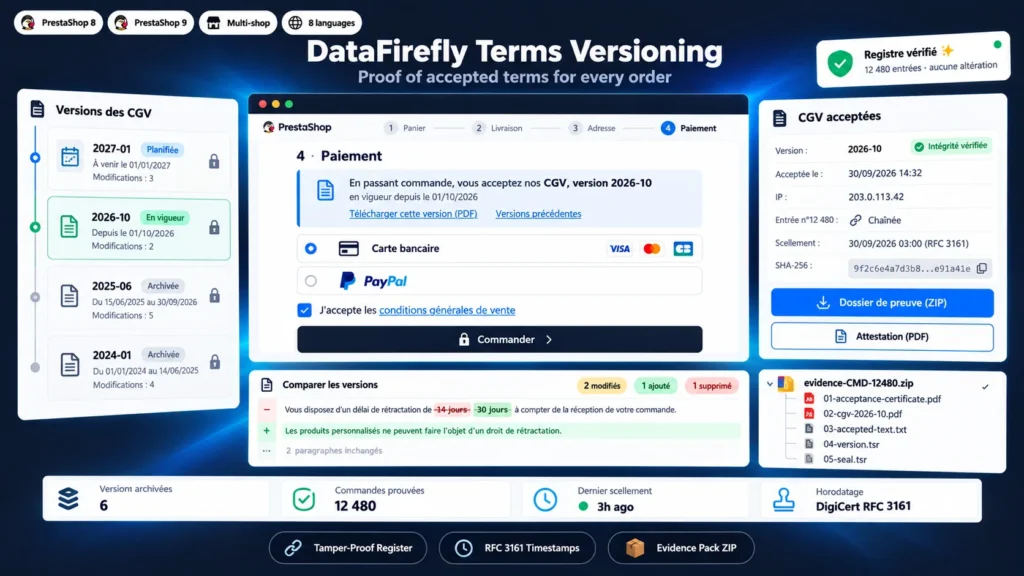
When a customer disputes an order or files a chargeback, you are asked for the terms they accepted on that day. PrestaShop only keeps the current version of your terms page. This module archives every version with its date, records on each order the version shown at payment, with the IP address, the browser and the SHA-256 fingerprint of the text, and attaches the PDF of that version to the confirmation email. When a dispute comes, one click on the order gives you an evidence pack ready to send.

At a glance
  • Every version of your terms archived with its effective date, locked once published
  • Version actually shown at payment recorded on each order (IP, browser, SHA-256)
  • PDF of the accepted version attached to the order confirmation email
  • Third party timestamps (RFC 3161) and a sealed acceptance register
  • One-click evidence pack ZIP from the order page
PrestaShop 8 & 9 RFC 3161 timestamps Sealed register psgdpr compatible
  • 30-day refund
  • 12 months updates
  • 24h support
www.datafirefly.com/en/
Terms and Conditions Versioning & Acceptance Proof for PrestaShop 8 & 9
v1.2.0 · updated 2026-09-30
What it does

The short version.

01

The version the customer actually saw

The module records the version displayed above the payment methods, when the customer sees it, not the version in force when the payment is confirmed. Terms published while a customer is paying cause no confusion.

02

Versions that cannot be touched afterwards

A published version is locked: its text, SHA-256 fingerprint and PDF no longer change. To change your terms you create a new version, with a change summary and an effective date, immediate or scheduled.

03

Evidence that holds up when challenged

Each acceptance contains the fingerprint of the previous one: changing or deleting a record afterwards is detected. Published versions and the register are timestamped by an independent authority (DigiCert by default), which anyone can check with OpenSSL.

04

The dispute file in one click

From the order page, a ZIP gathers the acceptance certificate, the accepted PDF, the exact source text, the timestamp tokens, the register entry and a verification guide. Send it as is to your lawyer or your bank.

The long version

Everything you'd want to know before you install.

A detailed look at how Terms and Conditions Versioning & Acceptance Proof for PrestaShop 8 & 9 works, why we built it the way we did, and the thinking behind the features above.

§ 01

What PrestaShop does not keep

PrestaShop shows an "I agree to the terms of service" checkbox that links to a CMS page. When you edit that page, the previous version is gone. Six months later, facing a customer who disputes return fees or a bank handling a chargeback, you cannot prove which text they accepted. That is exactly what this module records, order by order.

§ 02

A dated, locked history

Each version of your terms has a number, a text per language, an effective date and a change summary. On publication the version is locked, its SHA-256 fingerprint computed and its PDF generated in every language. You can schedule a future version, add your previous terms with their past date and compare two versions to see exactly what changed.

§ 03

The accepted version, order by order

At payment, the module shows the number of the version in force and a link to its PDF, and notes which version was shown to that customer. When the order is validated, it records this version with the fingerprint of the text in the customer's language, their IP address and browser. The PDF of that version is attached to the confirmation email, and the version appears in the customer account and, if you wish, on the invoice.

§ 04

Evidence a third party can verify

Records are chained: each acceptance includes the fingerprint of the previous one, so any later change, insertion or deletion becomes detectable. Published versions and the state of the register are timestamped by an independent authority under the RFC 3161 standard. An expert can check everything with OpenSSL, without having to trust you.

§ 05

For shops that are already trading

Add your previous terms with their effective date, then let the module link your past orders to the version that applied on their date. These orders are clearly marked as linked afterwards: the module does not claim a display it never saw.