PrestaShop Administration & Productivity

PrestaShop Form Builder 8 & 9: Drag and Drop Contact, Quote and Job Application Forms

Contact, quote and job application forms built with the mouse, with their submissions organised in the back office.

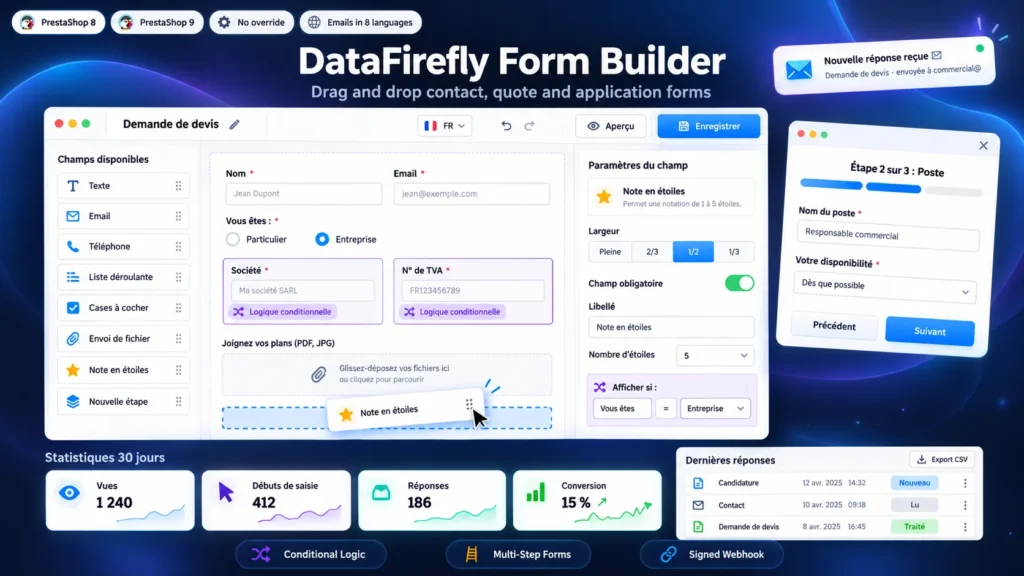
The native PrestaShop contact form offers a subject, an email, a message and an attachment. A quote request, a job application or a registration needs other fields, and often questions that depend on earlier answers. This module adds a three-column builder: you drag the fields, set each one on the right, and the form goes on the contact page, a product page, a CMS page or its own page. Every submission is stored in the back office with its files, emailed to the right person and exportable to CSV.

At a glance
  • Drag and drop builder: 18 field types, widths on a grid, undo and redo, preview
  • Conditional logic and multi-step forms with a progress bar
  • Display in 12 theme positions, in a popup window, with a CMS shortcode, a widget or a dedicated page
  • Submissions in the back office: statuses, internal note, reply to the visitor by email, print, CSV export
  • Notification emails with recipients based on answers, confirmation to the visitor, signed webhook
PrestaShop 8 & 9 Drag and drop Conditional logic Multi-step
  • 30-day refund
  • 12 months updates
  • 24h support
www.datafirefly.com/en/
PrestaShop Form Builder 8 & 9: Drag and Drop Contact, Quote and Job Application Forms
v1.2.2 · updated 2026-10-01
What it does

The short version.

01

A builder you use without reading the manual

The left column lists the field types, the center shows the form as visitors will see it, the right column sets the selected field. A click adds a field below the selection, a drag places it wherever you want. Ctrl+Z undoes, Ctrl+S saves, and the Preview button opens the form in a new tab even while it is disabled.

02

Questions that adapt to the answers

Each field can be shown or hidden depending on other answers: is, is not, contains, is empty, is greater than, with all or at least one of the conditions. A hidden field is not validated, stored or sent. The same logic runs in the browser and on the server, so a visitor cannot bypass it.

03

Long forms split into steps

A New step marker splits the form. The visitor sees a progress bar and the title of each step, each step is checked before moving on, and steps whose fields are all hidden by the logic are skipped. With the draft option, a visitor who leaves the page finds the answers on return.

04

Every request reaches the right person

The notification goes to the recipients of the form, or to other addresses depending on an answer: sales for a quote, support for an order question. Replying to the email writes to the visitor directly. In the back office you track each submission by status, reply from its page in the visitor's language, and the exchange stays in the history.

The long version

Everything you'd want to know before you install.

A detailed look at how PrestaShop Form Builder 8 & 9: Drag and Drop Contact, Quote and Job Application Forms works, why we built it the way we did, and the thinking behind the features above.

§ 01

One form per need instead of a single contact form

A quote request does not ask the same questions as a complaint or a job application. The module starts from four templates (contact, quote, application, blank) that you edit freely. The Quote template shows the Company and VAT fields only when the visitor chooses Company, and prefills the product when placed on a product page. The Application template is split into three steps and attaches the resume to the email.

§ 02

Placed where your visitors ask their questions

Tick the theme positions (contact page, product page, cart, CMS pages, columns, footer) or paste the shortcode in a CMS page. For a long form, the button display opens a popup window instead of lengthening the page. Each form can also have its own address, to add to a menu or a campaign.

§ 03

Files received without risk for the shop

Each file field sets its extensions and maximum size. Scripts, HTML pages and executables are refused whatever the settings, and the content is checked. Files are saved under a random name in a folder that cannot be reached from the web, and are downloaded from the submission page. They can also be attached to the notification email.

§ 04

Less spam without a captcha that annoys customers

An invisible field traps bots, the form is signed and timestamped, a submission sent too fast is refused, and a visitor cannot exceed the hourly number of submissions you set. If that is not enough, reCAPTCHA v3 works with your keys and only loads when the visitor starts filling in the form.

§ 05

Following requests until they are answered

The submission list shows the form, a summary and the status. The submission page shows every answer, the files, the page it was sent from and the customer when signed in. You reply from the page, the email is sent in the visitor's language and the submission is marked as processed. Statistics per form (views, starts, submissions) show where visitors give up, and the webhook passes each submission to your CRM.