
Everything you'd want to know before you install.
A detailed look at how DataFirefly Product Positions — Drag & drop categories for PrestaShop 8 & 9 works, why we built it the way we did, and the thinking behind the features above.
Merchandising drives 30% of category conversion
When a visitor opens a category in your store, the first 4 to 6 products generate the bulk of the revenue. What you show first is what you sell. Yet on native PrestaShop, controlling product order in a category is tedious: you have to edit each product page, change its position, and start over. For a store with 200 products in a main category, that's hours of manual work for every seasonal reorganization. DataFirefly Product Positions removes this friction and turns merchandising into a visual gesture — like rearranging cards on a desk.
Drag & drop: move a product in one second
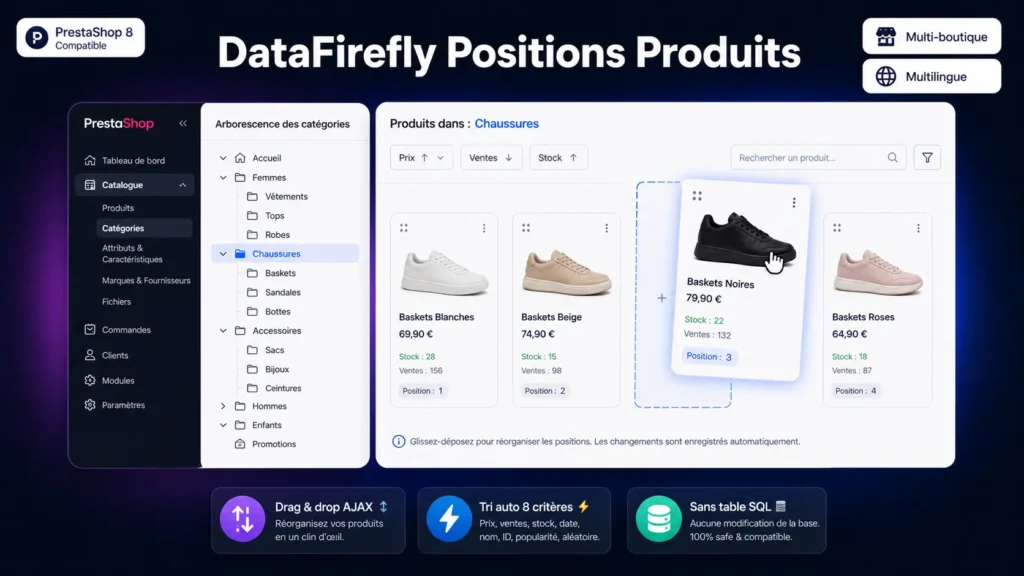
The interface displays the products of the selected category as a grid (thumbnail, name, reference, price, stock). Click and hold a product, drag to its new position, done. The save happens in the background via AJAX — no Save button to click, no page reload. The reordering is reflected in the front office immediately, for the next visitor. For long moves, three shortcuts save you from scrolling: send to top, send to bottom, or type the target position number directly.
Pinning: merchandising that survives your ERP
This is the problem every synchronized store runs into: you spend an hour composing a perfect category header, and the next morning the nightly ERP import has put everything back in supplier-file order. Pinning solves that. Click the pin icon on a product to freeze its position, or lock the whole category in one action. The module stores those positions in its own table and restores them automatically as soon as an external product update tries to change them. Auto-sorts follow the same rule: pinned products keep their slot, and the others reorganize around them. You can therefore freeze your six hero products and let the rest of the category sort itself by descending sales.
Auto-sort: 8 criteria, ascending or descending
For high-volume categories, drag & drop remains tedious. So the module ships an auto-sort system: pick a criterion (name, price, stock, sales over the last 90 days, reference, date added) and an order (ascending or descending), click Apply, and the entire category is reorganized. Two bonus options: reverse sort (handy to put recent products first without having to know the dates) and random sort (to refresh the look of a category without changing the catalog). An Apply to subcategories checkbox lets you propagate the sort to an entire branch in a single operation.
Architecture, PrestaShop 9 compatibility and multi-store
Positions are written to the standard category_product table: these are the native PrestaShop positions, and they display on the front office without any theme modification. The module adds a single technical table, dedicated to storing pins, dropped cleanly on uninstall. Since version 1.2.0 the module is PrestaShop 9 compatible: price formatting through the Locale service, image URL generation adapted to the new formats, AJAX calls aligned with the routing of the 9.x branch. The same package runs on PrestaShop 8.0 to 9.x. The shop selector at the top of the screen lets you, in multi-store mode, configure different positions and different pins for each sub-shop.
Performance and security
All AJAX requests are protected by the native PrestaShop admin token — no public endpoint, no access without valid admin authentication. SQL queries join on product_shop to load only the products actually present in the active shop: no data leak between shops. Restoration of pinned positions is guarded against re-entrancy, which prevents any loop during bulk updates. Sorting is a one-off operation: no extra computation is performed when front-office pages are loaded.
Typical use cases
Store synchronized with an ERP: full lock of your strategic categories so imports no longer touch the display order. Seasonal highlight (Christmas, sales, back-to-school): sort by ascending stock to clear end-of-line products at the top of the category. Collection launch: manually pin new arrivals in positions 1 to 6, then auto-sort the rest by descending sales. Visual refresh without changing the catalog: monthly random sort, pins preserved, to vary the appearance of a category for returning visitors.



This module is really handyAutomatically translated