
Everything you'd want to know before you install.
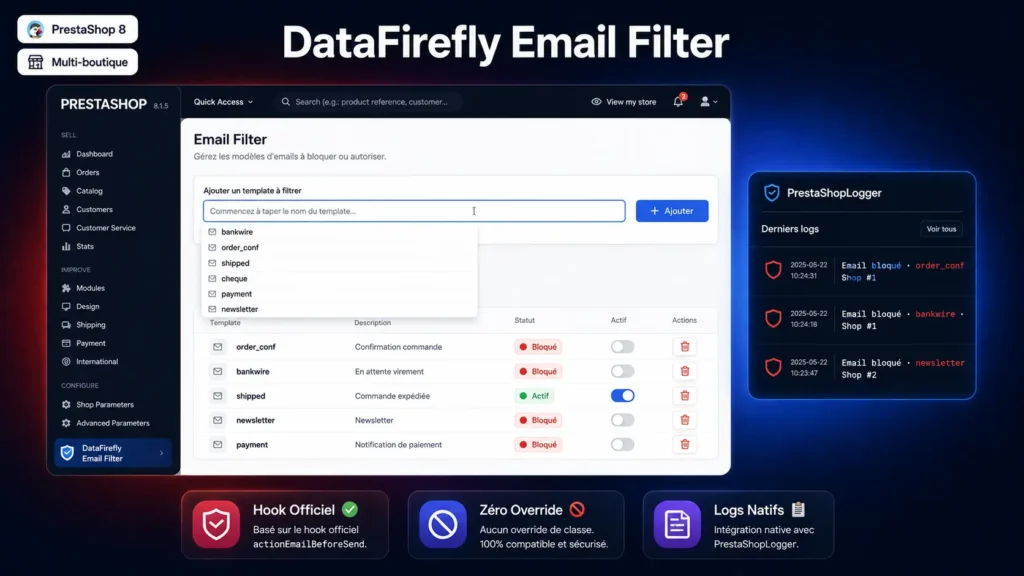
A detailed look at how DataFirefly Email Filter — Block transactional emails on PrestaShop 8 works, why we built it the way we did, and the thinking behind the features above.
The need
On PrestaShop, you have a pre-production environment that sends confirmation emails to your real customers when a test passes; or a B2B store where you have your own invoicing process and the native email is duplicate; or a multi-store where the German sub-shop sends its own newsletter via Brevo and PrestaShop emails become spam. All these cases call for the same solution: selectively cut certain emails. And all these cases end up in practice with hacked overrides that break on the next PrestaShop update.
The module in one sentence
A list of email templates to block, managed from the back office, applied via the official PrestaShop actionEmailSendBefore hook. No magic, no hidden complexity — the native PrestaShop mechanism is used as is.
Daily usage
You go to Modules → Module Manager, you configure DataFirefly Email Filter. A very simple page: a text field (with datalist autocomplete on PrestaShop standard templates) to add a template to block, and a table of templates already in the list with two buttons per row: toggle active/inactive and delete. That's it. No complex rules, no nested conditions — if the template is in the list, it's blocked; otherwise it goes through.
Multi-store
The module uses the native PrestaShop per-shop activation system. To enable filtering on certain shops only, you go to Modules → Module Manager, you select the target shop with the multi-store selector at the top, and you enable or disable the module at that level. The actionEmailSendBefore hook is called only on shops where the module is active — PrestaShop handles the routing. The templates list, however, is global and shared.
Performance and traceability
The hook executes a single SQL query: a SELECT on a unique key (the template) to check presence in the list. A few microseconds, totally negligible even on a store with several hundred emails per day. Each block is logged in PrestaShopLogger with the template and shop ID — visible in Advanced Parameters → Logs, Email filter. You can thus audit what wasn't sent, without having to dig into server logs.
Use cases
Pre-prod / staging: add all templates to the list, enable the module — no email leaves the test environment anymore, your test campaigns no longer pollute real customers. B2B with custom invoicing: block order_conf, keep your own in-house invoice email. Multi-store with external emails: enable the module only on shops connected to Brevo / ActiveCampaign / Mailchimp, keep native emails on other shops. Store migration: temporarily block order_conf and shipped during historical import to avoid sending 5,000 confirmations by mistake.
There are no reviews yet.