
Everything you'd want to know before you install.
A detailed look at how DataFirefly Final Sales — Non-Returnable Badge & Invoice Notice for PrestaShop 8 & 9 works, why we built it the way we did, and the thinking behind the features above.
§ 01
Unclear Final Sales policies cost money
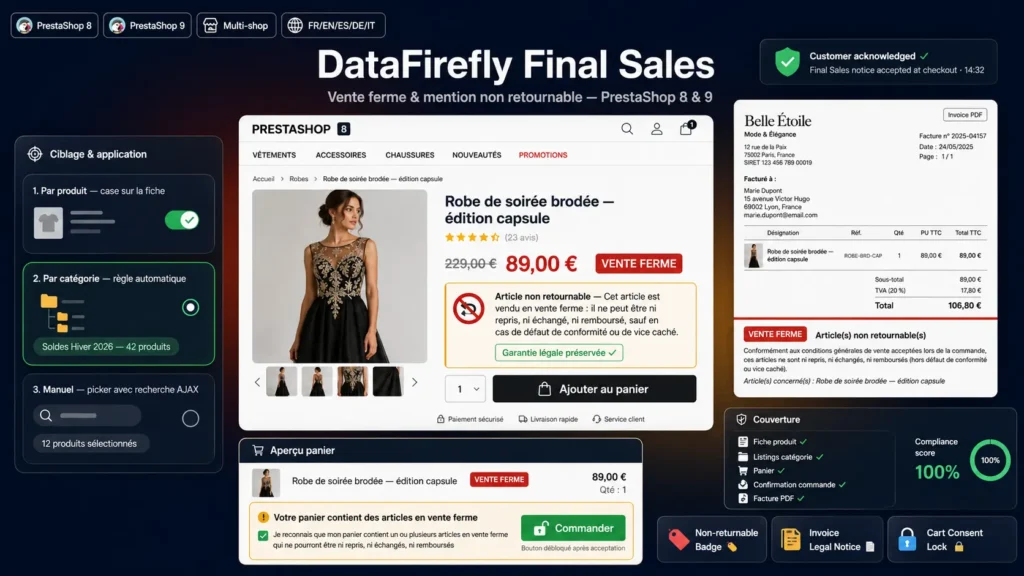
PrestaShop offers no native way to flag an item as Final Sales. Merchants who practice Final Sales (clearance, year-end stock liquidation, customised, perishable, opened hygiene items, B2B) state it in their Terms of Sale but with no reminder on the product page, in the cart or on the invoice. The result: the customer orders unaware, requests a return, and the it-is-in-the-terms argument often ends in a payment dispute, a bad review, a forced refund. DataFirefly Final Sales fixes this end-to-end: simple flagging, clear display, evidence on the invoice.
§ 02
Three flagging tiers to match your strategy
Per-product flagging via a checkbox injected into the edit form (Symfony product page on PrestaShop 8 and 9). Category flagging from the module configuration: all items in a selected category automatically become Final Sales — perfect for a Sales or Clearance aisle that is entirely non-returnable. Targeted manual flagging via the product picker with autocomplete: type a name, a reference or an ID, add to the list, validate. Manual flags always take precedence over category rules.
§ 03
Consistent display across the entire shopping journey
The badge appears exactly where the customer needs to see it: next to the price on the product page, on the product card in listings, in the cart with the full notice, on the order confirmation page, in the customer account when viewing the order. Background color, text color and badge label are configurable — and the label is translatable per language. A live back-office preview lets you validate the rendering before publishing.
§ 04
The consent lock: the explicit acceptance checkbox
For merchants who want solid legal evidence, the Require explicit acceptance in cart option displays a required checkbox in the cart whenever at least one Final Sales item is present. While the box is unticked, the Checkout button is visually and functionally disabled, via vanilla JavaScript with no external dependency. The checkbox label is translatable per language. This captures informed customer consent before checkout, exactly as consumer authorities recommend for exclusions from the right of withdrawal.
§ 05
The PDF invoice: the evidence mention
On the PDF invoice, a dedicated block appears automatically whenever at least one Final Sales item is present in the order. It contains the styled badge, the configurable legal text (reminding that the statutory warranty of conformity and hidden defects remain applicable) and the list of concerned items by full name. This is the document you will present to your payment platform, to a mediation body or in case of dispute with a customer claiming they were not informed.
§ 06
Five languages out of the box
French, English, Spanish, German, Italian. The default texts are legally neutral and factual — they describe the no return, no exchange, no refund except for non-conformity or hidden defect commitment without intruding on your Terms of Sale. You can edit each text per language from the Legal texts tab in the configuration. When you enable an additional language in PrestaShop, the module automatically inherits the English value and you can override it with your own translation.
§ 07
PrestaShop 8 and 9 compatible, no override
The module relies exclusively on native PrestaShop hooks. actionProductFormBuilderModifier for the Symfony product form checkbox, actionFrontControllerSetMedia for front assets, displayProductPriceBlock for the price badge, displayProductAdditionalInfo for the notice, displayShoppingCartFooter for the cart, displayOrderConfirmation and displayOrderDetail for orders, displayPDFInvoice for the invoice. No core class override, no file modified outside the module. PrestaShop 8 to 9 migration with no manual intervention, uninstall with no residual trace.
§ 08
Typical use cases
Fashion and textile shops: items at -70 percent that will not be restocked, where a return would be pure margin loss. Cosmetics and hygiene: opened items non-returnable for sanitary reasons (Article 16 of EU Directive 2011/83). B2B: contractual Final Sales. Personalization shops: personalised items non-returnable by nature (same Article 16). Clearance shops: entire catalog Final Sales by default via the category rule. Mixed shops: only specific categories non-returnable, the rest under the standard 14-day return.


There are no reviews yet.