
Everything you'd want to know before you install.
A detailed look at how Quantity +/- Buttons on the Product Page — PrestaShop 8 & 9 works, why we built it the way we did, and the thinking behind the features above.
§ 01
Why replace the native quantity field?
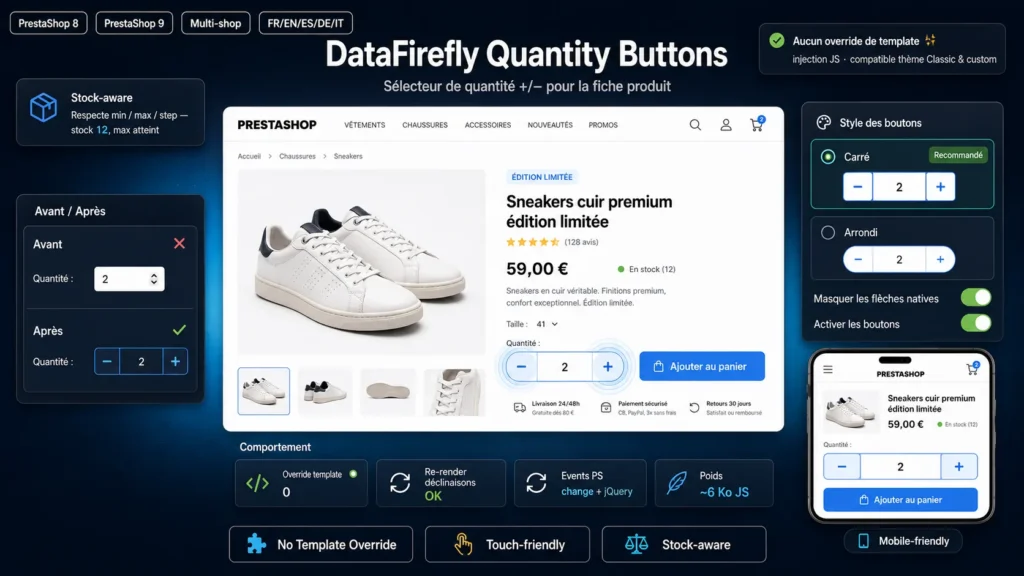
On the product page, PrestaShop displays a small number field that the customer must fill via the keyboard or via tiny arrows that are hard to aim at, especially with a finger on a smartphone. It is a point of friction right before adding to cart. Real + and − buttons, large and clearly visible, make choosing the quantity immediate and natural, on desktop as well as mobile.
§ 02
How the module works
The module touches no theme file. It loads a lightweight stylesheet and script only on the product page. The script finds the existing quantity field, wraps it in a button group and adds a + and a −. This injection approach makes it compatible with the Classic theme as well as custom themes, and shields it from PrestaShop updates since no template is overridden.
§ 03
The Classic theme and bootstrap-touchspin case
The Classic theme already enriches the quantity field with bootstrap-touchspin, which adds two small vertical arrows. Without care you would end up with those arrows in addition to the new buttons. The module cleanly neutralises the touchspin arrows inside its own group, keeping only the clearly readable + and −, with no duplicate and no layout shift.
§ 04
Reliable cart synchronisation
Changing the quantity is not enough: PrestaShop still has to take it into account. On every click the module applies the new value then fires the expected events, both native and jQuery, exactly as if the customer had typed the number. The total price, combinations and the add-to-cart button react normally. After a combination change, which rebuilds the quantity block, the buttons are re-injected automatically.
§ 05
Respecting stock and product constraints
The buttons do not just increment blindly: they read the minimum quantity, maximum quantity and step defined on the field. The customer cannot go below the required minimum or order beyond the available stock when it is bounded. The behaviour stays consistent with your shop's rules.
§ 06
Customisation without code
From the module configuration page you choose the button style (square or rounded), the background colour and the colour of the + and − icons, and decide whether to hide the native number arrows. The module thus blends visually into your branding, without writing a single line of code.




There are no reviews yet.