Other Free

Clear PrestaShop Cache — One-Click Purge (PS 8 & 9)

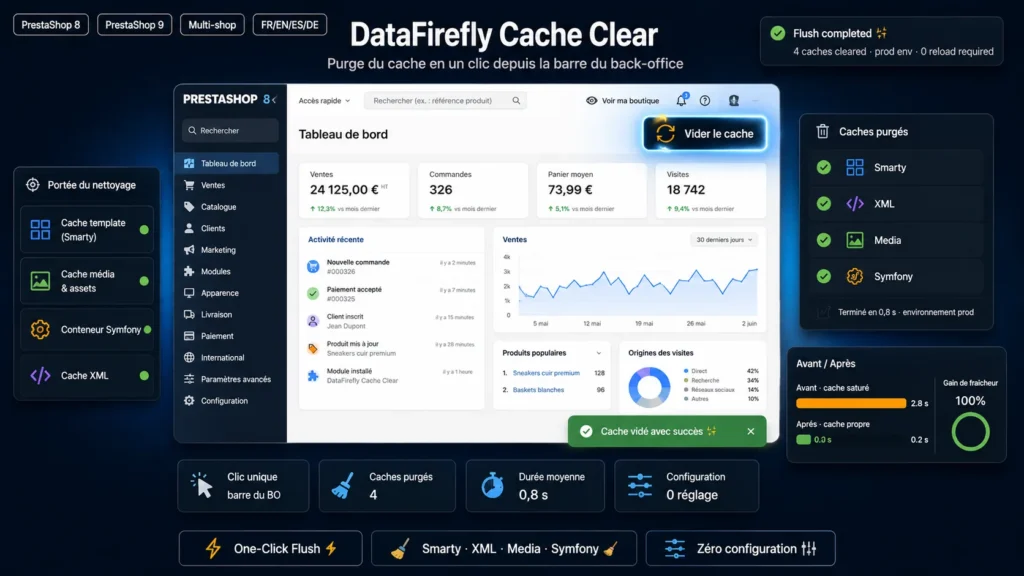
Clear the PrestaShop cache in one click, without leaving your page.

A "Clear cache" button in the back-office toolbar. Smarty, XML, Media, Symfony and OPcache purged in one click.

At a glance
  • "Clear cache" button in the toolbar of every back-office page
  • Purges Smarty, XML, Media, Symfony, OPcache and the object cache in one click
  • Every purge logged with the employee who ran it
  • Free, no configuration, compatible with PrestaShop 8 and 9
PrestaShop 8 & 9 Multistore 100% free 8 languages
  • 30-day refund
  • 12 months updates
  • 24h support
www.datafirefly.com/en/
One-click automatic PrestaShop cache purge
v1.1.0 · updated 2026-10-11
What it does

The short version.

01

One click, no reload

The button is added to the back-office toolbar. The purge runs over AJAX and a notification lists the caches that were cleared.

02

OPcache included

After a file update, OPcache can keep serving the old PHP code. The module resets it along with the other caches when the host allows it.

03

Safe Symfony purge

The Symfony cache is cleared by PrestaShop's native mechanism at the end of the request. The directory is never deleted while a page is using it.

04

Audit trail

Every purge is recorded in Advanced Parameters > Logs with the employee ID and the list of caches cleared.

The long version

Everything you'd want to know before you install.

A detailed look at how Clear PrestaShop Cache — One-Click Purge (PS 8 & 9) works, why we built it the way we did, and the thinking behind the features above.

§ 01

PrestaShop cache, cleared in one click

While developing and maintaining a store, you clear the cache dozens of times a day. DataFirefly Cache Clear adds a "Clear cache" button to the back-office toolbar: one click is enough, without going through Advanced Parameters > Performance.

§ 02

What gets cleared

The Smarty cache (compiled templates), the XML cache, the CSS/JS media cache and the PrestaShop 8/9 Symfony cache. The PHP OPcache is reset when the host allows it, and the Memcached or APCu object cache is flushed if it is enabled in the parameters.

§ 03

A Symfony purge that breaks nothing

The module first uses PrestaShop's native mechanism, which clears the Symfony cache at the end of the request. As a last resort, the environment's var/cache directory is renamed, then deleted once the response has been sent: other visitors rebuild a clean cache instead of reading a half-deleted one.

§ 04

Audit trail and permissions

Every purge is recorded in Advanced Parameters > Logs with the employee ID and the list of caches cleared. The button is only shown to employees whose profile has access to the module: super administrators and the profile of the employee who installed it.


€0.00
One-time · 12 months updates
Read the docs
  • Unlimited dev & staging installs
  • Source code included
  • 30-day refund
  • 24h support · EN / FR
5.0/5 20 reviews