
DataFirefly Staging Pro — Complete Guide
Create, protect and push to production a PrestaShop 8 and 9 staging: 4-step wizard, disk space check, live progress, backups and undo.
Staging Pro creates a complete copy of your shop (files and database) so you can test modules, themes and updates without risk, then push your changes to production. Since version 2.0.0, disk space is checked before and during the copy: the copy can no longer fill the disk of your hosting. This guide covers installation, the creation wizard, disk space safety, staging protection, pushing to production, backups and troubleshooting.
Installation and update
- Download
dfstagingpro-2.0.0.zipfrom your DataFirefly account. - PrestaShop back office → Modules → Module Manager → Upload a module, then send the ZIP.
- Open Advanced Parameters → Staging Pro.
To update from version 1.x, simply upload the new ZIP. The update adds the new columns, the new hooks and the default settings, and removes the HTTP passwords that were stored in plain text in old logs. Your existing stagings stay listed with a “1.x” badge and remain manageable: refresh, push to production, undo, delete.
Compatible with PrestaShop 8.0 to 9.x. PHP must be able to write in the shop folder and the MySQL user must have the CREATE, DROP, ALTER and INSERT rights, which is the case on a standard installation. No Composer dependency.
The dashboard
The module page shows five indicators at the top: number of environments, space used by the stagings, free disk space, duration of the last copy and push backups. The tabs give access to the environments, the creation wizard, the backups and the settings.
Each environment is shown on a card: staging address, folder, table prefix, size (files and database), date and duration of the last copy, protection badges, HTTP login and password (hidden, with the Show and Copy buttons) and private access link. The available actions are Open, Refresh, Push to live, Undo last push, Log and Delete.
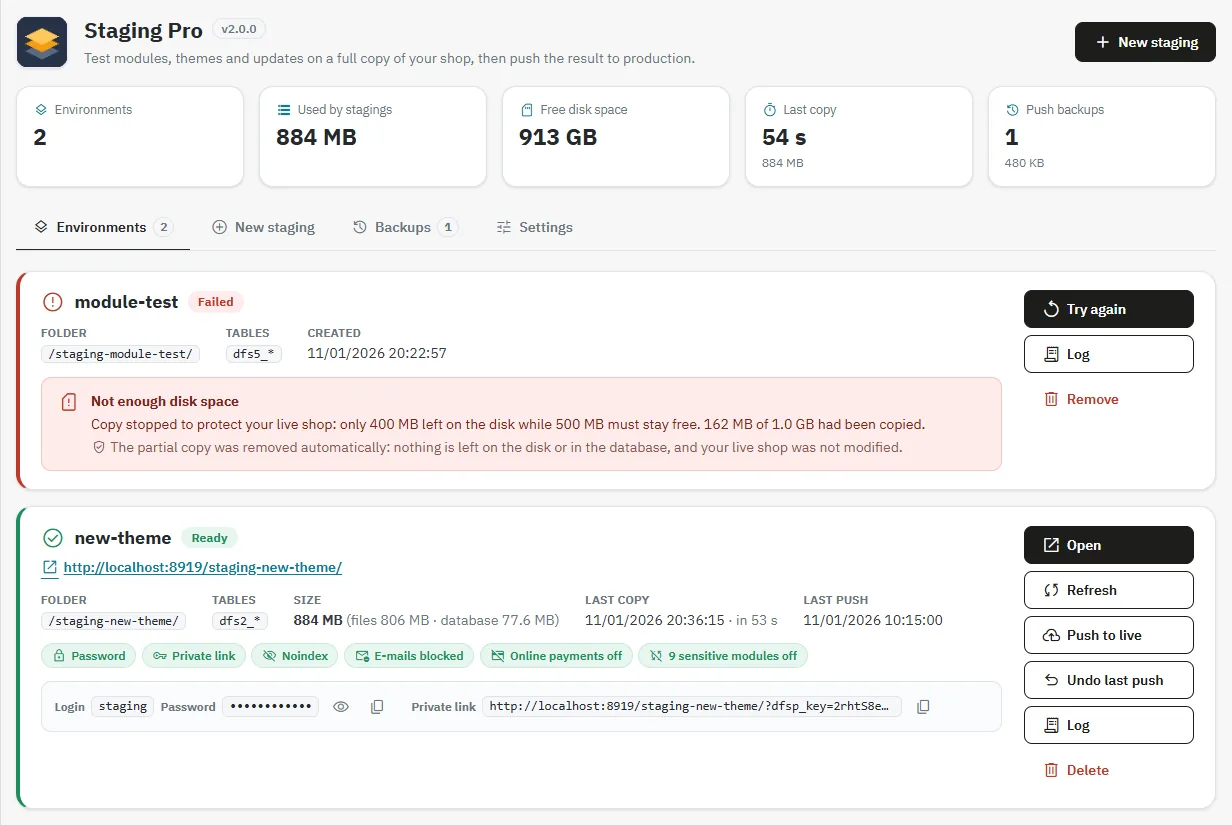
A failed copy stays visible with the reason for the failure, for example a lack of disk space, and the confirmation that the partial copy was removed. The Try again button runs the pre-checks again, then the copy.
Create a staging: the 4-step wizard
Step 1: location
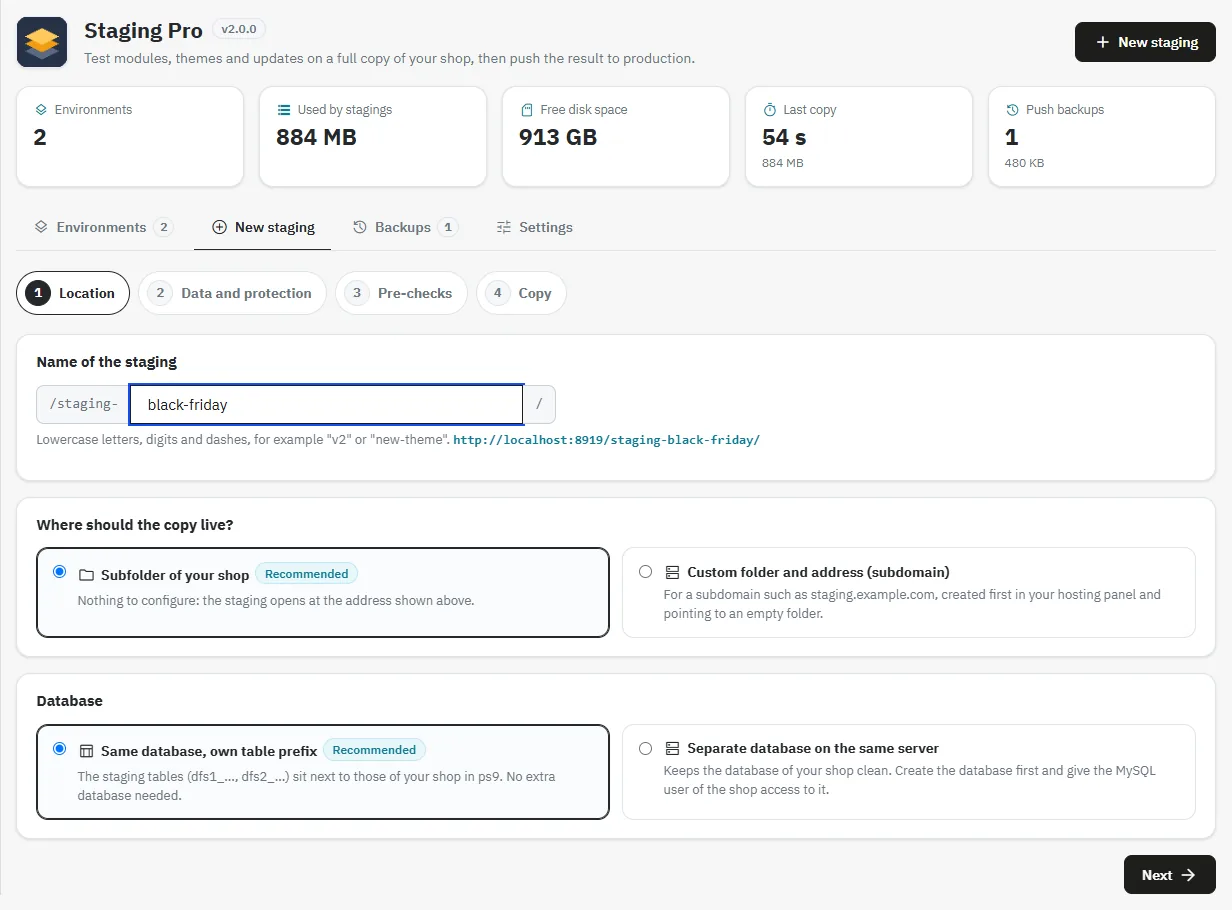
Enter a name (lowercase letters, digits and dashes, for example v2). The staging address is displayed live. Then choose:
- Subfolder of your shop (recommended): the staging is created in
/staging-name/, nothing to configure. - Custom folder and address (subdomain): for a subdomain such as
staging.example.com, created first in your hosting panel and pointing to an empty folder. - Same database, own table prefix (
dfs1_,dfs2_…), or Separate database on the same server, to be created beforehand and opened to the MySQL user of the shop.
Step 2: data and protection
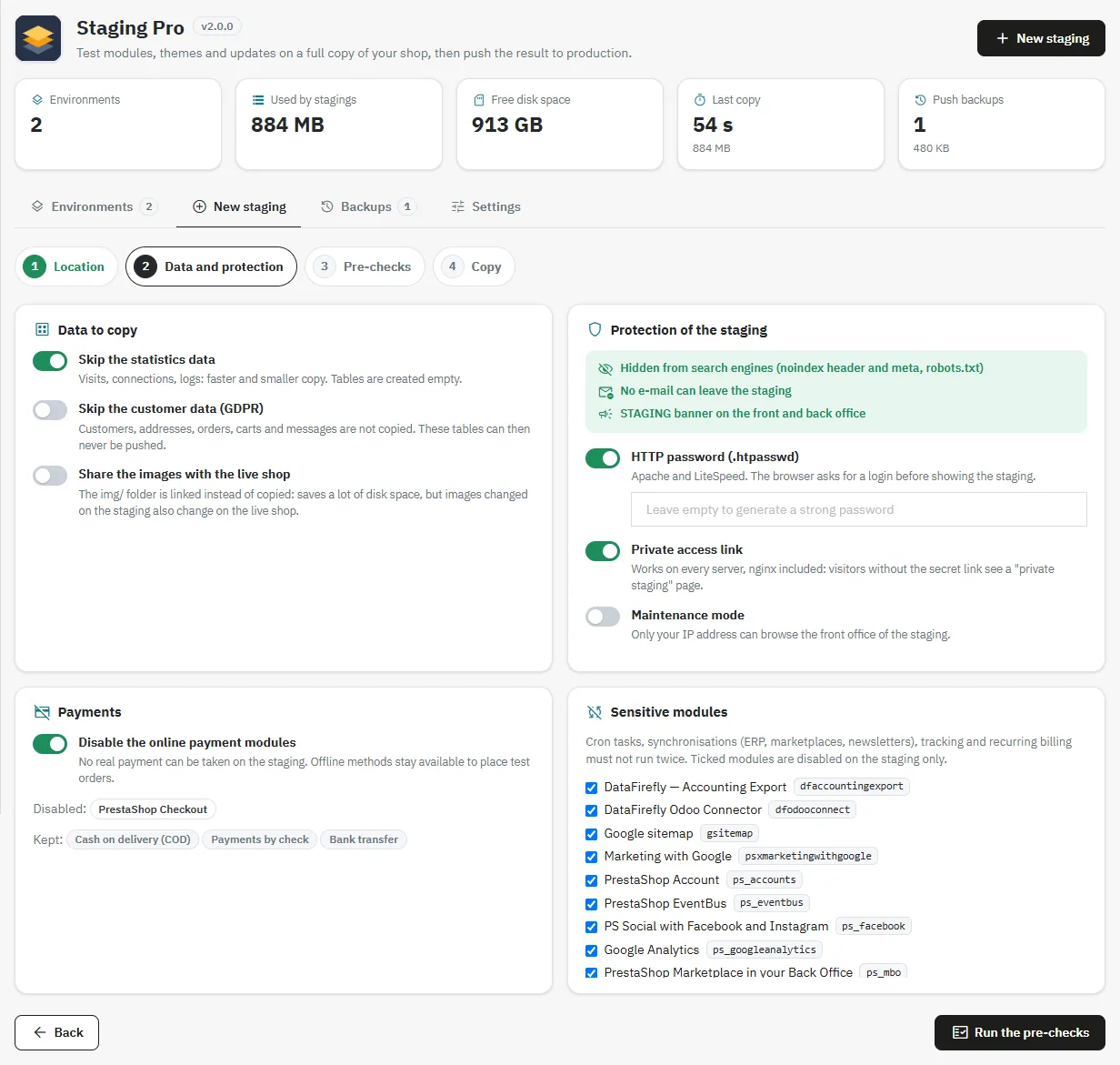
- Skip the statistics data (ticked by default): visits, connections and logs are not copied, the tables are created empty.
- Skip the customer data (GDPR): customers, addresses, orders, carts and messages are not copied.
- Share the images with the live shop: the
img/folder is linked instead of copied. Big space saving, but an image changed on the staging is changed on the live shop too. - HTTP password (Apache, LiteSpeed), Private access link (all servers, nginx included) and Maintenance mode.
- Payments: online payment modules are disabled on the staging. Offline methods (bank transfer, check, cash on delivery) stay available so you can place test orders.
- Sensitive modules: the active modules of the list (cron tasks, ERP or newsletter synchronizations, tracking, recurring billing) are offered for deactivation, on the staging only.
Three protections are always active: noindex, blocking of all e-mails and the STAGING banner.
Step 3: pre-checks
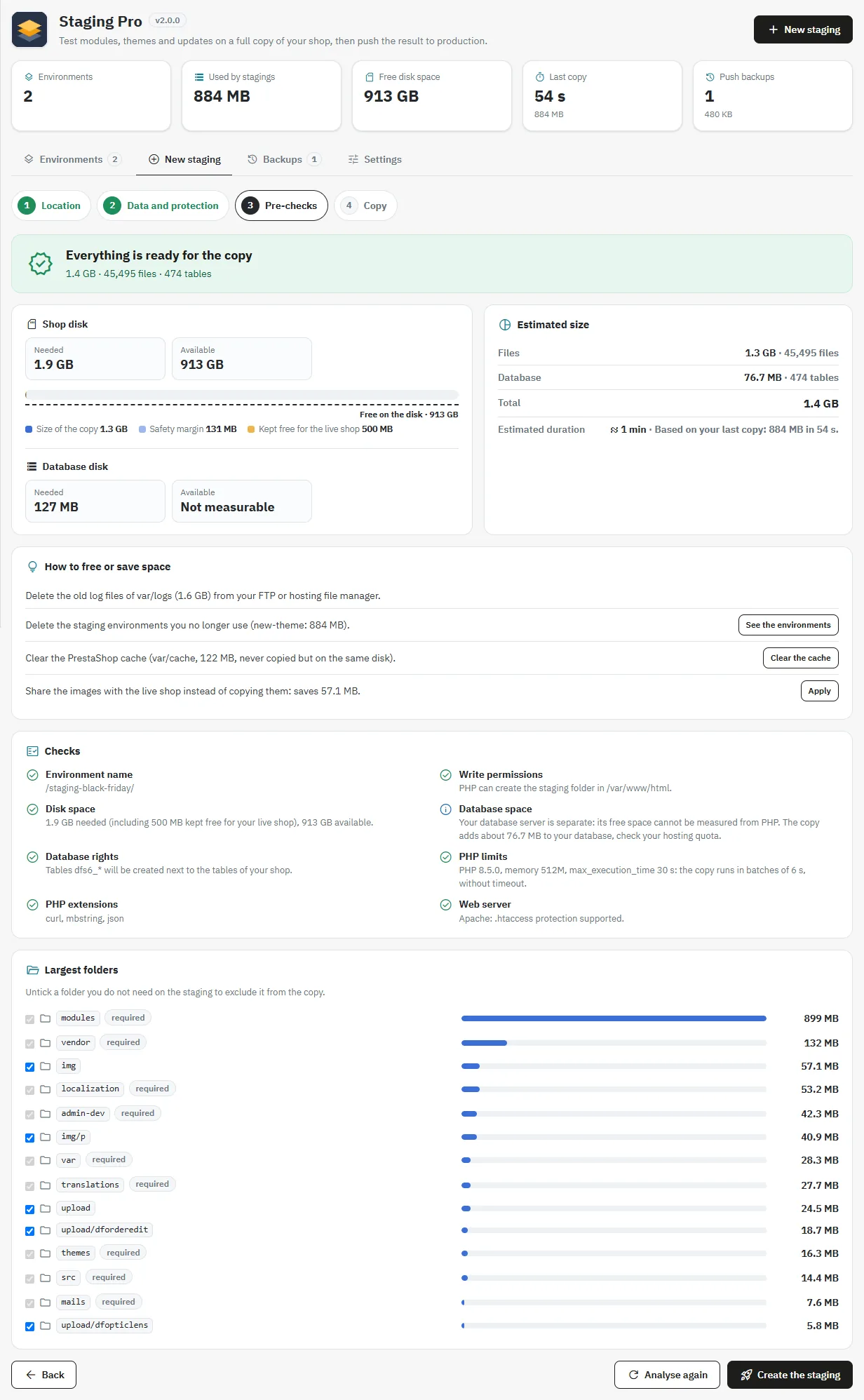
The module analyzes your shop: files are measured without being read, which takes a few seconds even for a large shop, then the database size is read from information_schema. The report shows:
- the disk space needed and available, with a gauge (size of the copy, safety margin, space kept free for the shop);
- the space on the database disk, when the MySQL server is local and measurable;
- the estimated size (files and database) and, if a copy has already been measured on your shop, the estimated duration;
- the checks: name, write permissions, MySQL rights, PHP limits, extensions, web server;
- the largest folders, which you can exclude with one click, and suggestions to save space.
Step 4: copy
Click Create the staging. The copy starts and its progress is displayed on the environment card (see “Follow the copy live”).
Disk space: how the module protects your shop
The staging is created on the same disk as your shop. A full disk can block the live shop: cache, sessions, file uploads, invoices. Staging Pro therefore applies three protections.
- Before the copy: the space needed is calculated as follows: size of the files to copy (caches, logs, sessions, backups and other stagings excluded) + database size + safety margin (10%, 50 MB minimum) + space always kept free for the shop (500 MB by default). If the free space is not enough, the copy is refused with three figures: needed, available, missing. The check is done again when the copy starts.
- During the copy: the free space is measured again continuously. The copy stops before going under the space reserved for the shop. Every write is checked: a full disk, on the files side or on the MySQL side, stops the copy with a clear message.
- After a failure or a stop: the partial copy (folder and tables) is removed automatically. Nothing is left on the disk or in the database, and the live shop is never modified.
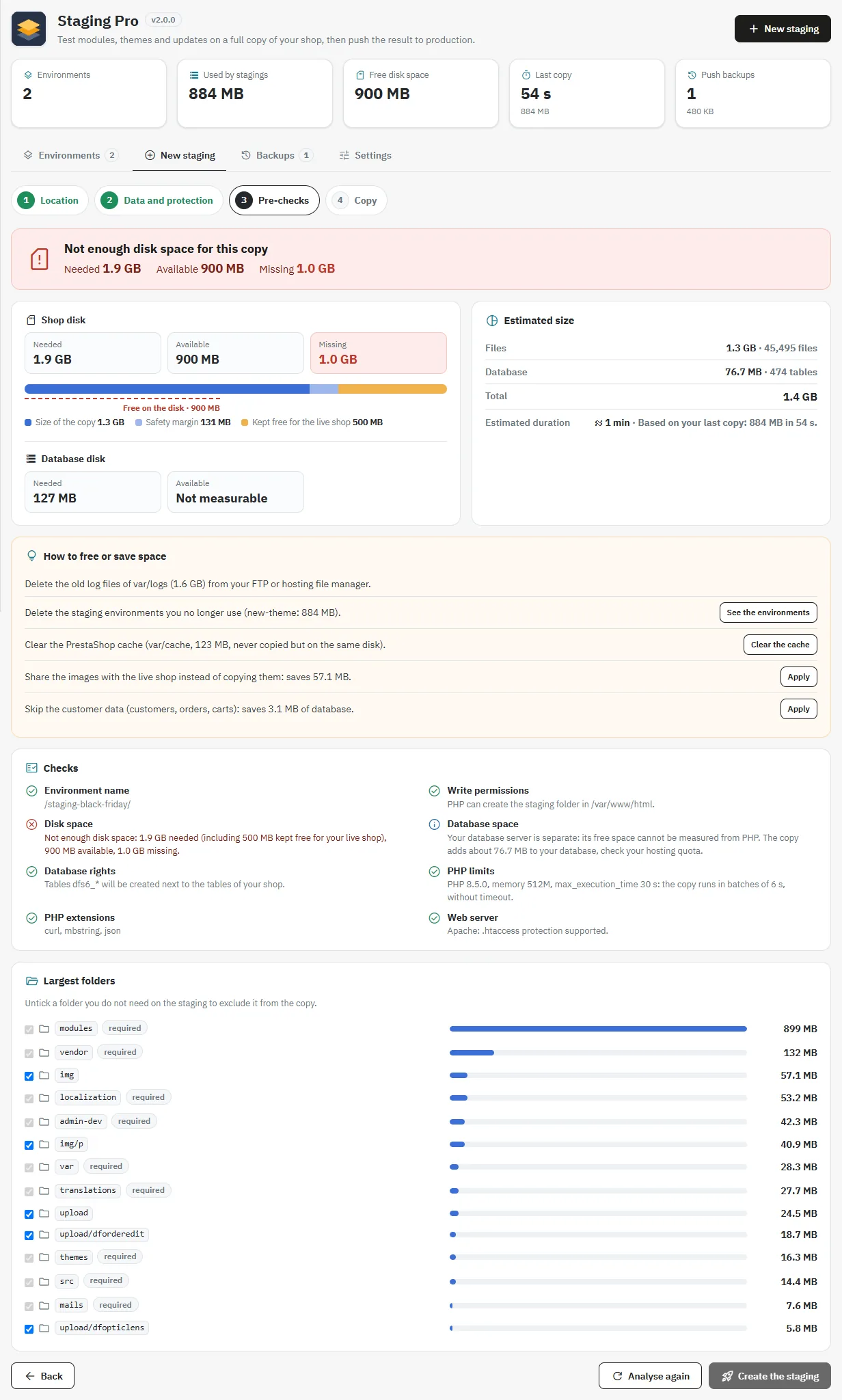
When space is missing, the report offers solutions with figures: share the images, skip the statistics or the customer data, exclude a large folder, clear the cache (button), delete the old logs in var/logs, delete old stagings or old push backups.
On some shared hosting plans, the PHP function disk_free_space is disabled and the free space cannot be measured. The module says so clearly, shows the approximate size of the copy and asks you to tick a confirmation after checking the space in your hosting panel. Write failures are still detected and cleaned up.
Follow the copy live
During the copy, the environment card shows:
- the steps: pre-checks, preparation, files, database, URLs, protection, verification;
- a progress bar;
- the number of files and bytes copied;
- the cloned tables;
- the elapsed time and the remaining time, estimated from the real progress;
- the last lines of the log.
The Stop button interrupts the copy and removes the partial copy.
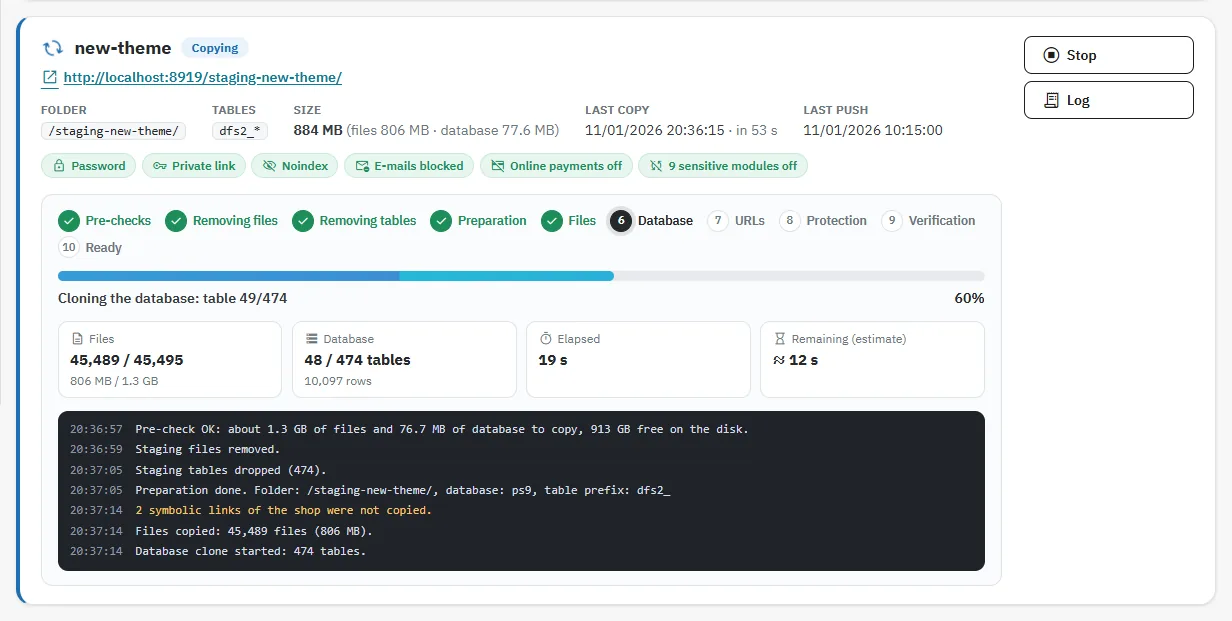
The copy advances in batches of a few seconds: no timeout, even with a low max_execution_time. If you close the page, the copy pauses and resumes when you reopen the dashboard, exactly where it stopped.
Staging protection
- Noindex:
X-Robots-Tagheader sent by PHP on all pages (works even withoutmod_headersand under nginx),noindexmeta tag androbots.txt. - No e-mail leaves:
PS_MAIL_METHOD = 3and blocking of every send by the module, even if someone re-enables SMTP on the staging. The banner of the staging back office shows the number of blocked e-mails. - HTTP password (user
staging), generated or chosen, in the APR1 format read by Apache and LiteSpeed. A self-check at the end of the copy verifies that the server answers 401 without credentials. - Private access link: without the secret link, visitors see a “private staging” page. The link sets a cookie valid for 30 days.
- Online payments and sensitive modules disabled, and STAGING banner on the front office and back office.
Refresh, try again, delete
- Refresh: rebuilds the staging from the current state of the shop. A window shows the pre-checks first. The space freed by deleting the old copy is taken into account. If space is missing, the refresh is not started and the current copy is kept.
- Try again: restarts a failed copy, after new pre-checks.
- Delete: removes the staging folder and tables. Outside the shop folder, only a folder carrying the environment marker is deleted.
Push to production
The Push to live button opens the list of staging tables, grouped by category: catalog, content and design, modules, customers and orders, other. For each table, you see the number of rows in the staging and in the shop. A search and an “Only tables that differ” filter make the selection easier.
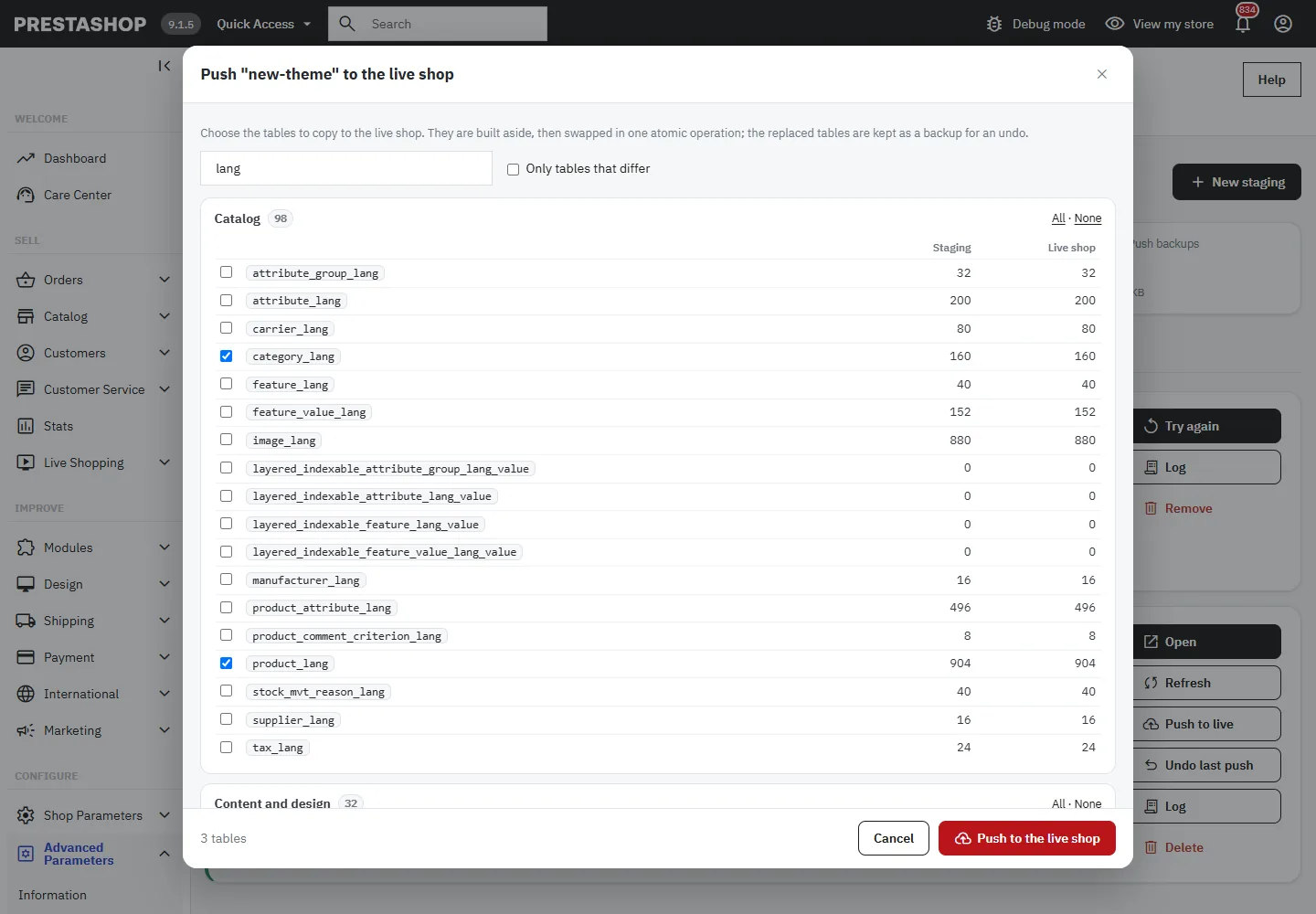
The selected tables are first copied aside, with the URLs rewritten from the staging to the shop. They are then swapped in a single atomic operation (RENAME TABLE): the shop never sees an empty or half-filled table. The replaced tables are kept as a backup (dfbak…). If the push fails before the swap, the temporary tables are removed and the shop is not touched.
Avoid pushing the customer and order tables if the shop has kept receiving orders since the copy: they would replace the recent orders. The critical tables (shop_url, configuration, shop, sessions) can never be pushed.
Backups and undo
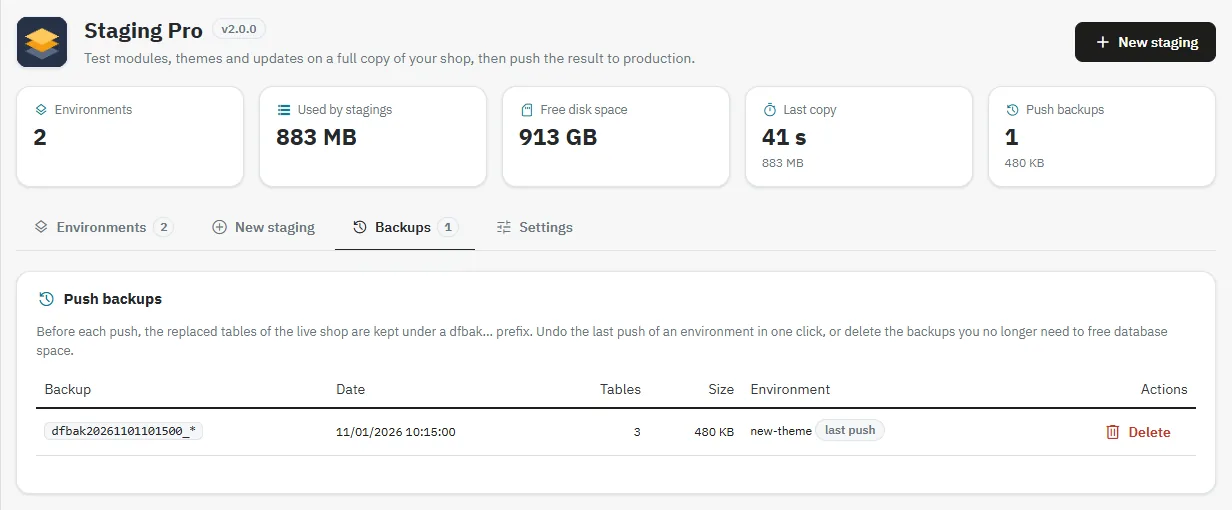
The Backups tab lists the backups created by pushes, with their date, number of tables, size and the environment concerned. The Undo last push button, on the environment card, restores the original tables. Delete the backups you no longer need to free space in the database.
Log
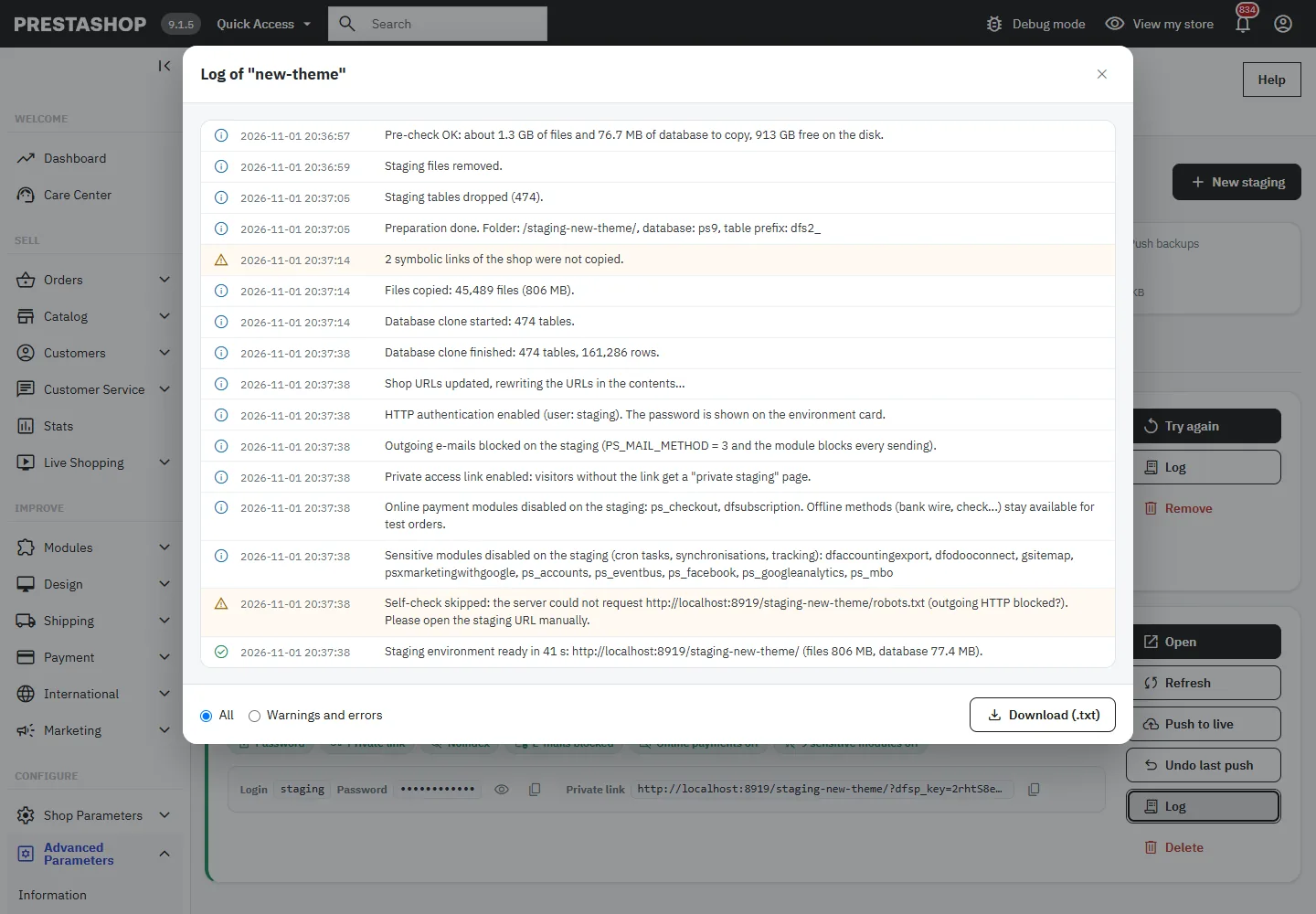
Each environment has its own log, in the language of the employee: pre-checks, steps, warnings, errors and cleanups. A filter shows only warnings and errors. The Download (.txt) button exports the full log with a header useful for support (versions, addresses, free space). Passwords never appear in the log.
Settings
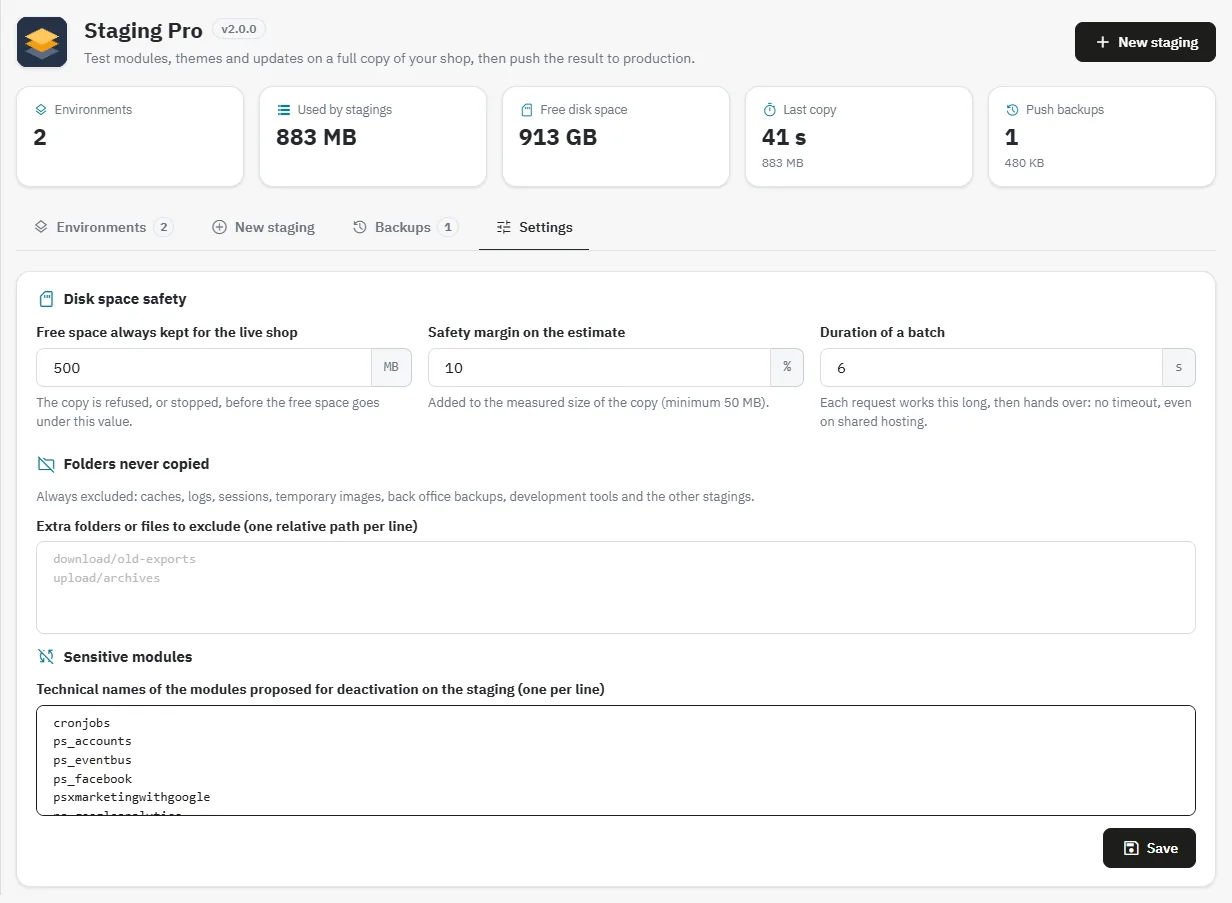
- Free space always kept for the live shop (500 MB by default): the copy is refused, or stopped, before going under this value.
- Safety margin on the estimate, added to the estimate (10%, 50 MB minimum).
- Duration of a batch (6 seconds by default, from 2 to 25).
- Extra folders or files to exclude, in addition to the automatic exclusions (caches, logs, sessions, back office backups, other stagings).
- Sensitive modules offered for deactivation on the staging.
Staging without customer data
With the Skip the customer data (GDPR) option, the tables of customers, orders, carts, messages, guests, newsletter and GDPR logs are created empty. The addresses of suppliers, manufacturers and warehouses are kept, as well as the order configuration tables (statuses, message templates, return statuses) and the whole catalog. This is the recommended choice when handing a staging to a contractor. On such a staging, the customer and order tables are removed from the push list and refused by the server: an empty table can never overwrite production.
Permissions and security
- Actions follow the permissions of the Advanced Parameters → Staging Pro tab: view, add (create), edit (copy, push, undo, settings) and delete. A read-only employee sees neither the passwords nor the action buttons.
- All actions are blocked if the current shop is itself a staging.
- The
parameters.php,.envand.htpasswdfiles of the staging are not accessible from the web.
FAQ and troubleshooting
What happens if my disk does not have enough space? The copy is refused before it starts, with the space needed, available and missing, and solutions to save space. If the space disappears during the copy, it stops before filling the disk and the partial copy is removed automatically.
My host disables disk_free_space, can I use the module? Yes. The module shows the approximate size of the copy and asks for a confirmation. Write failures are still detected and cleaned up.
The copy was interrupted (page closed, network outage). Reopen the dashboard: the copy resumes where it stopped.
My server runs nginx: the HTTP password does not work. nginx ignores .htaccess files. Use the private access link, which works on all servers. The self-check reports this case in the log.
Can the staging send e-mails to my customers? No. E-mails are always blocked on the staging, even if someone re-enables SMTP.
Can I test an order on the staging? Yes: online payments are disabled, but bank transfer and check stay available.
After a push to production, how do I go back? Use Undo last push on the environment card, then delete the old backups in the Backups tab.
Are my stagings created in 1.x kept? Yes. They stay listed after the update and can be refreshed, pushed to production or deleted.
The staging returns 404 everywhere on a cPanel / LiteSpeed host. Update the module, then refresh the environment: the password is generated in the APR1 format, compatible with LiteSpeed, and the 401 page is built into the .htaccess.
Version history
2.0.0 (November 1, 2026)
- Disk space check before the copy (files, database, margin, space reserved for the shop), monitoring during the copy, full disk detection on the files and MySQL sides, automatic cleanup of the partial copy.
- 4-step wizard with pre-check report, exclusion of the largest folders and suggestions.
- Live progress by step, manual stop, resume after interruption, translated and downloadable log.
- Atomic push to production, Backups tab.
- Subdomain (custom folder and address) and separate database.
- Private access link,
noindexsent by PHP, e-mails always blocked, sensitive modules disabled, offline payment methods kept. - Permissions checked per action, passwords removed from the log, multistore, translations in 8 languages.
1.1.0 (September 4, 2026)
- “Skip the customer data” option.
1.0.1 (September 3, 2026)
- HTTP password in APR1-MD5 format, built-in 401 page,
ErrorDocumentrewritten, self-check at the end of the copy.
1.0.0 (June 11, 2026)
First public release.