A visitor searches for a product you do not sell. They get an empty page and they leave. Yet that search is valuable information: someone came to your store with a precise purchase intent, for a product you could stock.
Capturing it turns a lost visit into a qualified request.
Two situations to tell apart
They call for different responses, and mixing them up produces an ineffective setup.
The product exists but is not found. A typo, a synonym, an out-of-stock product excluded from results. The problem is the engine, not the catalogue, and the right answer is to fix the search.
The product is not in the catalogue. There, the demand is real and unmet. That is the case this article deals with.
Before setting up any capture mechanism, deal with the first category. On many stores, half of zero-result searches come down to the engine, and capturing those requests leads nowhere.
What to offer the visitor
The no-results page must offer an action, not just a statement.
Four elements, in this order.
Immediate suggestions. Similar products, the matching category, results for a close spelling. This recovers the most visitors, before any capture even happens.
The alert form, with clear wording: “Notify me if you stock this product”. The email is enough, the search term is already known.
An optional detail field. Brand, model, intended use. It turns a vague phrase into an actionable request, and it is filled in by the most motivated visitors.
A link to customer service, for those who prefer to ask their question directly.
One important wording point: do not promise what you will not deliver. “We will let you know as soon as possible” is better than “This product will be available soon”, which commits you to a listing decision you have not made.
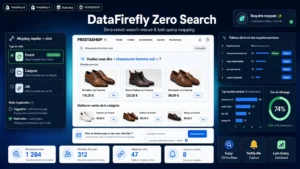 No Search Results Page PrestaShop 8/9 — Rescue Page & Product AlertsThe "no results" page that rescues the sale instead of losing it.€79.00
Qualifying the request
A list of raw search phrases is not usable as is. Three treatments make it useful.
Grouping. Fifteen spelling variants of the same brand must be counted together. Without grouping, each request looks isolated while the combined volume is significant.
Manual qualification. Each group gets a decision: to be stocked, already exists under another name, out of scope, to watch. This classification takes a few minutes per week and avoids starting from scratch every quarter.
Attachment to a category of your tree, which shows where demand concentrates.
A frequent lesson from this exercise: requests often concentrate on two or three precise gaps, not on a wide scatter. That is what makes them actionable.
Using requests for sourcing
Three readings, in order of ease.
The missing accessory or consumable. You sell the equipment, people ask for the wear part. Easy to stock, often good margin, and it grows average order value without new acquisition.
The incomplete range. Requests for sizes, power ratings or variants missing in a category where you are already present. The supplier is known, the addition is mechanical.
The absent brand. The heaviest case, which requires a supplier agreement. It is justified from a significant, recurring request volume over several months.
A decision benchmark: one isolated request justifies nothing. Twenty requests over three months, for a product you know how to source, justify a test.
The follow-up message
This is the part that produces the sale, and it is often neglected once the list exists.
When you stock a requested product, the message must go out. Three rules.
It recalls the search and its date. “You were looking for this product in March” reactivates the context, even months later.
It links straight to the product page, not to the homepage.
It does not oversell. A factual message announcing availability converts better than a promotion, because the need already existed.
The conversion rate of these messages is generally high, precisely because they answer a stated request. Over several months it drops mechanically, which argues for fast handling of the strongest requests.
The consent framework
Capturing an email and sending a message afterwards counts as electronic direct marketing.
The visitor filling in this form is usually not yet a customer. Prior consent is therefore required under GDPR and the ePrivacy rules, and it is gathered through the very act of requesting the alert, provided the purpose is explicit.
Three requirements. A precise stated purpose: being notified when this product becomes available. No pre-ticked box for the newsletter next to it, which would invalidate the consent. And an unsubscribe link in every message.
An important retention point: a request that led nowhere must not be kept indefinitely. Twelve to eighteen months is a reasonable duration, with automatic deletion beyond that. Past that point, the request is no longer current and keeping it is no longer justified.
What you learn about your catalogue
A secondary benefit, and often the most lasting one.
Zero-result searches reveal vocabulary gaps. A customer searching for “petrol mower” when your product pages say “gas-powered mower” finds nothing, even though the product exists.
These cases are fixed with a synonym dictionary, not with sourcing, and they are more numerous than you would think.
Second lesson: searches by use case rather than by product. “Gift for an angler”, “product to clean a patio”. They match no product page but they describe an intent your navigation could serve with a themed selection.
Measuring
Four indicators.
The zero-result search rate, against total searches. Above 15%, your engine or your catalogue has a structural problem.
The capture rate on the no-results page, the share of visitors who leave an alert. Below 5%, rework the wording.
The number of products stocked as a result of these requests, which measures the real use of the mechanism.
The revenue generated by these references, compared with the cost of stocking them.
The Zero-Result Search module for PrestaShop sets this up on PrestaShop 8 and 9: an empty-result page with suggestions and spelling correction, an alert form with a detail field, grouping and qualification of requests in the back office, and the availability message sent when the product is stocked.