
Everything you'd want to know before you install.
A detailed look at how Product Comparison Module for PrestaShop 8/9 works, why we built it the way we did, and the thinking behind the features above.
§ 01
The comparison that truly helps decide
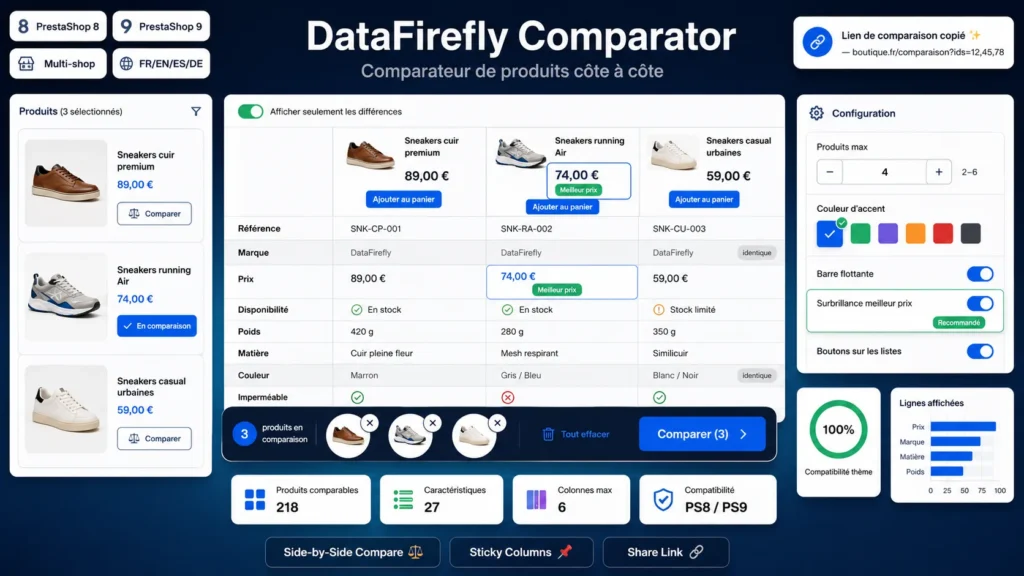
The customer adds the products they are interested in to their comparison from the product page or directly in listings, then opens a dedicated page that lines them up in columns. The header and first column stay frozen while scrolling so the context is never lost, even with a long feature table.
§ 02
Best price and differences brought forward
The lowest-priced column is automatically highlighted with a dedicated badge. A "show differences only" toggle hides rows whose values are identical across all products, leaving only what truly distinguishes the items and speeding up the decision.
§ 03
Present everywhere, without disrupting the journey
The "Compare" buttons are added automatically on the product page and in listings, and re-injected after every Ajax filtering. A floating bar with thumbnails accompanies the shopper across the whole store, and each comparison produces a shareable URL to send or find again.
§ 04
Built for PrestaShop 8 and 9
No-Composer, no-framework architecture, manual PSR-4 autoloader and a classic front controller for seamless PrestaShop 8 and 9 compatibility, single store or multistore, across the catalogue's five languages.
§ 05
Fast, self-contained and theme-friendly
The comparator is written in vanilla JavaScript, with no jQuery or external dependency. The selection is kept by browser token with a localStorage mirror for instant rendering, and merged across devices for logged-in customers. The design is self-contained, independent from your theme and responsive.





There are no reviews yet.