
Everything you'd want to know before you install.
A detailed look at how Import Export CSV & XML for PrestaShop 8 & 9 — Visual Mapping, Scheduled FTP/SFTP Imports works, why we built it the way we did, and the thinking behind the features above.
A real import/export engine, not the native CSV import
PrestaShop's built-in CSV import gets you through a one-off manual load, but it can't remember a configuration, fetch a file from a supplier, or run on its own every night. This module industrializes data exchange: you describe the source, the format and the column mapping once, you save the profile, and you reuse or schedule it at will. Import as well as export, CSV as well as XML, the same tool covers your catalog's entire lifecycle.
The visual mapping that saves hours
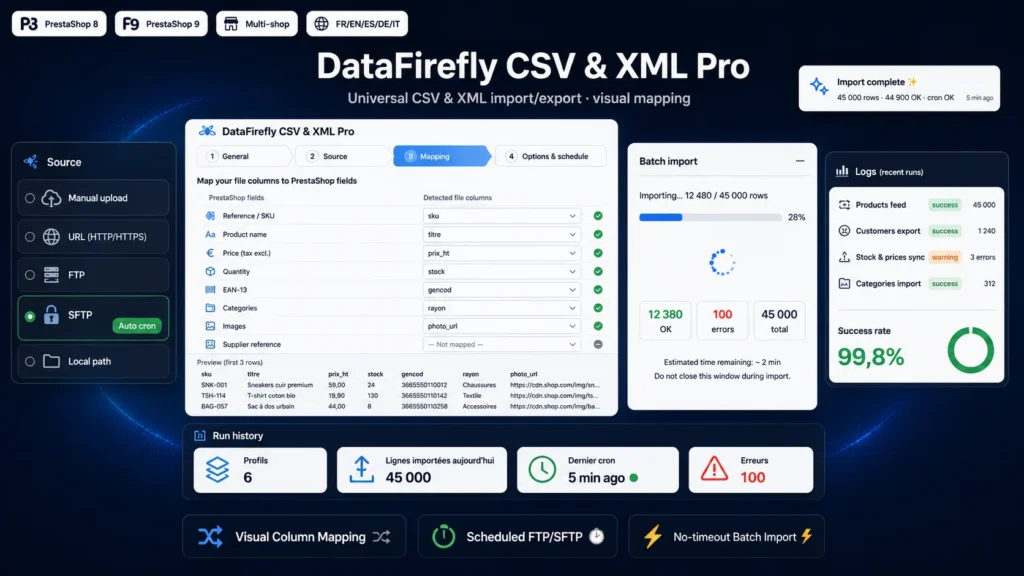
Upload a sample file or let the module fetch it from the remote source: it detects the columns, shows a preview of the first rows and automatically proposes a mapping to PrestaShop fields. Recognition covers common labels in both French and English — reference and SKU, price, quantity and stock, EAN and barcode, VAT — and lets you adjust each association in a clear table. No more recounting columns and no more failed imports because a column shifted.
A profile for every feed, reusable and schedulable
Each profile encapsulates everything: the source (upload, URL, FTP, SFTP or local file), the format and its encoding, the separator, the column mapping, the import options and the schedule. Create as many as you need — your wholesaler's daily product feed, the weekly customer export to your marketing tool, the hourly price and stock update. A profile relaunches in one click from the back office, or triggers itself when its frequency is due.
Your files, fetched and deposited automatically
On import, the module fetches the file wherever it lives: a URL over HTTP/HTTPS, an FTP server in passive or active mode, an SFTP server (via the ssh2 extension, with an explicit message if it is missing) or a local path restricted to the store directory. On export, it can conversely deposit the generated file on your FTP/SFTP or in a local folder, or simply offer it for download. FTP/SFTP passwords are encrypted at rest and never leave the server in clear text.
Built for large files
A catalog of tens of thousands of rows doesn't import in a single request. The engine processes the file in successive AJAX batches, shows a live progress bar and resumes at the exact byte position after each batch — no risk of a PHP timeout, even on shared hosting. In cron mode, processing chains synchronously to the last row. Each batch updates the OK / errors / total counters in real time.
PrestaShop's business formats, handled natively
The module understands the specifics of the PrestaShop catalog. Combinations are written as Group:Value|Group:Value — for example Size:M|Color:Red — and attribute groups as well as values are created if they don't exist; the combination is recognized by its exact set of attributes. Features follow the Name:Value|Name:Value format. Categories, images and tags are written as multi-values with the separator of your choice, the first image serving as the cover. The VAT rate is linked to the right tax group of the default country, and images can be downloaded from URLs.
Traceability and alerts, for peace of mind
Every run leaves a trace: status, number of rows processed, succeeded and in error, message and row-by-row error detail (the first 200). As soon as an import fails or contains rejected rows, an e-mail alert is sent automatically to the address of your choice, with a template in French or English. Logs are purged automatically according to the retention period you define, and temporary files are cleaned up after 48 hours. The module adds no core override and uninstalls cleanly.

There are no reviews yet.