PrestaShop Administration & Productivity

PrestaShop Payment Link Module 8 & 9 for Phone and Email Orders

The customer calls, you prepare the order, they pay from their phone.

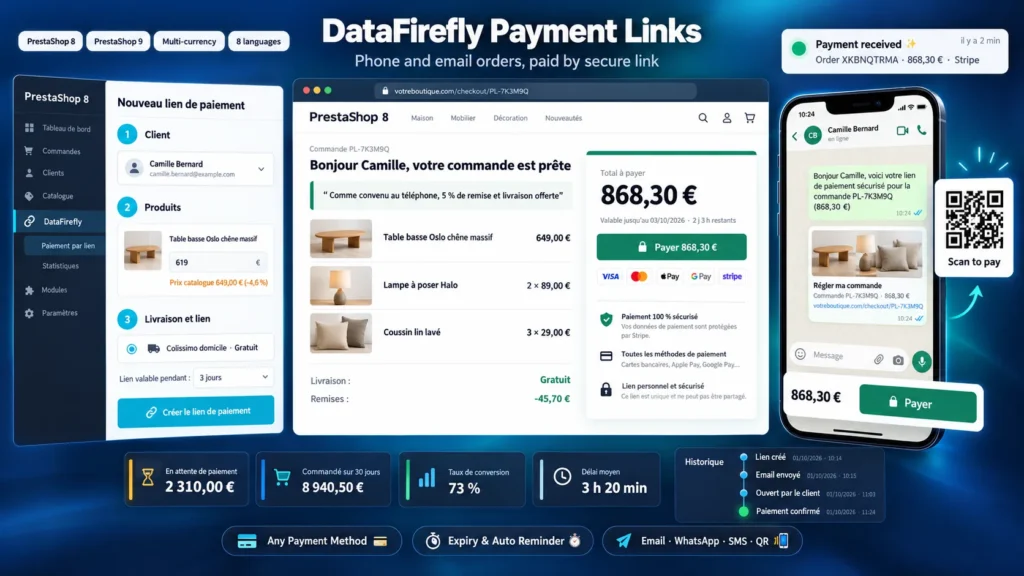
A customer orders by phone, by email or at the counter: without a module, you either ask for their card number or explain how to redo everything on the website. With this module, you build their cart in the back office, with your negotiated prices, your discount and the chosen carrier, then send them a link by email, SMS or WhatsApp. They open a summary page, click Pay and land directly on the payment step of your shop. The order is created by your usual payment module, exactly like an online order.

At a glance
  • Cart prepared in the back office: customer, addresses, products, carrier
  • Negotiated prices and discount applied to this order only
  • Link with an expiry date, sent by email, WhatsApp, SMS or QR code
  • Payment with the modules already installed: Stripe, PayPal, bank transfer…
  • Automatic reminder before expiry and notification to the salesperson
PrestaShop 8 & 9 Any payment method Expiry and reminder 8 languages
  • 30-day refund
  • 12 months updates
  • 24h support
www.datafirefly.com/en/
PrestaShop Payment Link Module 8 & 9 for Phone and Email Orders
v1.2.1 · updated 2026-09-30
What it does

The short version.

01

A phone order ready in two minutes

Find the customer by name, email or phone number, or create them as a guest. Add products from the keyboard, combination by combination, change a price, apply a discount: totals and shipping costs are recalculated while you are still on the phone.

02

The customer pays just like on your website

The link opens a clear page with the order details, the message you wrote and a countdown. One click on Pay signs them in and takes them to the payment step, with identity, address and shipping already confirmed. They choose from your usual payment methods.

03

Links that do not linger

Each link has an expiry date, from 2 hours to 30 days. The customer gets an automatic reminder before the deadline if they have not paid. After that, payment is blocked, and you can extend, revoke or recreate the link in one click.

04

You know where every link stands

A dashboard shows the amount awaiting payment, the conversion rate and the average time to order. Each link keeps its history: sent, opened by the customer, went to payment, order. The salesperson who created the link gets an email when the customer pays.

The long version

Everything you'd want to know before you install.

A detailed look at how PrestaShop Payment Link Module 8 & 9 for Phone and Email Orders works, why we built it the way we did, and the thinking behind the features above.

§ 01

Phone sales without taking card numbers over the phone

Taking a card number over the phone exposes the shop to fraud and falls outside PCI DSS. Sending the customer a list of products to add themselves loses the sale half the time. A payment link solves both: you prepare the exact order, the customer pays online on their side with their bank's strong authentication, and the order enters PrestaShop like any web order.

§ 02

Your negotiated prices, without touching the catalog

A price typed for a line applies to that cart only, through a specific price attached to the cart. Your catalog prices, price rules and other customers are not affected. The gap to the catalog price is shown as a percentage next to each line, so you can watch your margin during the call. The overall discount and free shipping use a cart rule reserved for that customer.

§ 03

No new payment method to install

The module does not collect any money itself. The customer goes through your shop's checkout and pays with the modules you already use: Stripe, PayPal, Mollie, bank transfer, direct debit or any other PrestaShop-compatible module. No extra account to open, no added fee, and orders follow your usual statuses, emails and invoices.

§ 04

Designed for mobile, where the link is opened

Most customers open the link from an SMS or WhatsApp. The payment page shows the total and the Pay button on the first screen thanks to a sticky bar at the bottom, with the detailed order right below and a link to your phone number if they have a question. At the counter or on a paper quote, the QR code and the printable quote send the customer to the same page.

§ 05

Follow-up that prevents forgotten links

Each link has an expiry date and an automatic reminder before the deadline. The dashboard shows the money awaiting payment and the links expiring within 24 hours. When the customer pays, the salesperson gets an email, the order carries the link reference in its internal note, and the history shows whether the customer changed the cart before paying.