
Everything you'd want to know before you install.
A detailed look at how Bulk Edit Product Features for PrestaShop 8 works, why we built it the way we did, and the thinking behind the features above.
Fill in product features in bulk in seconds
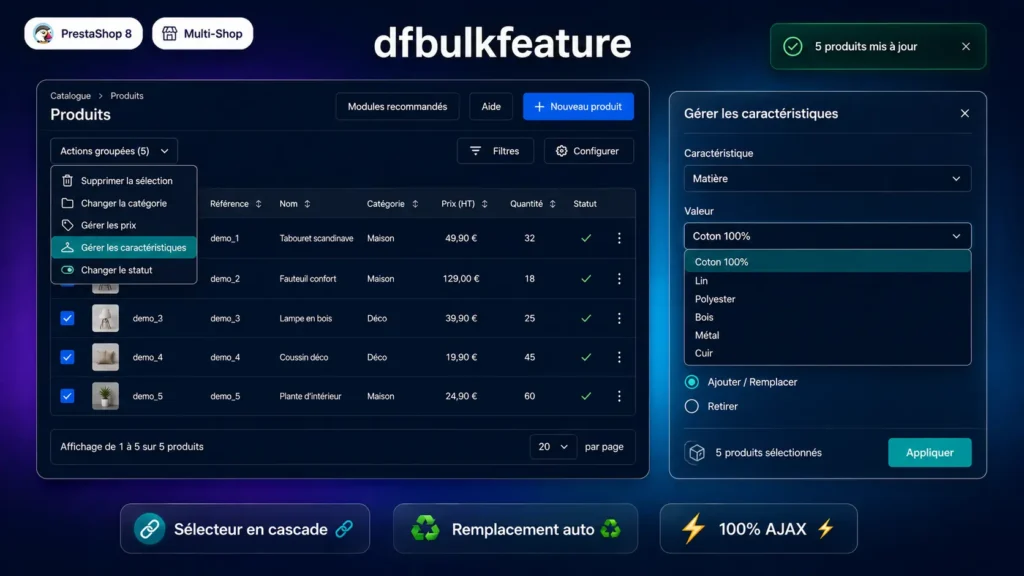
PrestaShop features (material, colour, brand, origin, etc.) enrich product pages and feed faceted search filters. On a catalogue of several hundred products, filling them in or correcting them page by page can take days. dfbulkfeature reduces this to seconds: select the products in the list using the native PrestaShop checkboxes, click Bulk actions, open the modal, choose the feature and its value, confirm.
Smart behaviour on assignment
In PrestaShop, a product can only have one value per feature (excluding custom values). When assigning a value in bulk, the module checks for each product whether a value already exists for that feature: if so, it is deleted before the new value is inserted, to guarantee data consistency. If the value is already identical, the product is simply skipped and counted as successful.
Clean removal, including custom values
In Remove mode, you can target a specific value or erase an entire feature from the selected products. On a full erase, the module also cleans up orphaned custom values in the database (feature_value and feature_value_lang tables) — a detail that PrestaShop itself does not always handle correctly natively.
Clean installation, no SQL table, PS8 Vue.js compatible
The module writes directly to PrestaShop's native feature_product table without creating any additional table. All operations run via AJAX with no page reload. A MutationObserver monitors the DOM and re-injects the button if Vue.js updates the product list after a filter, pagination or sort. Assets are loaded only on the back-office product list page.
There are no reviews yet.