
Everything you'd want to know before you install.
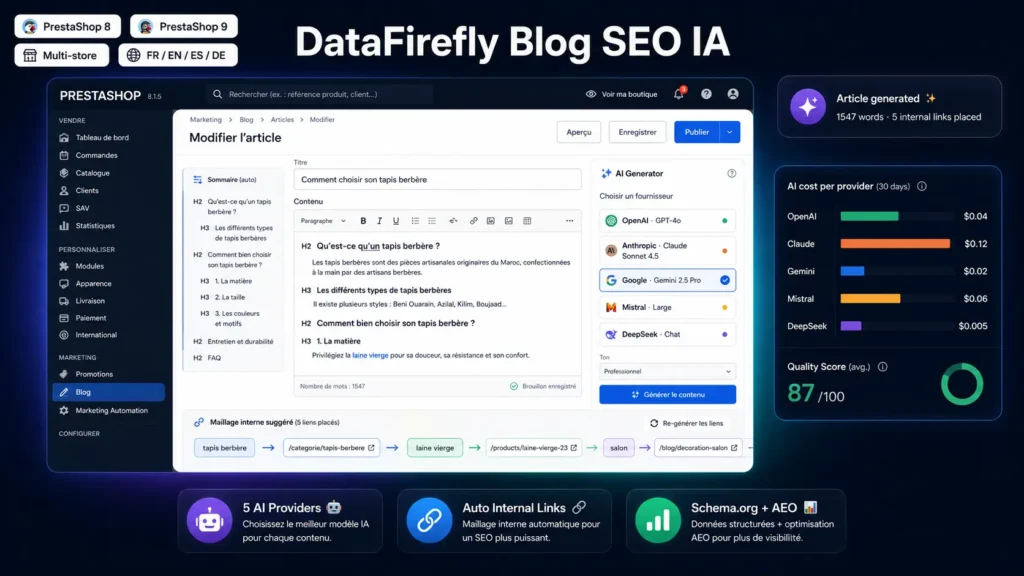
A detailed look at how DataFirefly SEO AI Blog Pro — 1-click blog setup, bulk article suggestions and "1 article every N days" scheduling for PrestaShop 8 & 9 (OpenAI, Claude, Gemini, Mistral, DeepSeek) works, why we built it the way we did, and the thinking behind the features above.
§ 01
Why an e-commerce blog still pays off — if you automate it
Editorial content is one of the few durable SEO levers: a well-ranking article keeps generating traffic months after publication, with no recurring ad cost. The problem lies elsewhere: producing the content. A serious SEO article takes 2 to 4 hours of work per language (keyword research, outline, copywriting, internal linking, SEO meta, FAQ, proofreading). For a trilingual store publishing two articles a week, that's 20 to 40 hours of monthly work — equivalent to a part-time community manager salary. DataFirefly Blog SEO AI flips this equation: the same store pays 5 to 30 dollars a month in AI API consumption (depending on the chosen provider) and obtains the same content volume, in the same SEO structure, with the same internal linking — except everything is generated, structured and published from the back office in a few clicks.
§ 02
Why five AI providers instead of just one
Each provider has a sweet spot. OpenAI GPT-4o-mini is the cheapest for excerpts and batch titles (~$0.0001 per generation). Anthropic Claude Sonnet 4.5 remains the reference for long, structured articles with high editorial stakes. Google Gemini 2.0 Flash offers the best quality/price ratio for medium-length content ($0.10 per million input tokens). Mistral Large works wonders on French and European languages, with EU data sovereignty integration for sensitive stores. DeepSeek Chat offers the lowest market rates for very high-volume editorial stores. The module unifies these five providers behind a single interface (same prompts, same return structure, same cost log) and lets you switch at any time. You only pay API usage to the provider of your choice — DataFirefly takes no commission or markup.
§ 03
The internal linking engine, in detail
It's the module's most powerful differentiator. You define your keyword → URL rules once in the admin (e.g. the keyword Berber rug points to the berber-rugs category of your catalogue with rotating anchor Berber rug, Moroccan Berber rugs, Berber model). For each rule, you configure: target type (product, category, CMS page, other blog post, custom URL), alternative anchor list, strict exact-match or substring, optional nofollow attribute, max placements per article, rule priority (lower values are higher priority). On article save, the engine tokenises the HTML, identifies each keyword occurrence not already inside an a, code, pre tag or an Hn heading, applies rules in priority order, rotates anchors, respects minimum distance between two occurrences (DFBLOG_IL_MIN_DISTANCE, in characters) and the global per-article limit (DFBLOG_IL_MAX_PER_POST). The result is stored in the database content_rendered field and served directly to the front-end — no on-the-fly computation.
§ 04
Product selection, your editorial cross-sell lever
An article that mentions a product without a link to it loses 100 % of its conversion potential. Three modes per article. Manual mode: enter a CSV list of product IDs — useful when you have a clear cross-sell idea. Auto-keywords mode: the engine extracts keywords from title and content, queries the PrestaShop catalogue and proposes products whose title, excerpt or features match — useful to automate without spending AI tokens. Auto-AI mode: the module sends an article summary to the configured AI provider and asks it to pick the most relevant products from a catalogue subset — ideal when the editorial connection isn't obvious from raw keywords. Selected products show in a cross-sell block at the article footer + reciprocal Articles mentioning this product widget at the product page footer. The blog ↔ catalogue linking builds itself.
§ 05
Full SEO, AEO included
On every article, the module auto-populates title (with deduplication between meta_title and page title), meta description, canonical, Open Graph (og:title, og:description, og:type=article, og:image, og:url), Twitter Card (summary_large_image), hreflang to every translation of the article + hreflang x-default. On every archive (category, tag, author), the same structure adapted. JSON-LD is injected without using the Smarty nofilter filter (a red flag for the PrestaShop validator): three schemas independently togglable in config — BlogPosting (with author, publication and modification dates, image, language, word count), BreadcrumbList and FAQPage (from a per-article JSON FAQ field). On the AEO side (Answer Engine Optimization), the module exposes an llms.txt file at /blog/llms.txt grouped by category — a format currently standardising to let AI crawlers (Perplexity, ChatGPT browsing, Gemini, Claude web search) quickly understand your blog's editorial structure. The XML sitemap at /blog/sitemap.xml includes all active posts, categories and tags with xhtml:link hreflang alternates.
§ 06
Webhooks for Zapier, n8n, Make integration
Six events emit an HMAC SHA-256 signed webhook: post.created (draft creation), post.published (publication or transition from scheduled to published), post.updated (published post modification), post.deleted (deletion), category.created, ai.article_generated (successful AI article generation). The payload is JSON containing event, Unix timestamp, shop ID and data (id_post, title, slug, status for post.* events). The HMAC SHA-256 signature is computed with a per-webhook secret and sent in the X-DfBlog-Signature header as sha256=hex. Typical use cases: auto-post published articles to LinkedIn and X via Zapier, feed a Brevo or Mailchimp newsletter on every publication, trigger an n8n workflow that re-translates a modified article, or simply log all AI actions to a Notion table.
§ 07
Admin dashboard: your whole blog on one page
The module's home screen in PrestaShop's back office shows: number of published posts, drafts in progress, scheduled (with or without date), AI-generated posts, total views, 30-day views, 30-day AI cost, total AI cost. A top posts table (by views) with quality score and AI badge. A 30-day AI usage by provider table with aggregated cost per provider. A list of recent AI errors (useful to detect a revoked API key or quota overage). Four quick-action buttons: open the AI generator, manage posts, configure the module, open the dashboard. No need to dig for information.
§ 08
PrestaShop Addons validator: 100 % compliant
The module passes the official validator with zero blocking errors or warnings. All PHP files carry the normalised DataFirefly licence header, the root htaccess file is present, code follows PSR conventions (single quotes, trailing commas, short array syntax, normalised binary spacing), Smarty escapes are systematically explicit (html UTF-8 or intval depending on the value type), JSON-LD is hex-encoded via htmlspecialchars to avoid the Smarty nofilter filter, and a helper centralises PrestaShop runtime context access to isolate the code from direct Context::getContext() calls.
§ 09
Use cases
Multi-language fashion store wanting to publish two articles a week without hiring a copywriter — combine Mistral Large for French, OpenAI GPT-4o-mini for EN/ES versions, configure internal linking toward collections. Technical B2B with vocabulary-rich catalogue — use Claude Sonnet 4.5 for writing (best on expert tone) and a strict exact-match internal linking toward technical product sheets. Single-language marketplace with very high editorial volume — DeepSeek Chat to minimise per-article cost, batch generation of titles + excerpts + meta, dense internal linking. Informational blog with AEO strategy — Gemini 2.5 Pro for very long pillar articles, llms.txt enabled, systematic FAQPage on every article.


There are no reviews yet.