PrestaShop Catalogue Management

Bulk Edit Products in PrestaShop 8 & 9: Spreadsheet-Style Editor

Your catalog in a spreadsheet, with an Undo button on every change.

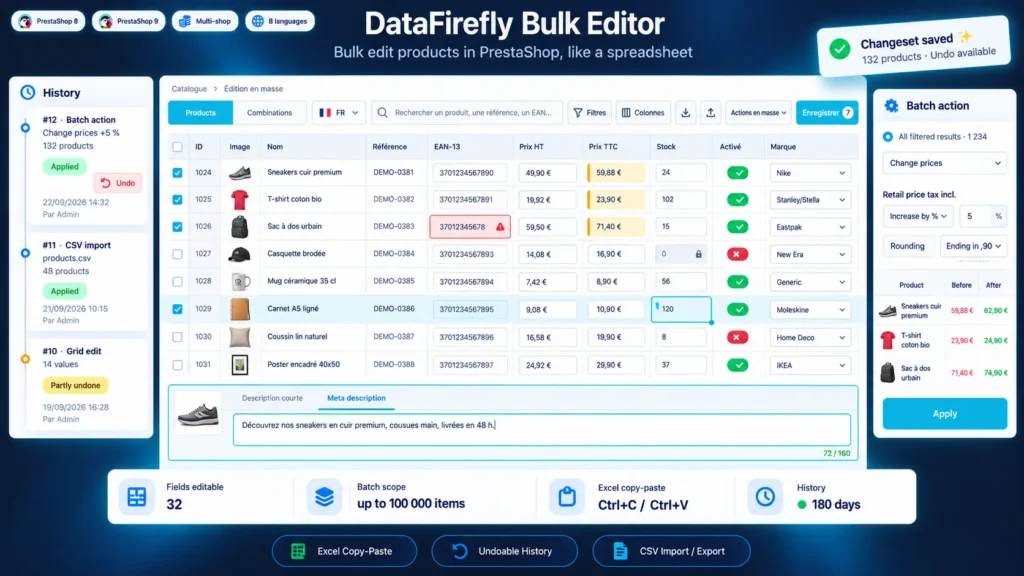
Changing the price of 300 products, fixing 80 EANs or filling empty meta titles means opening product pages one by one with the native tools. This module shows your catalog in a spreadsheet-style grid inside the back office: you edit cells with the keyboard, paste a column from Excel, and apply a price increase with .90 endings to every filtered product. Every save, batch action or CSV import is recorded in a history and can be undone in one click, without overwriting what was changed in the meantime.

At a glance
  • Keyboard-driven editable grid for products and combinations, inside the back office
  • Copy and paste with Excel and Google Sheets, fill down, local undo
  • Batch actions on the selection or on every filtered result, with a preview
  • Bulk discounts, plus CSV export and re-import
  • Full history: every change can be undone without overwriting later edits
PrestaShop 8 & 9 Undoable history Excel copy-paste CSV import / export Multistore
  • 30-day refund
  • 12 months updates
  • 24h support
www.datafirefly.com/en/
Bulk Edit Products in PrestaShop 8 & 9: Spreadsheet-Style Editor
v1.0.0 · updated 2026-09-23
What it does

The short version.

01

A real spreadsheet in the back office

Arrows, Tab, Enter, F2 or direct typing to edit, Shift to select a range, Ctrl+C / Ctrl+V with Excel or Google Sheets, Ctrl+D to fill down, Ctrl+Z to step back before saving. Edited cells stay highlighted until you save.

02

Batch actions that show the result before applying it

Price increases or decreases by percentage or amount, price computed from the purchase price, charm rounding, stock, status, brand, tax rule, categories, SEO texts from a template, discounts. The preview shows before and after on the first products, then the action runs in chunks without timeouts.

03

Everything can be undone, cleanly

Each save, batch action or import forms a changeset in the history, with the employee, the date and value-by-value details. Undoing restores the previous values but by default keeps those changed again since, so a colleague's work is not overwritten.

04

Excel when you prefer Excel

Export the filtered products to CSV with every editable field, rework them in your spreadsheet and import the file back: products are matched by key, ID, reference or EAN, a preview shows the changes and only the values that actually changed are written.

The long version

Everything you'd want to know before you install.

A detailed look at how Bulk Edit Products in PrestaShop 8 & 9: Spreadsheet-Style Editor works, why we built it the way we did, and the thinking behind the features above.

§ 01

The large catalog problem

The PrestaShop back office is built to edit one product at a time. As soon as you need to adjust the prices of a brand, add EANs for Google Shopping or rewrite meta titles, the work adds up to hours of clicks. The native CSV import helps, but with no preview and no way back: one shifted column and hundreds of product pages need fixing.

§ 02

A grid you handle like a spreadsheet

The module shows your products, or your combinations, in a dense grid with the ID column pinned on the left. You filter by category, brand, stock, price or missing data, then edit directly in the cells. Copy and paste works both ways with Excel and Google Sheets: a pasted column of prices fills the grid, a copied selection lands in your spreadsheet. Changes stay pending and highlighted until you save.

§ 03

Batch actions you check before running them

For repetitive changes, batch actions apply to the selected rows or to every result of a filter. Raise prices tax incl. by 5% with .90 endings, set the selling price to twice the purchase price, fill empty meta titles with "{name} | {shop}", add a 20% discount from October 1 to 15 on a category: the preview shows before and after on the first products, then processing runs in chunks with a progress bar.

§ 04

A history that actually helps when something goes wrong

Every save, batch action or CSV import creates a changeset in the history, with the employee, the date, the number of products and every value before and after. Undoing a changeset restores the previous values. If a product was changed again since, its current value is kept and reported, unless you choose to overwrite it. A discount removed by mistake comes back exactly as it was.

§ 05

Writes done the way PrestaShop would do them

The module goes through the core Product, Combination, StockAvailable and SpecificPrice objects: other modules' hooks fire, stock movements are recorded and search is reindexed when a name or a reference changes. In multistore, the grid shows and edits the selected shop only, without copying its values to the other shops.