
Everything you'd want to know before you install.
A detailed look at how Group Products as Variants in PrestaShop 8 & 9: Amazon-Style Color and Size Selector works, why we built it the way we did, and the thinking behind the features above.
Why one product per color
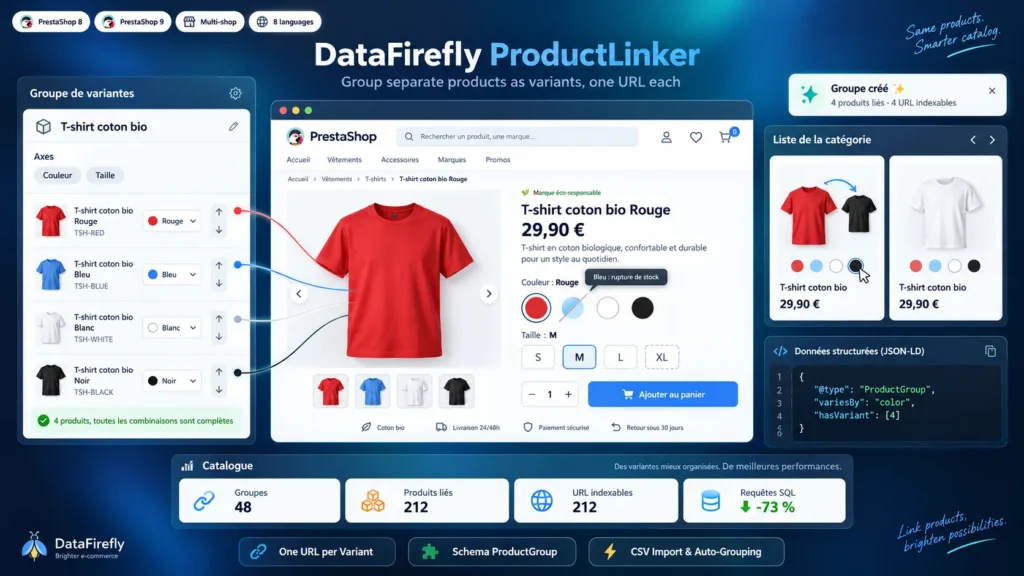
A PrestaShop product with combinations has a single URL: the red T-shirt and the blue T-shirt share the same page, the same title and the same Google position. Many merchants therefore create one product per color, by hand or with DF ProductSplitter, so that each color gets its own page, its own photos and its own chance on the search blue T-shirt. The downside: nothing on the red page says it also exists in blue. This module fills that gap; it is the reverse move of ProductSplitter.
How the pages are linked
A group brings together several products and one or more axes. Each axis is a native attribute group, so the colors, textures and translations already entered in Catalog > Attributes are reused. For each product of the group, you set its value on each axis. The order of the group rows gives the order of the swatches, and a button sorts the rows by attribute order.
What shoppers see
On each page of the group, the selector sits above the add-to-cart button. The current variant is outlined, the others are links to their pages, and a loading indicator appears on click. An out-of-stock variant is faded and struck through, or hidden depending on your setting. In listings, swatches appear under the price and the card image changes on hover.
Built for SEO
Links between variants are real HTML links, which strengthens internal linking. Each page keeps its own canonical, or points it to the main product if you choose so. The ProductGroup JSON-LD block describes the group with the price shown to the shopper, and the single-product-per-group option relies on native product visibility: the other pages stay online, reachable and findable through the internal search.
There are no reviews yet.