


Everything you'd want to know before you install.
A detailed look at how Multi-Store Synchronization works, why we built it the way we did, and the thinking behind the features above.
What is Multi-Store Synchronization for?
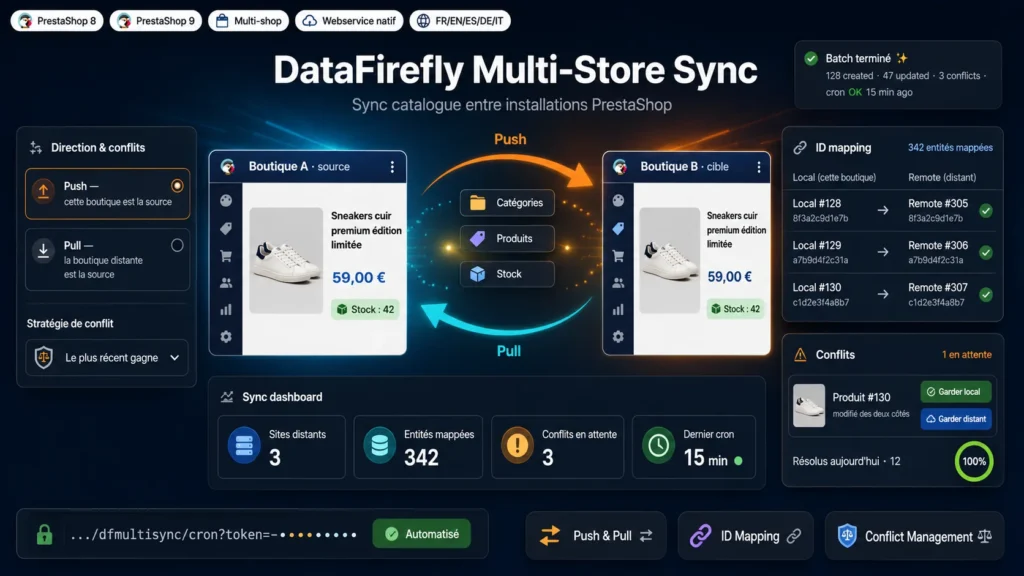
PrestaShop's native multistore relies on a single installation sharing one database. This module answers a different need: synchronizing genuinely separate PrestaShop installations, each with its own database, its own hosting, possibly its own domain. It is ideal for linking a wholesale store and a retail one, one site per country, or a staging store and its production.
Push or pull, you choose the source
Each profile defines a synchronization direction and a target remote store. In push, the current store sends its data; in pull, it receives it. You can create as many profiles as needed, each with its own entities and its own conflict strategy.
ID mapping that stays reliable over time
The module keeps a permanent registry of the correspondences between local and remote identifiers. Languages are matched by ISO code, categories by hierarchy, combinations by reference. This persistence guarantees that no entity is wrongly recreated, even across syncs repeated over months.
Conflict management built for reality
When both sides edit the same record, four strategies are available: source wins, target wins, newest wins, or manual arbitration. In manual mode, each conflict appears in a dedicated queue and is settled in one click, with no risk of accidental overwrite.
Robust on large catalogs
Synchronization runs in batches within a configurable time budget, with automatic resume: an interrupted run resumes precisely where it stopped. That is what makes the module safe to use on large catalogs and on shared hosting.
Cron automation
A token-secured cron URL triggers all relevant profiles automatically, for example every fifteen minutes. The dashboard shows the state of synchronizations, detailed logs and a connection test against the remote webservice.
There are no reviews yet.