
Everything you'd want to know before you install.
A detailed look at how PrestaShop 8 Country Flag Switcher Module — DataFirefly works, why we built it the way we did, and the thinking behind the features above.
Let visitors switch country or language in one click
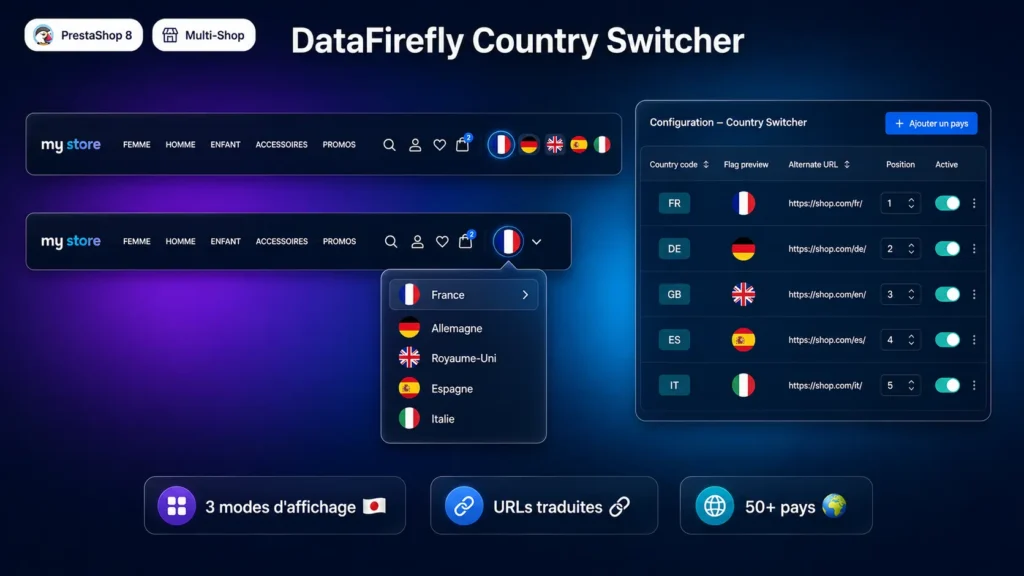
On a PrestaShop 8 store targeting multiple countries, a country switcher is an essential UX element: it immediately tells the visitor that the site exists in their language or for their country, and lets them access it without extra navigation. datafireflycountryswitcher adds this component to your theme's navigation bar — clickable flags, dropdown menu, or both — with full configuration from the back office.
Three display modes and configurable position
Flags mode displays clickable flag icons directly in the nav. Dropdown mode shows a dropdown menu with country names. Mixed mode combines both. The display position is chosen between displayNav1, displayNav2 and displayTop based on your theme's structure. Flag size (in px), country name display and whether to show or hide the current store are all configurable.
Native URLs and correct redirects per page
Clicking a flag does not simply redirect to the target store's homepage. On product, category, CMS, manufacturer, supplier, homepage and standard pages, the module generates the correct translated URL in the target language via the native PrestaShop Link class. If the page type is not recognised, a smart fallback replaces the domain and adapts the language prefix.
Multistore groups and flag images
The group system allows linking multiple stores: all display the flags of the entire group. Each entry can have a manual alternate URL that overrides the native domain — useful for stores on subdomains or custom paths. For flag images, the module uses flagcdn.com (free public CDN) as a fallback if no custom image is configured.
There are no reviews yet.