
Everything you'd want to know before you install.
A detailed look at how Create “A vs B” Product Comparison Pages on PrestaShop 8 & 9: Indexable SEO Comparisons works, why we built it the way we did, and the thinking behind the features above.
“A vs B” searches happen right before the purchase
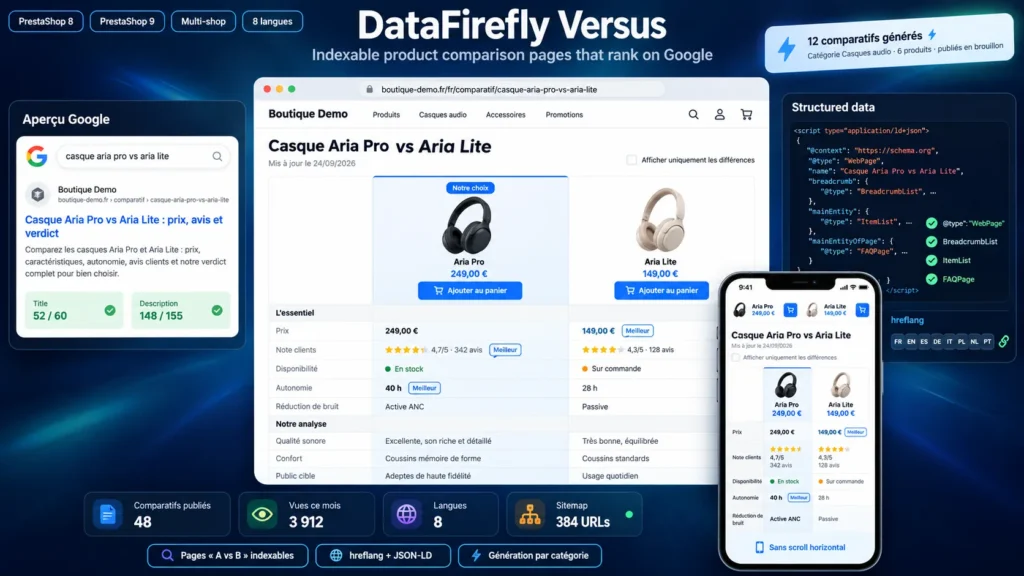
Someone searching for “Dyson V15 vs V12” has already narrowed their choice to two models. These searches are very close to conversion, yet shops leave them to blogs and price comparison sites. The native comparator or a session comparator cannot rank: the page changes with each visitor, has no stable URL and is not meant to be indexed. This module creates fixed pages that you write and that Google can rank.
A complete SEO page with no technical setup
Each comparison has a slug per language and a translated prefix, with the canonical tag, hreflang tags and a 301 redirect when the page is reached through another address. The breadcrumb goes through a listing page of all comparisons. The JSON-LD describes the page, the breadcrumb, the list of compared products with a link to each product page, and your questions and answers. A dedicated sitemap to submit in Search Console lists every page with its language versions.
Editorial content that makes the difference
A page that only holds a feature table rarely ranks. The module lets you write an introduction, a verdict and criteria based on your own expertise, for example “Real battery life | 18 h* | 12 h”, with the best value marked. Questions and answers are shown as an accordion and marked up. You can pick a recommended product, highlighted in the table and in the verdict.
A table that reads on a phone
Comparison pages are often viewed on mobile, where horizontally scrolling tables become tedious. Here, below 768 px, each row shows its label above the values and three products fit the screen width. A bar with the name and price of each product stays visible while scrolling, and visitors can hide identical rows to keep only what sets the products apart.
Dozens of pages without cannibalization
The generator creates one comparison for each pair among the top 2 to 12 products of a category, with titles and slugs in every language, skipping existing pairs. Pages are created unpublished so you can complete them before publishing. The back office shows a Google result preview, counts the views of each page and refuses a second comparison on the same products, so two pages do not fight for the same searches.


There are no reviews yet.