Other PrestaShop Modules

Text-to-Speech Product Audio Module PrestaShop 8/9

Let shoppers listen to your product pages, in one click

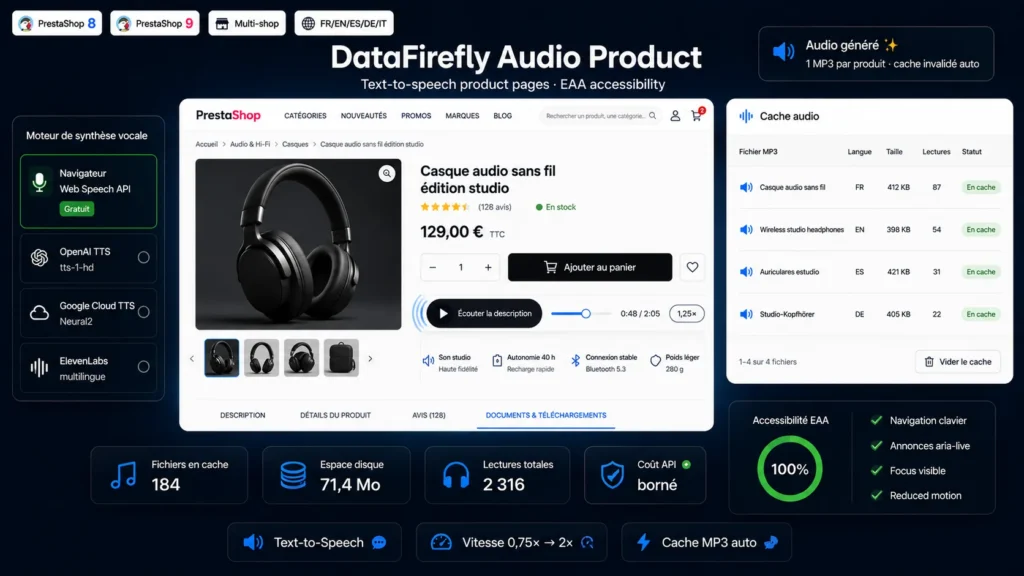
A Listen to the description button on every product page: free in-browser speech synthesis or premium OpenAI, Google and ElevenLabs voices, adjustable speed, auto-invalidated MP3 cache and a fully accessible player.

At a glance
  • Listen to the description button on every product page
  • 4 TTS engines: browser (free), OpenAI, Google Cloud, ElevenLabs
  • Adjustable playback speed from 0.75x to 2x
  • MP3 cache generated on first click, invalidated on product update
  • Accessible player: ARIA, keyboard, reduced motion - EAA minded
PrestaShop 8 & 9 EAA Accessibility 4 TTS engines Audio cache Multistore
  • 30-day refund
  • 12 months updates
  • 24h support
www.datafirefly.com/en/
Module Lecture Audio Produit Text-to-Speech PrestaShop 8/9
v1.0.0 · updated 2026-07-12
What it does

The short version.

01

One-click listening

A discreet, elegant player sits on the product page: reads the name and descriptions, with progress bar, time counter and pause button - no iframe, no forced third-party service.

02

Free engine included

The browser's Web Speech API reads product pages directly on the visitor's device: zero API key, zero cost, zero data sent to third parties. Perfect to start immediately.

03

Premium voices of your choice

Upgrade to a natural voice with OpenAI TTS (tts-1, tts-1-hd, gpt-4o-mini-tts), Google Cloud Text-to-Speech (Neural2 voices) or multilingual ElevenLabs. API test button built into the back office.

04

Adjustable speed

Visitors cycle through 0.75x, 1x, 1.25x, 1.5x and 2x. Speed is applied client-side: a single cached audio file covers every speed, with no regeneration.

05

Smart cache

Generated on the first click, stored in var/dfaudioproduct outside the module folder, ETag and 304 responses, automatic invalidation on every product update, optional TTL and one-click purge.

06

Native accessibility

aria-pressed states, aria-live announcements, visible focus, keyboard navigation, prefers-reduced-motion support: a concrete step towards the European Accessibility Act requirements.

The long version

Everything you'd want to know before you install.

A detailed look at how Text-to-Speech Product Audio Module PrestaShop 8/9 works, why we built it the way we did, and the thinking behind the features above.

§ 01

Why audio on a product page

Listening has become second nature: podcasts, voice messages, narrated articles. On mobile, hearing a description while doing something else beats reading a wall of text. And for visually impaired, dyslexic or simply tired visitors, it is sometimes the only pleasant way to discover your products. The module turns the content you have already written into an audio experience, with nothing to rewrite.

§ 02

A bounded, predictable API cost

Unlike solutions that generate audio on every visit, the module produces at most one MP3 file per product and language, on the first click only. Text is extracted server-side, cleanly truncated at a sentence boundary according to your character limit, and the file is reused for every subsequent visitor. Update the product: the matching cache is purged and the audio regenerates on the next play.

§ 03

Accessibility: an investment, not a constraint

The European Accessibility Act is pushing online stores to make their content accessible. Audio playback of product pages is a concrete, visible answer: it benefits people with disabilities as much as every other visitor. The player itself is beyond reproach: fully keyboard operable, correctly announced to screen readers, respectful of reduced-motion preferences.

§ 04

Installed in five minutes

Install the ZIP, enable it: the browser engine works immediately, with zero configuration. For a premium voice, paste your OpenAI, Google or ElevenLabs API key, pick the voice, click Test connection, save. The player appears below the buy block on all your product pages, in the visitor's language.