PrestaShop Administration & Productivity

RFM Customer Segmentation for PrestaShop 8 & 9: Win Back Inactive Customers

Know who to contact, with which offer, and how much the campaign brought in.

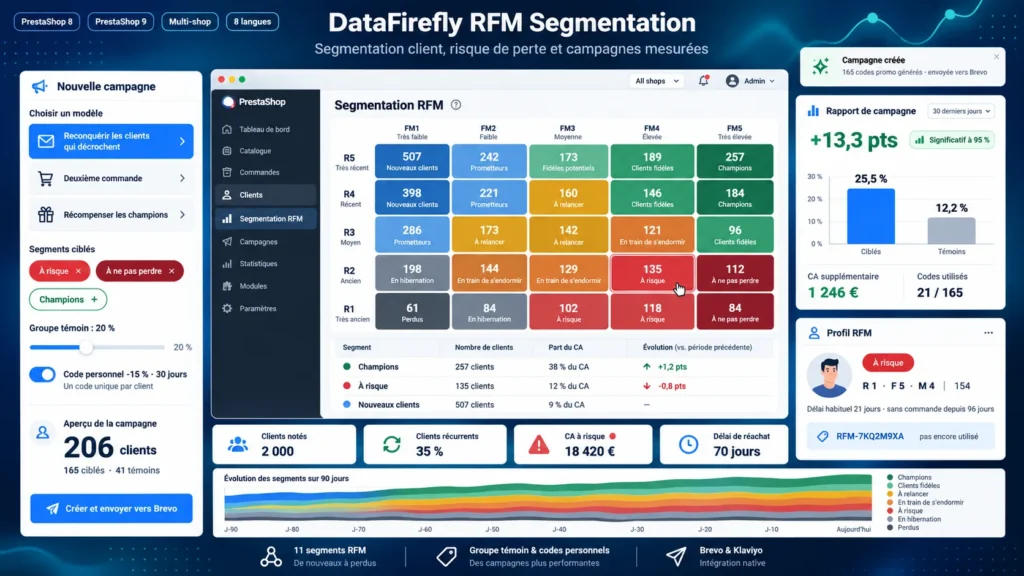
Your customer base holds loyal buyers, customers who are drifting away and others already lost, yet PrestaShop shows them all in the same list. This module scores every customer from 1 to 5 on the recency, frequency and monetary value of their orders, places them in one of 11 RFM segments and computes their churn risk from their own buying rhythm. You then create a campaign in a few clicks: frozen list, control group, personal voucher, CSV export or push to Brevo and Klaviyo. The report compares targeted customers with the control group to measure what the campaign actually earned.

At a glance
  • RFM score from 1 to 5 per customer and 11 segments, from Champions to Lost
  • Churn risk based on each customer's own buying rhythm
  • Campaigns with control group, personal vouchers and measured uplift
  • Segments synced to customer groups for your cart rules
  • CSV export and Brevo or Klaviyo sync of changed contacts only
PrestaShop 8 & 9 11 RFM segments Control group Brevo & Klaviyo Multistore
  • 30-day refund
  • 12 months updates
  • 24h support
www.datafirefly.com/en/
RFM Customer Segmentation for PrestaShop 8 & 9: Win Back Inactive Customers
v1.2.0 · updated 2026-09-24
What it does

The short version.

01

A score you can explain

Each customer gets three scores from 1 to 5: days since the last order, number of orders and amount spent over the chosen period. Thresholds are computed as quintiles of your own base or set by hand, and the combination places the customer in one of 11 segments, each with a recommended campaign.

02

Churn risk, customer by customer

A customer who orders every 20 days and has not come back for 60 days is in danger; one who orders twice a year is not. The module compares the elapsed time with each customer's usual rhythm, or with the shop's median repurchase delay for one-time buyers, and ranks the risk on four levels.

03

Campaigns with a known result

A random share of the list is set aside and receives nothing. The report compares the purchases of targeted customers with those of this control group, computes the uplift in conversion points and the additional revenue, and tells you whether the difference is statistically significant.

04

Connected to your tools

Segments fill PrestaShop customer groups, usable in cart rules and in payment or carrier restrictions. Contacts are sent to Brevo or Klaviyo with their segment, campaign and voucher code, and only contacts whose data changed are sent again.

The long version

Everything you'd want to know before you install.

A detailed look at how RFM Customer Segmentation for PrestaShop 8 & 9: Win Back Inactive Customers works, why we built it the way we did, and the thinking behind the features above.

§ 01

Why segment your customers with the RFM method

Recency, frequency and monetary value are the three indicators that best predict a customer's next purchase. A customer who ordered last week, orders often and spends a lot does not need the same message as a customer whose last order was a year ago. PrestaShop makes no such distinction: every customer looks the same in the native list. The module computes these three scores for your whole base and shows you who to talk to first.

§ 02

Readable segments, not a black box

The 11 segments follow the RFM grid used by CRM teams: Champions, Loyal customers, Potential loyalists, New customers, Promising, Need attention, About to sleep, At risk, Cannot lose them, Hibernating and Lost. Each segment shows its share of customers and revenue, its average basket, its 30-day trend and the campaign to run. Clicking a cell of the recency x value map opens the list of the customers inside it.

§ 03

Spot the customers who leave before they are lost

Churn risk does not rely on a single threshold. The module measures the usual delay between two orders of each customer and compares it with the time elapsed since the last one. One-time buyers are compared with your shop's median repurchase delay. The dashboard shows the revenue carried by at-risk customers and the list of your best repeat customers who are drifting away.

§ 04

Campaigns whose real effect you measure

Pick a template (win-back, second order, loyal customers who dropped, VIP champions, reactivation) or build your own audience. The module freezes the list, sets aside a random control group and can create a single-use discount code for each targeted customer. During the tracking window it compares the orders of targeted and control customers, so you know whether the campaign produced extra sales or whether these customers would have bought anyway.

§ 05

Your segments in PrestaShop, Brevo and Klaviyo

Each segment can fill a PrestaShop customer group, to reserve a cart rule for Champions or remove a payment method for lost customers. The default group of the customer and the native groups are never modified. On the email side, the module sends the segment, scores, campaign and voucher of each contact to Brevo or Klaviyo: build dynamic segments in your tool and they follow every new computation.