
Everything you'd want to know before you install.
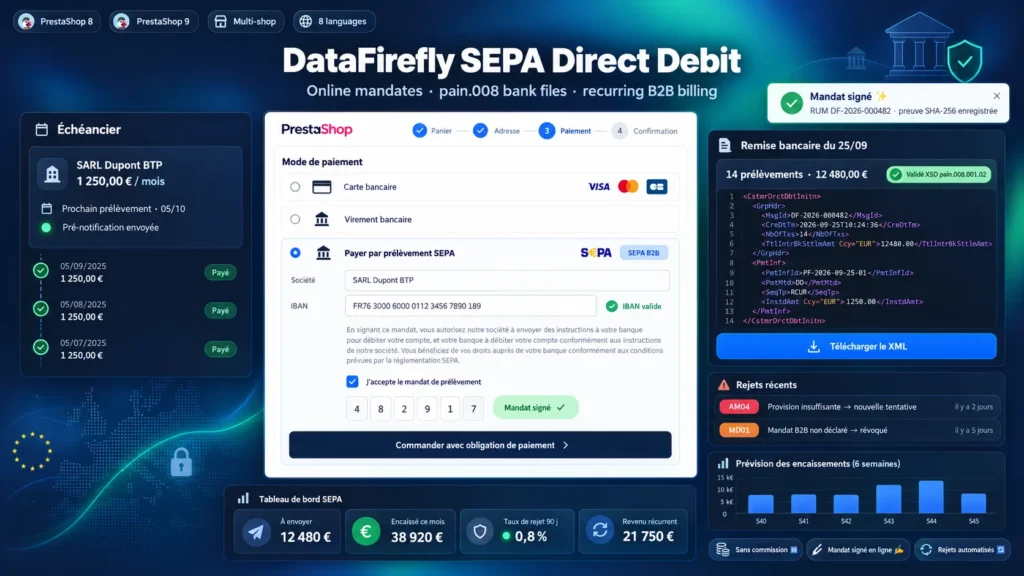
A detailed look at how SEPA Direct Debit with Online Mandates for PrestaShop 8 & 9 works, why we built it the way we did, and the thinking behind the features above.
SEPA direct debit or a Stripe subscription
Payment providers offer SEPA direct debit, but every instalment is charged, funds pass through their account before reaching you and your mandates stay with them. With this module, the mandate is signed on your shop, the file leaves from your bank and the money lands in your account. You need a SEPA creditor identifier and a direct debit agreement, both provided by your bank. After that, the cost is limited to your bank's fees on each file.
B2B or Core mandate: what the module applies
The B2B scheme is for business customers: the debtor cannot request a refund after the debit and must register the mandate with their bank before the first collection. The module reminds the customer at signature, in the confirmation email and at checkout. The Core scheme suits any customer, with an 8-week refund right. The mandate text uses the official wording, shown in the customer's language with your creditor name and identifier.
From cart to bank statement
The customer orders and signs a mandate, or picks one already signed. The order moves to “Awaiting SEPA direct debit” and a collection is created on the date set by your pre-notification period, announced to the customer by email and on the invoice. You generate the file and upload it to your bank. After the period you set without reject, or when you import your bank's camt.054, the collection is marked paid and the order moves to payment accepted.
Rejects, from R-code to retry
A reject arrives a few days after the due date, sometimes later for a refund under the Core scheme. When the return file is imported, the module finds the collection by its end-to-end reference, records the R-code and its label, moves the order to “SEPA direct debit rejected” and alerts you. Depending on the code, it schedules a pre-notified retry or revokes the mandate. Beyond the number of rejects you set, the payment method is no longer offered to the customer.
Bank changes, reminders and follow-up
A customer who changes bank signs a new mandate from their account: schedules and collections not yet sent move to the new account with fresh pre-notifications, and the old mandate is closed. From the back office, you send a signature request to a customer, remind pending mandates from the dashboard and follow outstanding amounts, rejects and this month's recurring revenue.

There are no reviews yet.